


A handyman emails a bathroom estimate on Monday afternoon, checks the inbox twice on Tuesday, and wonders whether a message today looks eager or professional. A photographer, cleaner, or consultant faces the same silence. The quote is out, the client hasn't said no, and the calendar is filling around a job that may never book.
The fix isn't a louder reminder. To follow up on quote requests well, each message needs one job, one question, and a clear stopping point. That approach protects the relationship, reveals the true reason for a stall, and turns acceptance into a documented deposit rather than an unpaid promise.
Table of Contents
- When to Follow Up on a Sent Quote
- How to Write Each Follow-Up Message
- Ask Why the Quote Stalled
- Turn Acceptance into a Deposit Checkpoint
- Track Status and Decide the Next Step
When to Follow Up on a Sent Quote
A handyman who sent a bathroom estimate yesterday doesn't need a new strategy. The quote's age determines today's action. Match the age to one row in the table, send that message, and record the next date.
| Timing | Purpose | Channel | Stop if |
|---|---|---|---|
| Same day | Confirm scope and send the itemized estimate | Email with the estimate | The request was withdrawn |
| Day 3 to 4 | Ask whether the start date works | Short email | Client already replied |
| Day 7 | Ask what is unclear in scope, price, or timing | Client said no or not now | |
| Day 10 to 11 | Restate what is included, excluded, and when the price expires | Email or text | Scope has changed |
| Day 14 | Ask who decides and when | Call or text | A later date was requested |
| Day 21 | Close the loop or pause the file | Final email | Any clear no or deferral |
Start With the Request, Not the Reminder
Speed matters most before the estimate exists. When a new inquiry arrives, the first reply should confirm receipt and restate the requested scope while the need is still active. The Cirrus Insight sales follow-up statistics roundup reports research covering roughly 15,000 leads that found responding within five minutes made a lead about 21 times more likely to become qualified than waiting 30 minutes. That figure concerns leads, not signed estimates, so it supports a fast confirmation, not a promise that speed alone wins the job.
A practical same day confirmation is short. Name the job, repeat the scope in one sentence, state when the estimate will arrive, and ask for the one missing detail that blocks pricing. For a bathroom, that may be whether tile removal is included. For a cleaning quote, it may be square footage and access hours.
The estimate itself should carry the details that prevent later confusion. Include assumptions, exclusions, a validity window such as 14 or 30 days, payment terms, and one clear way to accept. A client who has to hunt for the next step often delays for that reason alone.
Space the Touches Over Three Weeks
Daily nudges train clients to ignore the thread. The table gives the sequence six touches in total, spaced across about three weeks, with the first follow up on day 3 to 4. That spacing leaves time to read, compare, and consult someone else without letting the quote go cold.
- Day 3 to 4: Ask one low friction question, such as whether the proposed start date works.
- Day 7: Ask what's unclear instead of asking for a decision.
- Day 10 to 11: Restate inclusions, exclusions, and the price expiry date.
- Day 14: Ask who decides and when that person will review it.
- Day 21: Close the loop or pause the file with a final note.
Owners who want the underlying logic for build a repeatable sales cadence can adapt the same principle here. The cadence is a schedule of different purposes, not the same reminder resent six times.
Practical rule: One quote gets one open question at a time. A new question replaces the old one, and the client note records which question is still open.
Know When to Stop
Persistence becomes noise at the first clear signal. Stop or switch channel when the client declines, names a later date, or changes the scope. A changed scope needs a revised estimate, not another nudge on the old price. A later date needs that date logged and the sequence paused.
Don't keep the three week clock running after a reply changes the facts. Send only the row that matches the quote in front of the business today, then set the next date and move on to paid work.
How to Write Each Follow-Up Message
A follow up message fails when it could be about any job. It works when the client recognizes the project in the first line and can answer in one reply. The steps below fit an email or a text, and each one removes a specific reason for silence.
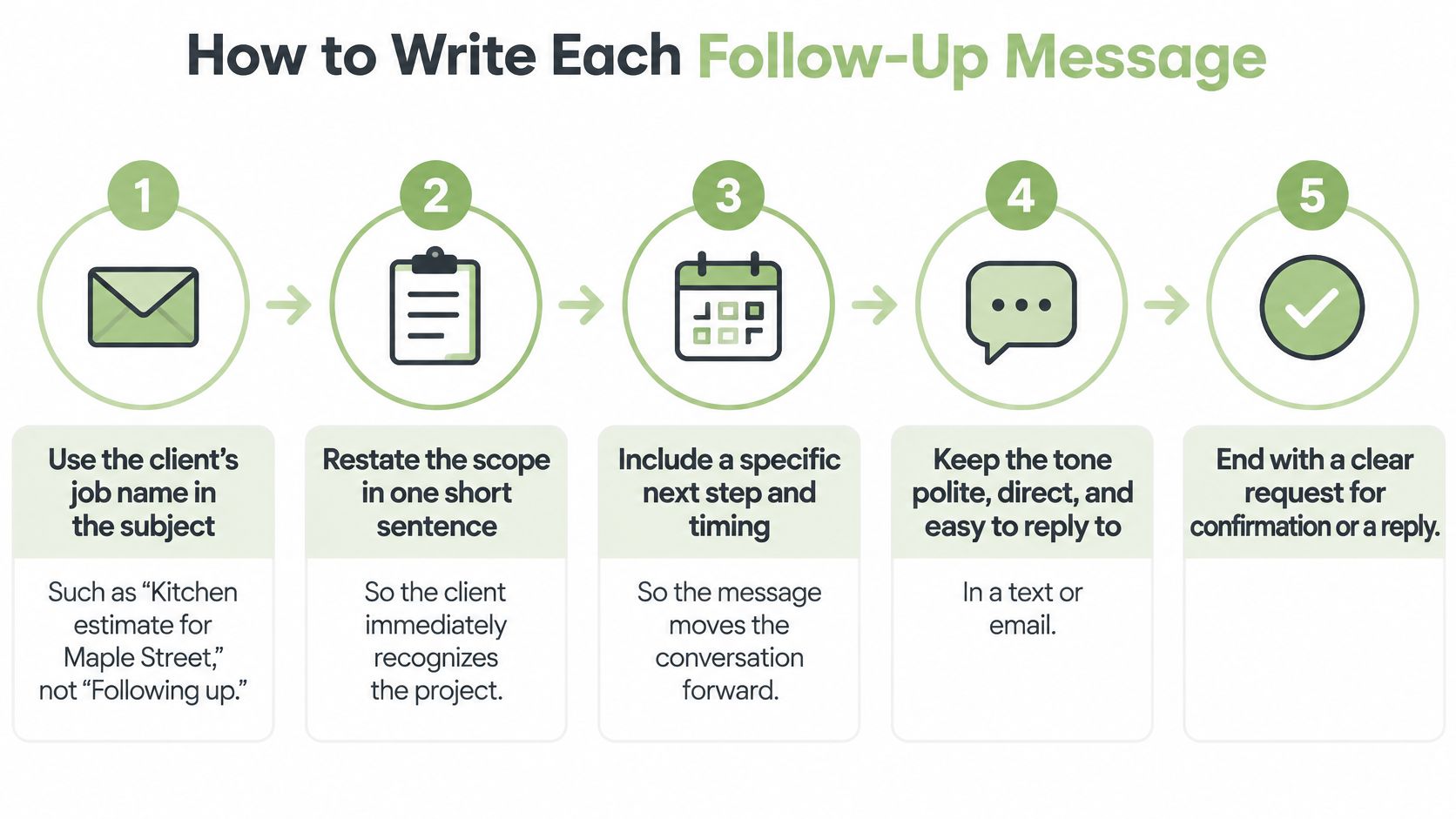
Use These Five Steps Every Time
- Name the job in the subject. Write "Kitchen estimate for Maple Street," not "Following up." A specific subject survives a crowded inbox and threads correctly.
- Restate scope, assumption, exclusion, and expiry. One sentence covers the work. Then name one assumption, one exclusion, and the date the price expires, so the client isn't guessing what the number buys.
- Ask one question only. Choose the start date, a missing measurement, or who else must approve. Two or three questions invite the client to postpone all of them.
- Attach the estimate again. Send it as a link or PDF. Don't bury a new price inside the thread, because two totals in one conversation create a dispute later.
- End with the decision needed. Keep the note under about 120 words and replace "let me know" with the actual answer required.
Weak: "Just checking if you saw this." Stronger: "Do you want the Saturday morning or afternoon block?"
The stronger line names the missing detail and gives two easy options. Owners who want a clear structure for follow-up emails can use the same logic, subject, context, one question, clear close, without copying a corporate template that sounds wrong for a two person service business.
Before sending, check the estimate itself. In GetBill, estimates can be sent instantly and can include custom items, taxes, and notes, so assumptions and tax treatment can sit on the document rather than in a side email. Visible assumptions give the follow up something concrete to point to.
Two Scripts That Fit Real Jobs
Day 3 email, photographer's wedding coverage quote
Subject: Wedding coverage estimate for June 14
"Hi Maya, the estimate covers eight hours of coverage, one photographer, and an online gallery. It assumes reception lighting is provided by the venue and doesn't include a printed album. The price holds until March 30. Does the 2 p.m. start still match the ceremony plan? Reply here and the date can be held once the deposit step is confirmed. Thanks, Alex"
Day 10 text, cleaner's recurring office quote
"Hi Jordan, following up on the twice weekly office cleaning estimate. It includes restrooms and kitchen, and excludes carpet extraction. The price holds until April 5. Should cleaning start Monday and Thursday evenings, or Tuesday and Friday? One reply locks the schedule question."
Both scripts restate scope, expose one exclusion, name an expiry, and ask a single question. Neither asks whether the client has decided. That's deliberate, and the same discipline matters later when a polite reminder to pay needs to name an amount and date rather than drift into general checking in.
One legal boundary needs stating plainly. The FTC Rule on Unfair or Deceptive Fees frequently asked questions explains a rule effective May 12, 2025, under 16 C.F.R. Part 464, covering live-event tickets and short-term lodging, not ordinary handyman, cleaning, consulting, design, or contracting services. Service businesses shouldn't present that rule as a general federal pricing requirement for estimates. They should check the consumer protection and fee disclosure rules in their own state or locality, and keep fees visible on the estimate as a matter of clear practice rather than citing the wrong rule.
Ask Why the Quote Stalled
The day 7 message shouldn't be another reminder. It's a feedback request. Silence usually hides a specific blocker, and a neutral question finds it without pressuring the client into a defensive no.
Use one script, word for word if needed:
"Is anything in the scope, price, timing, or approval process unclear?"
That question gives the client four respectable reasons to reply. It also gives the business four buckets for sorting the answer, and each bucket calls for a different edit. Sending the same reminder to all four wastes the information.
| Reply says | Bucket | Next edit |
|---|---|---|
| Something is missing from the estimate | Missing information | Add the photo, measurement, or exclusion and resend the same estimate |
| The price is higher than expected | Budget mismatch | Offer a smaller defined scope, not a silent discount |
| Not now, or a later month | Timing | Record the month named and pause the sequence |
| Someone else needs to approve | Another decision-maker | Ask who needs the document and send it with permission |
Match the Edit to the Bucket
Missing information is the easiest fix. Add the photo, measurement, or exclusion and resend the same estimate so the client compares one document, not two versions. A handyman might add that disposal of the old vanity is included. A consultant might spell out which meetings are in scope.
Budget mismatch calls for a smaller defined scope, not a silent discount. Cutting the price without cutting work teaches the client that the first number was padded. Cutting a defined item, such as one room, one deliverable, or one visit per month, keeps the rate intact and the trade off visible.
Timing means the sequence stops. Record the month the client named, confirm it in one short reply, and pause. Continuing the three week cadence after a client says September doesn't show diligence. It shows the messages are automated and nobody read the reply.
Another decision-maker means the estimate hasn't reached the person who can say yes. Ask who needs the document and send it to that person with the client's permission. Don't forward it cold, and don't ask the contact to sell the job internally without the document.
Feedback Has Value Even Without a Booking
A stalled quote can reveal unclear deliverables, a procurement barrier, or a scope that doesn't match what the buyer needs. That information improves the next estimate even when this job goes elsewhere. The AIA best practices guide on the power of feedback reports evidence from more than 50,000 architecture and engineering client surveys in which 41% of prospects responded to proposal-feedback requests and 92% of those responses were positive. Those figures come from architecture and engineering proposals, so they support asking the question. They don't predict how a handyman's or cleaner's clients will respond.
Log the bucket in the client note before writing anything else. That single habit turns a pile of dead quotes into a record of why work stalls, which is more useful than another reminder sent on hope.
Turn Acceptance into a Deposit Checkpoint
Acceptance ends the sales conversation and starts a cash conversation. Treating both the same way is how approved work begins without money attached to it. A polite pre sale note asks a question. A post acceptance checkpoint confirms terms in writing before any work starts.
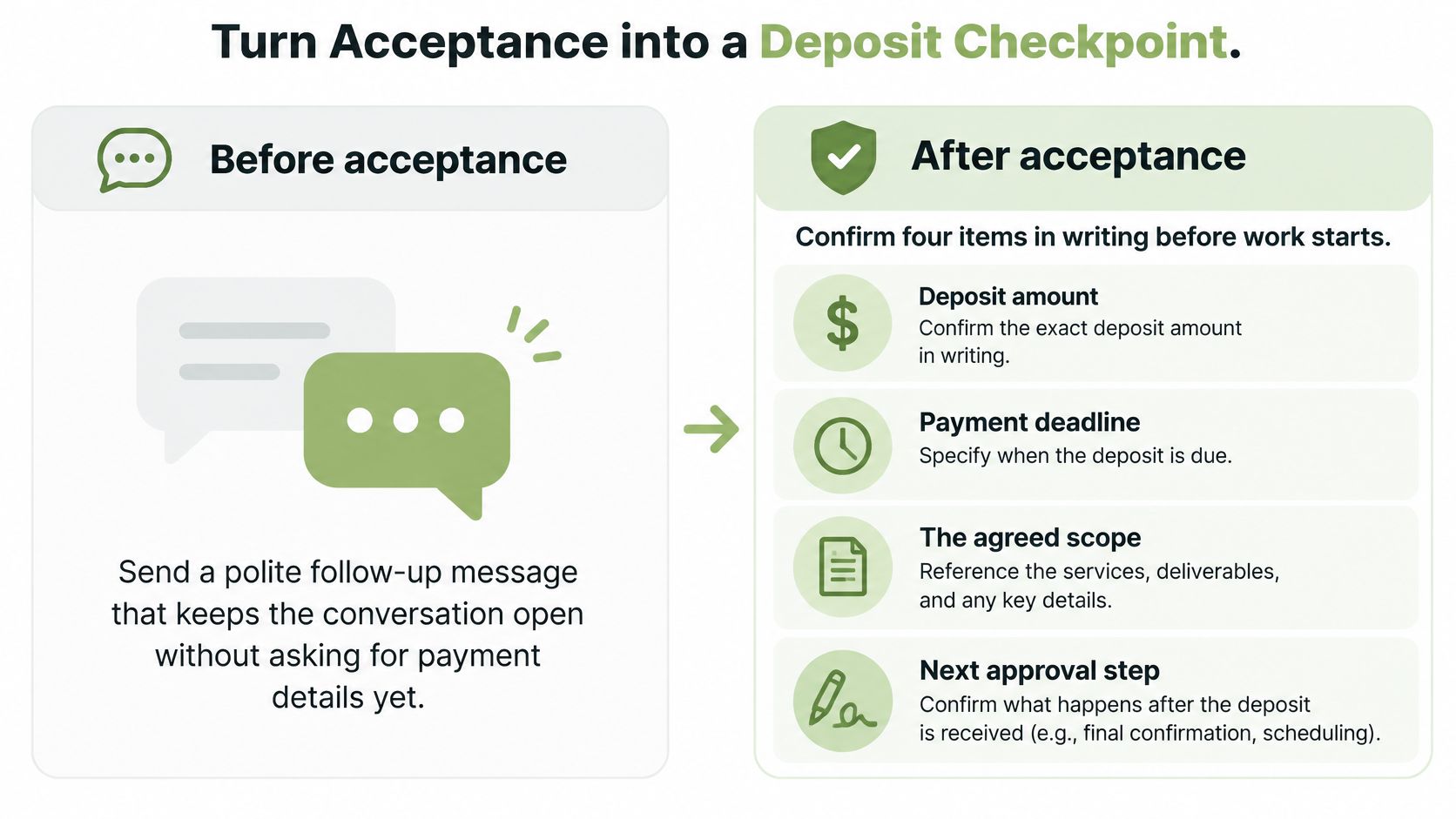
Confirm Four Items Before Work Starts
Once the client accepts, confirm these items in one written message:
- Deposit amount: The exact figure due now, not just a percentage.
- Payment deadline: The date the deposit must arrive to hold the schedule.
- Remaining balance: The amount left and when it falls due.
- Scope change process: How extra work will be priced and approved before it's done.
A staged example makes the structure concrete. Say a consultant quotes a project with 30 percent of the total due at signing and the balance due at delivery. The checkpoint message states the deposit in dollars, the due date, and the remaining balance in dollars. It also states plainly that acceptance alone is not payment, and that scheduling happens when the deposit lands.
That firmness isn't distrust. The QuickBooks small business late payments report for 2025 surveyed 2,487 U.S. small businesses and found 56% were owed money from unpaid invoices, averaging $17,500 per affected business, with businesses using longer payment terms reporting cash flow problems at 60% compared with 40% among those using immediate terms. Those figures justify setting the deposit at acceptance. They don't forecast any single reader's outcome, and they don't excuse vague terms.
Use an Invoice for Staged Billing
The tool has to match the arrangement. Stripe's invoicing documentation describes support for collecting partial payments or setting up payment plans, while Payment Links don't provide that same capability. For a deposit followed by a balance, an invoice is the right instrument, because it can track what's been paid and what remains instead of treating the deposit as full settlement.
Reconciliation needs the same care. Stripe's payment application documentation states that a single payment can't be applied across multiple invoices. A cleaner invoicing two properties separately should request separate payments, or name exactly which invoice one full payment settles. Otherwise the allocation gets resolved by hand later, usually at tax time, when nobody remembers.
The mechanics shouldn't require retyping. In GetBill, an accepted estimate can be converted into an invoice with one click, without re-entering data, and clients can pay through Stripe-hosted checkout, with funds moving directly to the business's connected Stripe account. That keeps the accepted scope, the deposit request, and the balance on one document chain. A structured deposit invoice template helps owners lay out those four checkpoint items consistently, and longer terms such as net 30 belong only where the business can carry the wait without straining payroll, materials, or rent.
Track Status and Decide the Next Step
A quote pipeline held in memory leaks. The owner remembers the big job, forgets the small one, and can't tell which silence means "still deciding" and which means "already hired someone else." A status list in the client record fixes that, provided the statuses follow the order a quote moves.
| Status | What it means | Next action |
|---|---|---|
| Sent | Estimate delivered, no reply yet | Follow the cadence row for its age |
| Questions open | Client asked about or hinted at a gap | Answer it and resend the same estimate |
| Accepted | Client agreed in writing | Stop sales follow-up and send the deposit request |
| Deposit recorded | Deposit paid, balance still due | Schedule the balance invoice and its date |
| Rejected or paused | Clear no or a later month | Log the reason and stop or set a revisit date |
Update the Record at Every Contact
After every message, call, or text, two entries go into the client note before the owner moves on: the next touch date and the one question still open. That takes under a minute and removes the need to reread the whole thread later. A note that says "waiting" is useless. A note that says "Day 10 on Friday, ask whether Friday evenings work" is an instruction.
The sequence of statuses also prevents a common error, sending a sales nudge to a client who already accepted. Once the status reads accepted, the only outbound document is the deposit request. Once it reads deposit recorded, the next task is scheduling the balance invoice and its date, not celebrating and forgetting the balance exists.
In GetBill, clients can accept or reject estimates online, which creates a documented digital approval, so the accepted status rests on a record rather than a possibly misremembered phone call. Synced webhooks mark invoices as paid automatically once transactions clear, which keeps the deposit recorded status honest without manual checking. GetBill customers can also create links that let recipients view invoices or estimates without signing in. That convenience carries a boundary: send the link only to the intended recipient, because anyone who obtains a valid link can open it. A group chat or a shared office thread is the wrong place for it.
Handle the Three Outcomes Separately
The client accepts. Stop sales follow up the same day. Send the deposit request with the amount, deadline, and remaining balance, and schedule work only against the terms just confirmed. Owners who want the document mechanics can follow the process for converting a quote to an invoice so the accepted scope carries forward without retyping or quiet changes.
The client asks to revisit later. Write down the month named, send one short confirmation, and stop. "Noted, will check back in September" respects the answer and keeps the door open. Don't keep the three week sequence running underneath that promise. Clients notice, and the September conversation starts with an apology instead of a quote.
Day 21 arrives with no reply. Send one final note that states the price expiry date, closes the file, and leaves a clean path back. Don't add a new discount to that message. A last minute price cut after three weeks of silence suggests the original number was negotiable all along, and it trains the client to wait out the next quote too.
A consultant's four line final note can read:
Subject: Project estimate, price held until May 9 Hi Sam, circling back isn't helpful on this one, so this is the last note. The estimate for the onboarding project holds until May 9, and the file will close after that date. If timing changes, a revised estimate can be prepared from the same scope. Thanks for considering the proposal.
That note does three things in four lines. It names the expiry, announces the end of the sequence, and offers a revised estimate later without reopening price today. It also costs the client nothing to ignore, which is exactly why it sometimes gets a reply. Silence was never the same as a no, but after day 21 the business should treat it as a closed file rather than an open hope.
Finish One Action Today
The system above only works if the records behind it are current. Today's closing task is small and specific. Open the oldest open estimate, check its assumptions and tax treatment, confirm the expiry date still makes sense, and record the next touch date and open question in the client note.
Repeat that for each open quote, one per sitting rather than in a monthly panic. A clean status list turns follow up from a chore that depends on mood into a lookup. Find the status, take the matching action, update the note, and get back to the work that pays.
Create the estimate, capture the client's acceptance online, convert it into an invoice without re-entering data, and record the deposit and remaining balance in GetBill. Set up one open quote there today, add its expiry date and next touch date, and let the status, not memory, drive the next message.