


The job is done. Now the cleaner has to figure out what to charge. The estimate is on a phone, the deposit confirmation is buried in email, and a last-minute change never made it into the spreadsheet. Sending an invoice should not require detective work.
An estimate invoice app keeps the agreed scope, invoice, and payment records connected. The real test is not how polished the document looks. It is whether the owner can see what changed, what the client paid, and what is still owed before requesting the balance.
Table of Contents
- Why the Estimate-to-Invoice Workflow Matters
- How Online Estimates and Invoices Work
- Key Features to Look For in an Estimate Invoice App
- How to Choose the Right App
- Estimate and Invoice Examples for Service Businesses
- How GetBill Supports the Billing Workflow
- Make a Practical Billing Decision
Why the Estimate-to-Invoice Workflow Matters
For a small service business, billing often happens between client appointments rather than during dedicated office hours. A photographer prepares an estimate after a consultation. A handyman updates materials after a site visit. A consultant bills work against an agreed milestone. Each needs a dependable record of the commercial agreement, not just another document template.
The scale of this audience is substantial. The U.S. Census Bureau's business-owner report recorded 30.4 million nonemployer businesses in 2023, representing approximately 83.5% of all U.S. employer and nonemployer businesses that year. Independent operators aren't a peripheral audience for billing software.
The Handoff Is Where Errors Become Expensive
Consider a cleaner whose client adds an extra room after receiving an estimate. If the owner edits the invoice from memory, the added service may appear without explanation, the deposit may be omitted, or an old rate may replace the agreed rate. The client then has a reasonable question about the balance.
A connected workflow should make the owner's decisions traceable:
- Proposed work: The estimate describes the service, exclusions, and expected charges.
- Agreed changes: Revisions are documented before they become billing surprises.
- Billable work: The invoice reflects the applicable scope and payment terms.
- Collection: Payment records explain what remains outstanding.
Practical rule: A client should be able to understand the amount requested without comparing scattered messages and receipts.
Choose Around the Business Model
A tutoring business may need a different billing routine from a contractor collecting project installments. For tutoring-specific evaluation, Tutorbase describes their billing feature, a relevant resource when the owner's operating model centers on teaching rather than standalone service jobs.
For photographers, cleaners, consultants, and tradespeople, the evaluation should prioritize document consistency, reusable records, client access, collection, balance visibility, and mobile usability. Jurisdictional requirements belong on that list too. Ordinary U.S. service invoices should be reviewed against applicable contracts and state or local requirements, not treated as subject to a universal federal invoice-pricing rule.
How Online Estimates and Invoices Work
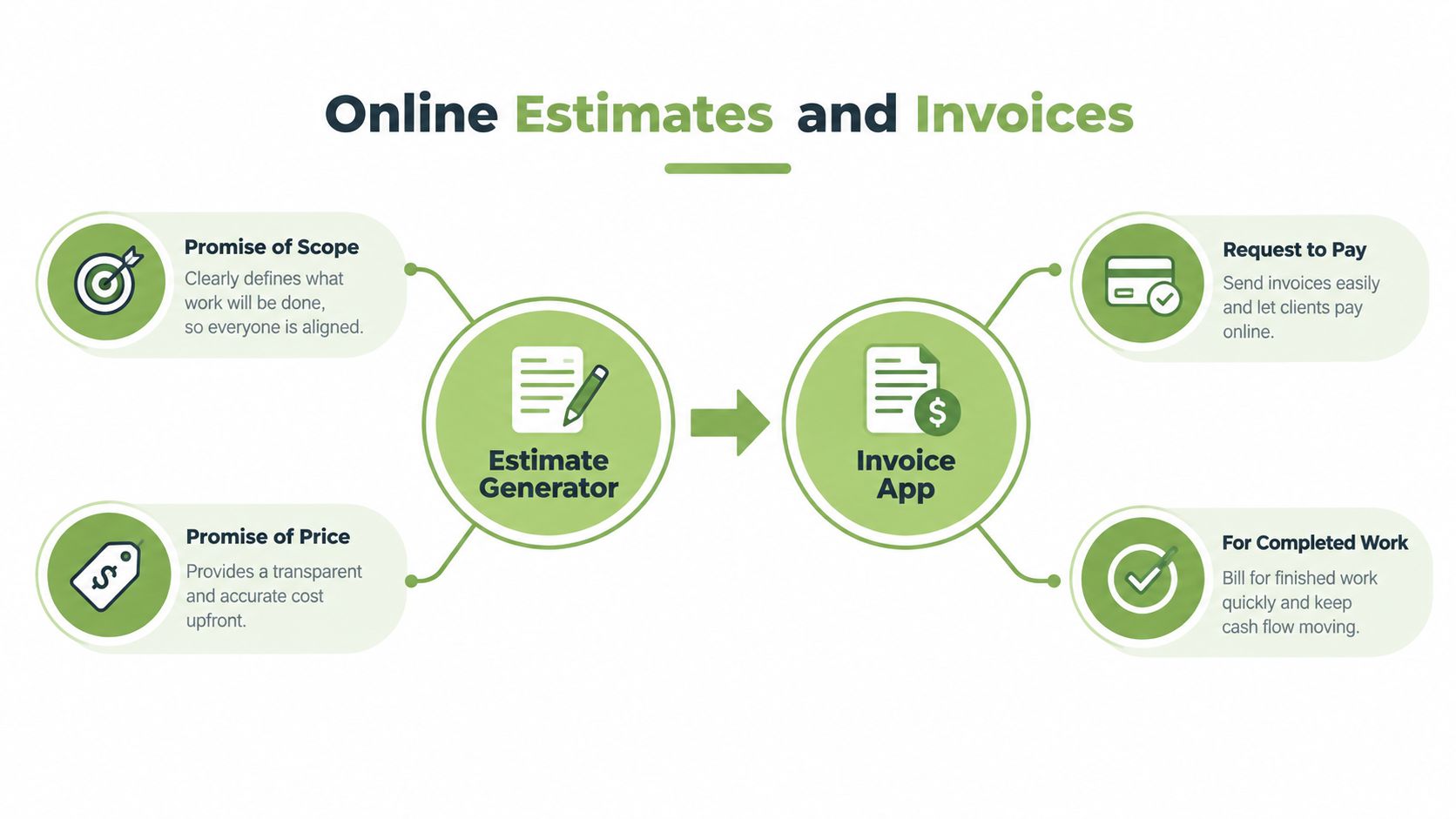
An online estimate generator records proposed scope and price. An invoice app produces a request for payment when work becomes billable under the agreement. These documents can contain similar information, but they serve different purposes.
For residential cleaning, the estimate might describe the rooms included, the cleaning standard, supplies, exclusions, and anticipated charges. The invoice identifies the work being billed and the payment due. Depending on the agreement, that request may relate to a deposit, completed visit, or project milestone rather than the entire job.
The diagram shows the basic relationship between the documents.
Build the Estimate From Explicit Inputs
Each line should identify a service or product, its quantity, and its rate. Discounts and applicable taxes should be distinguishable from the underlying service charges. Notes, dates, and terms should clarify what the price covers and when the proposal stops being current.
The owner should also distinguish scope descriptions from payment instructions. “Kitchen deep clean” describes work. A deposit requirement describes when money is due. Combining them in an unexplained line makes later reconciliation harder.
The quote-to-invoice workflow guide provides a practical reference for organizing this document handoff. Conversion should carry agreed client and line-item information forward, while allowing the owner to inspect the result before issuing it.
Preserve the Agreement During Conversion
An accepted estimate shouldn't change when the owner updates a reusable service price. A sound workflow preserves the original document and identifies any subsequent revisions. Software conversion itself isn't evidence of legal client acceptance and doesn't replace a signed contract where one is needed.
Digital billing adoption provides context, not proof that every business needs the same system. The OECD's 2025 SME digitalisation report found that 28% of surveyed businesses used e-invoice software services, while cautioning that distribution through firms already offering such tools introduced selection bias.
Once an accurate invoice is issued, the operational question changes. The owner needs to know whether the client can access it, how payment can be made, and whether the recorded balance matches the payment evidence.
Key Features to Look For in an Estimate Invoice App
Reusable templates save preparation effort, but templates alone don't protect the estimate-to-paid workflow. A strong evaluation separates document convenience from record integrity and collection control.
Client records should prevent repeated entry of names, billing addresses, and contact details. Product or service records should make descriptions and rates consistent. However, reuse needs an important boundary: updating a current service record shouldn't overwrite a historical agreement.
Evaluate Accuracy Before Appearance
Branded PDFs help clients recognize the business, but an attractive document with an incorrect total still creates a billing problem. Owners should test quantity changes, discounts, applicable tax calculations, rounding, and the relationship between line totals and the document total.
Nielsen Norman Group's form-error guidance recommends inline validation as soon as a user finishes a field, rather than waiting until submission. Applied to billing, that means identifying an invalid quantity, malformed email address, or unsuitable numeric format before the owner sends the document.
Estimate Invoice App Evaluation Criteria
| Feature | Workflow question | Why it matters |
|---|---|---|
| Reusable records | Can saved clients and services be used without altering older documents? | Reduces re-entry while protecting history. |
| Calculations and validation | Are invalid entries flagged and totals reproducible? | Prevents incorrect payment requests. |
| Estimate conversion | Does the invoice preserve agreed details? | Avoids rebuilding the agreement from memory. |
| PDF, email, and public links | Can the client easily access the current document? | Supports delivery and review. |
| Deposits and partial payments | Is every payment reflected against the correct invoice? | Makes the remaining balance understandable. |
| Mobile access | Can the owner complete billing tasks on a phone? | Supports work away from a desk. |
| Connected card payments | Is the payment route supported for the account and region? | Determines whether online collection is usable. |
Inspect Payment Status Separately From Balance
Payment acceptance, processing, and settlement aren't interchangeable. A client completing a card-payment step doesn't necessarily mean funds are already available to the business. The owner should inspect the connected provider's status rather than infer settlement from the invoice's appearance.
The app should also distinguish a payment record from an accounting conclusion. Recording a deposit can reduce the client's outstanding obligation, but it doesn't by itself establish how that receipt should be recognized in the books.
Clear terms support this distinction. The guide to terms for invoices is relevant when defining due dates, deposit treatment, and payment instructions. Terms should match the actual agreement rather than rely on default wording that the owner hasn't reviewed.
Test the Awkward Cases
A demonstration using perfect inputs reveals little. A more useful test includes an incomplete client email, a revised service quantity, and a payment that hasn't settled.
- Check correction behavior: Fixing an error shouldn't erase unrelated entries.
- Inspect document versions: The owner should be able to identify which scope was issued.
- Review partial payments: The remaining balance should be explainable from individual records.
- Confirm regional support: A displayed card-payment option isn't enough without an eligible connected account.
How to Choose the Right App
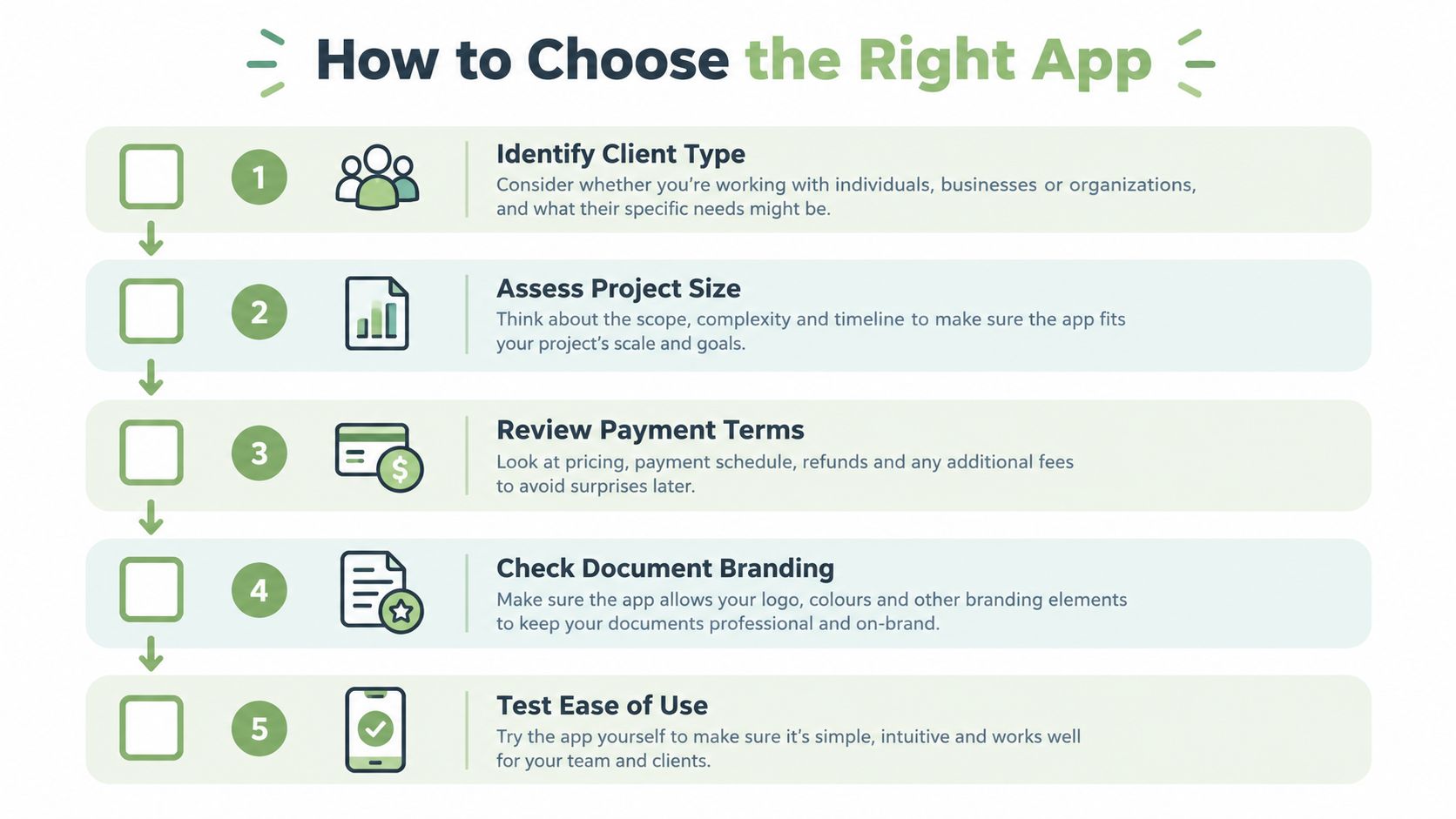
The shortlist should begin with the business's operating requirements, not a vendor's feature count. A consultant billing organizations may need purchase-order references. A photographer may prioritize branded proposals and deposits. A cleaner working on-site may place mobile entry above elaborate document design.
Owners should record the actual requirements before testing software. Client type, project size, payment terms, branding, mobile use, and procurement fields all affect suitability.
Run a Complete Test Job
A realistic trial should include creating an estimate, selecting a saved client, revising a line, converting the document, and reviewing the client-facing output. The owner should then record a deposit and a partial payment and verify the balance against the test records.
This trial should use the same device and working conditions as ordinary billing. A tool that feels straightforward on a desktop may be awkward when an owner edits service descriptions on a phone outside a client's property.
The useful shortlist is the one that survives a complete billing task, not the one with the longest feature page.
Spreadsheets and word processors remain flexible for unusual layouts and occasional documents. Their trade-off is that owners must maintain formulas, versions, payment records, and document relationships themselves. Dedicated billing apps organize those tasks, but their document fields or workflow may not accommodate every contract or procurement requirement.
Examine the Payment Architecture
For SAQ A eligibility, the PCI Security Standards Council's payment-page guidance states that every element of the card-payment page delivered to the customer's browser must originate directly from a PCI DSS-validated third-party provider. With iframe implementations, card-data capture elements must remain inside the provider-controlled iframe.
Owners evaluating online collection should ask who supplies the card-entry fields and submission path. Raw card numbers shouldn't be copied into invoice notes or client records. A hosted payment experience is a selection criterion, not a blanket guarantee of compliance.
Businesses serving Spain can also consult renn's billing help for Spanish freelancers as a jurisdiction-specific resource, without treating it as guidance for U.S. tax obligations.
The final checklist should assign practical priorities:
- Essential: Accurate conversion, usable payment records, and required client fields.
- Important: Mobile access, document delivery, and provider compatibility.
- Optional: Visual customization beyond what clients need to recognize and understand the bill.
Estimate and Invoice Examples for Service Businesses
Delayed collection makes these workflow distinctions consequential. The 2025 Intuit small-business late-payments report found that 56% of surveyed U.S. small businesses reported outstanding invoices, while 47% said at least some invoices were more than 30 days overdue. When receivables sit unpaid that long, the structure of the estimate-to-paid workflow decides whether the owner can see exactly what is owed, at which stage, and against which document.
The examples below are illustrative workflows, not reported customer outcomes.
A Photographer With a Session Deposit
A photographer can itemize preparation, session work, editing, and agreed deliverables in an estimate. The guide to writing an estimate is useful when deciding how much detail belongs in the scope and exclusions.
A branded PDF gives the client a readable proposal. Once the agreement is documented, the owner can issue the appropriate invoice and record the deposit against the relevant balance. Later requests for additional edits should be documented rather than inserted into the original terms.

A Cleaner Reusing Service Records
For repeat visits, saved client and service records make preparation more consistent. The cleaner should still review the current scope before issuing each document. Reuse isn't the same as automatic recurring invoicing.
Labor, supplies, travel, and other agreed charges should have meaningful descriptions. A deposit belongs in payment information, not among service charges if doing so would inflate the project total. An emailed document or public link can help the client review the bill without requiring a separate explanation of every line.
A Contractor Billing a Project in Stages
For an illustrative $2,000 project with a 30% deposit, the deposit calculates to $600, leaving $1,400 before subsequent payments. These figures are hypothetical and show only how a deposit structure reduces the balance.
The contractor can request a mid-project installment when the agreed milestone becomes billable. After recording that payment, the final balance should equal the project amount less the deposit and installment, adjusted only for documented changes. The invoice must make clear whether it requests a milestone payment or presents the entire project with prior payments credited.
Supported online card collection through a connected Stripe account depends on account eligibility and region. The contractor should check the provider's payment state before treating a pending transaction as settled funds.
Collection check: A reduced balance should be traceable to an identifiable payment, not merely to an edited total.
How GetBill Supports the Billing Workflow
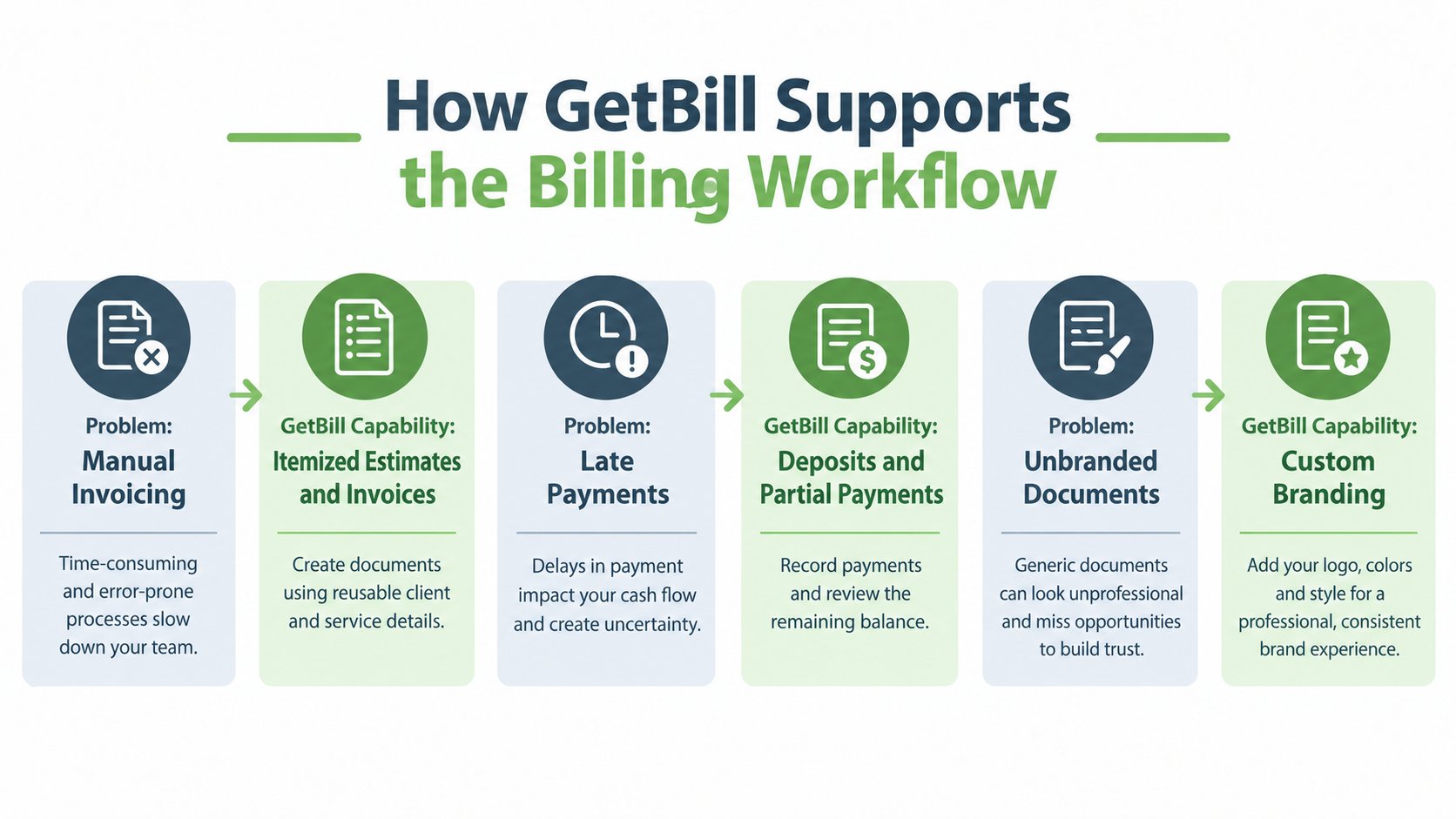
GetBill is one option for independent professionals and small service businesses that need focused estimating and invoicing. The features worth testing line up with the billing tasks covered above: reusable client and item records, estimate-to-invoice conversion, delivery, and balance tracking. The owner's own test run matters more than how polished the sample documents look.
The application supports itemized estimates and invoices, reusable client and product or service records, and estimate-to-invoice conversion. Conversion inside the same record keeps the agreed scope attached to the bill, which removes the re-entry step where line items get dropped or rates get mistyped. That handoff is where the practical value sits, not in the template design.
Match Each Capability to a Billing Task
Branded PDFs and sharing by email or public links cover document delivery. Deposits, partial-payment records, and remaining balances cover the collection side: what has been paid, what is still owed, and which invoice the money belongs to. These are tracking functions, and they don't change whether a client pays on time.
One limitation shapes the evaluation: automated reminders and automated estimate generation aren't established capabilities here. An owner who relies on reminder sequences to chase overdue balances will run that step outside the application. The functions that hold up under testing are document creation, conversion, branding, sharing, and payment tracking.
Supported online card payments run through a connected Stripe account, with availability dependent on the account and region. Android and iOS applications support billing away from a desk. Eligible plans also support multiple business profiles and white-label documents, which suits an owner issuing documents for distinct service businesses.
Document branding is a separate question from the payment gateway. Stripe remains its own provider, and payment-provider responsibilities stay with that provider rather than the invoicing application.
Keep Compliance and Accounting Boundaries Clear
A branded PDF is a readable document. A structured e-invoice is intended for machine processing through the format and delivery arrangements required by the receiving system. Sending an invoice electronically doesn't establish that it satisfies a particular mandate.
Vertex's 2025 e-invoicing research reported that nearly 100 countries had implemented e-invoicing mandates, with businesses in mandated markets identifying integration, data security, and privacy as practical concerns. That international context makes compatibility checks important for cross-border and public-sector work.
Owners should verify:
- Required identifiers: Customer and supplier tax or procurement identifiers.
- Document conventions: Required fields and numbering arrangements.
- Delivery requirements: Whether a structured format or designated network is necessary.
GetBill shouldn't be treated as a full accounting, payroll, tax-filing, ecommerce, AI invoicing, public-catalog, or structured tax-compliance platform. Owners also shouldn't assume recurring invoices, automated reminders, or public estimate approval.
For a separate perspective on accounting needs, the invoice-software discussion from Bookkeeping and Accounting of Florida Inc. is a relevant resource. The practical decision is whether focused billing software covers the operational task while separate bookkeeping or compliance systems handle the remaining responsibilities.
Make a Practical Billing Decision
The final evaluation should be a reconciliation exercise. The owner should be able to explain the invoice total, identify the agreed scope, and trace each recorded payment without relying on memory or scattered messages.
Verify the Client-Facing Result
A short acceptance checklist keeps the decision grounded:
- Recalculate totals: Confirm quantities, rates, discounts, and applicable taxes.
- Inspect the handoff: Check that conversion preserves the intended agreement.
- Review delivery: Open the emailed or public document as a client would.
- Reconcile payments: Match deposits and installments to the remaining balance.
- Confirm status: Inspect the underlying provider record before assuming settlement.
For clients with structured e-invoicing requirements, the compatibility checks above remain separate from PDF branding. Cross-border and public-sector work may need identifiers, numbering rules, document fields, or delivery systems outside a conventional billing app's scope.
Apply the Correct Legal Scope
The FTC's Rule on Unfair or Deceptive Fees guidance states that the rule took effect on May 12, 2025, and covers live-event tickets and short-term lodging. It isn't a general federal pricing rule for handyman, cleaning, consulting, photography, or contracting invoices.
Accurate line descriptions and clear deposit terms remain sensible business practices, but they shouldn't be presented as obligations imposed on ordinary service businesses by that narrow rule. Owners should confirm the rules applicable to their own jurisdiction and work.
A suitable app makes the owner's existing billing decisions easier to document and reconcile. It doesn't replace those decisions, the underlying contract, or specialist compliance advice.
GetBill offers itemized estimates and invoices, reusable records, document sharing, and deposit and partial-payment tracking. Owners whose needs match that workflow can visit GetBill and test a representative job from estimate creation through remaining-balance reconciliation.