


A cleaner has finished a visit, packed the supplies, and opened an email to bill the customer. The draft lists house cleaning and a total, but nothing about the extra oven cleaning, the booking payment, or when the balance is due. The customer now has to reconstruct the job before paying.
Knowing how to send an invoice means making that reconstruction unnecessary. The strongest workflow starts with agreed payment events, carries the approved scope into the bill, and delivers a balance the client can verify. A polished PDF helps, but it can't fix a surprise charge or an invoice sent to someone who doesn't approve payment.
Table of Contents
- What a Send-Ready Service Invoice Includes
- Send the Invoice Step by Step
- Choose Deposits and Due Dates Before the Work Starts
- Confirm the Recipient's Format Before Work Starts
- Follow Up and File the Payment Record
What a Send-Ready Service Invoice Includes
A send-ready invoice should answer the customer's questions without requiring another email: who performed the work, what was delivered, what has already been paid, and what remains due. For the cleaner, that means identifying the visit and separating the standard cleaning from approved extras rather than presenting an unexplained total.
Start with invoice identity. Assign a unique invoice number and an issue date, then add the business's name and contact information. Use the customer's billing name, which may differ from the person who booked the service, and include the estimate, project, or purchase-order reference.
The reference matters because the recipient may not have arranged the work. A bookkeeper matching a handyman's bill to an approved estimate needs a recognizable job description, not just the property owner's first name.
Make the work and the balance readable
Each line should identify a service or cost the client can recognize. For hourly work, show the task, hours, and hourly rate. For fixed-price work, describe the deliverable or visit and the agreed price.
Keep labor, materials, and reimbursable expenses separate when the estimate treats them separately. A consultant's travel reimbursement shouldn't disappear inside a larger consulting charge. Likewise, a handyman's materials should match the agreed billing arrangement rather than appear as an unexplained addition.
A deposit or progress payment belongs in the calculation as a credit. The client should see the service total, applicable adjustments, money received, and remaining balance without doing mental arithmetic. A payment request that prominently displays the original total while hiding the deposit invites an avoidable question.
For owners who also handle bills from subcontractors or vendors, Zaro's guide to supplier invoices offers useful context for understanding the document from the receiving side. That perspective helps when preparing a bill another business must approve.
Check terms before presentation
Put a calendar due date on the invoice and identify the primary payment method. Add a short contact note directing billing questions to the person who can resolve them. The invoice shouldn't leave the customer guessing whether to call the field worker, the office, or the project manager.
Tax treatment needs its own check. Don't assume every photography, cleaning, or repair service should carry the same sales-tax treatment; confirm the applicable state guidance for the actual service before adding a tax line. Similarly, the FTC fee-disclosure rule for live-event tickets and short-term lodging isn't a general service-invoice template.
Fields to confirm before sending
| Field | What to write | Why it matters |
|---|---|---|
| Invoice identity | Unique number and issue date | Stops duplicates and starts the due-date clock defined in the terms |
| Client and job | Billing name plus estimate, project, or PO reference | Matches the bill to approved work |
| Line items | Labor, materials, and reimbursables with quantity, unit, and price | Replaces vague service descriptions |
| Money already paid | Deposit or progress payment as a credit | Shows the client isn't being billed twice |
| Amount requested | Remaining balance in one clear figure | Makes the payment action obvious |
| Terms and route | Calendar due date and one primary way to pay | Establishes an objective date for follow-up |
Use this check before choosing the delivery method. Attractive formatting won't compensate for the wrong billing name or an omitted credit.
Send the Invoice Step by Step
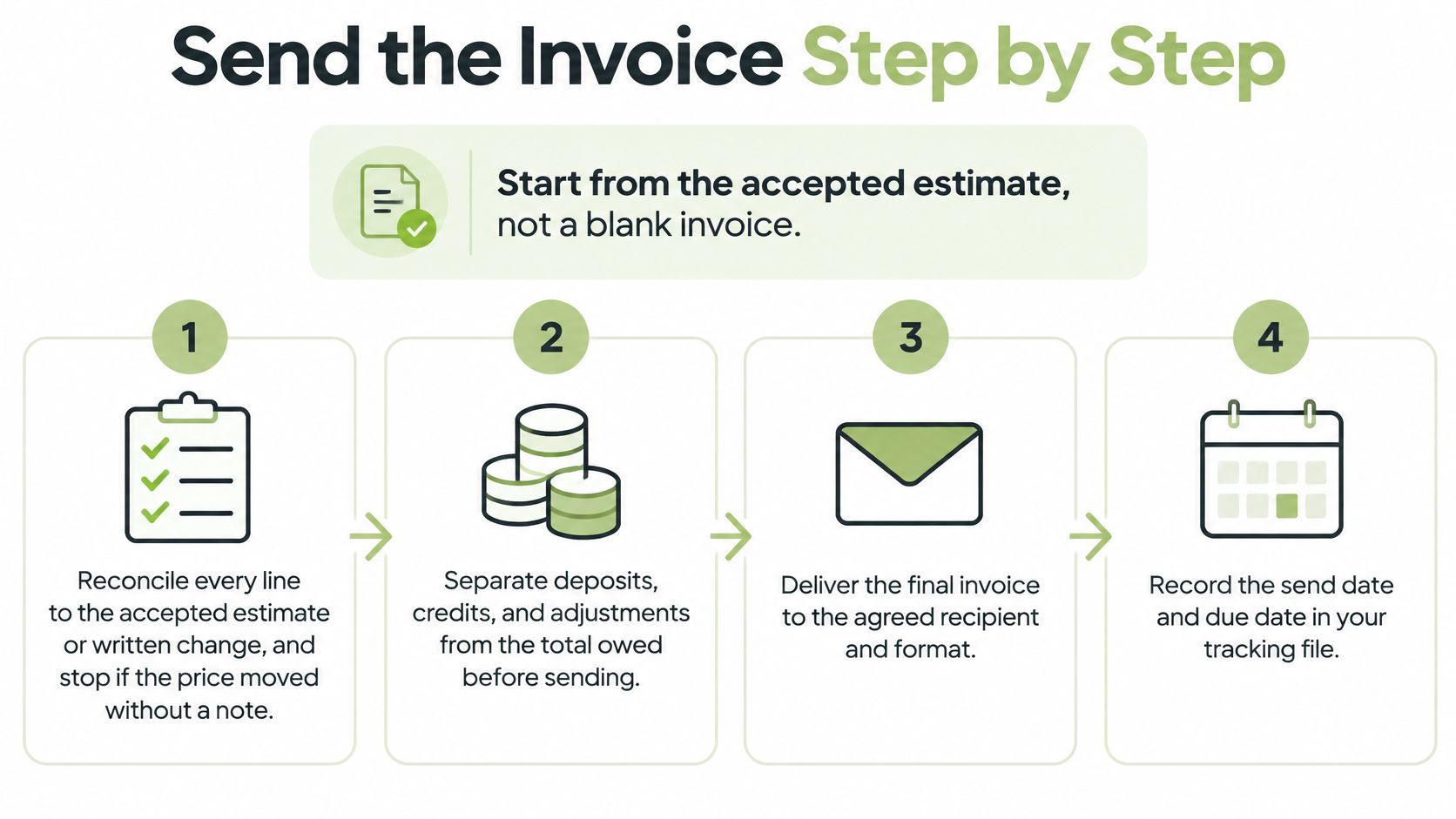
Start from the accepted estimate, not a blank invoice. The estimate holds the original agreement; the invoice records the work now being billed. Copying from memory creates room for missing items, altered descriptions, and accidental price changes.
- Reconcile the work with the agreement. Compare each invoice line with the accepted estimate and any written changes. Check service dates, quantities, rates, materials, and approved extras. If the price increased without a documented explanation, resolve that discrepancy before sending.
- Separate previous payments from the balance. Confirm that deposits, credits, and progress payments match the payment record. Don't ask for the original job total again because it was copied from the estimate. The amount requested should reflect the current billing event.
- Produce a readable PDF. Open the exported file, not just the editing screen. Check that descriptions aren't cut off, page breaks don't separate totals from their labels, and payment instructions remain legible. The customer should be able to download, print, or file the document.
- Address the person who approves payment. Use the agreed billing contact and repeat the purchase-order or job reference already supplied. A project contact can be copied when appropriate, but sending only to that person may leave accounts payable unaware that payment is due.
- Offer a working payment route. Choose a primary method already configured and tested. A card checkout should belong to the business's established payment setup; a fallback might be a check or bank transfer. More choices aren't helpful when the instructions conflict.
- Send and preserve the final version. Deliver through the agreed email address or document link, then retain the exact invoice and send date. Share viewing links only with intended recipients. A link that works without signing in should be treated as sensitive business correspondence.
The visual workflow condenses those actions into preparation, delivery, and tracking.
Keep the message shorter than the invoice
The email's job is to direct the recipient to the bill, not reproduce every line item. Include the invoice number, job description, remaining balance, due date, and payment route. Keep supporting explanations on the invoice or in clearly identified attachments.
For example, a portrait photographer who already collected the sitting fee should send the gallery balance with that fee shown as a paid credit. The message should request the balance, not describe the full package price as though nothing has been paid.
Receipts, approved changes, or completion records can help a business customer authorize payment. The practical approach to attaching documents to an invoice is to include evidence that answers a likely approval question, not every file associated with the job.
Security check: A bank-account change shouldn't rely on the invoice email alone. Confirm changed instructions by phone or another independently trusted channel.
Remove retyping from the next job
In GetBill, an accepted estimate can be converted into an invoice with one click, without re-entering data. The invoice can be emailed directly to the client's inbox with a secure viewing link; each invoice has a unique access link that lets the client view and pay without creating an account. Supported online card payments require the business's connected Stripe account, with availability depending on the account and region.
Software still needs the right agreement to work from. For the next job, put the deposit requirement and balance trigger into the estimate, then prepare the balance invoice when the agreed milestone is complete. If those terms weren't agreed, settle them with the client rather than adding a surprise deadline after delivery.
Owners choosing a system can compare freelancer invoicing tools against this actual workflow. The useful comparison is whether a tool preserves approved details, produces readable documents, and supports the business's collection process, not which vendor lists the most features.
Choose Deposits and Due Dates Before the Work Starts
Payment terms are a working-capital decision, not a formatting convention. A business that buys materials, reserves a date, or pays helpers before collecting the fee is funding the client's project in the meantime. The right billing structure limits that exposure without making the engagement unnecessarily difficult to buy.
In a 2025 Intuit QuickBooks survey of 2,000 U.S. small-business respondents, 56% were owed money from unpaid invoices, averaging $17,500 per affected business. Those findings don't predict an individual client's behavior, but they reinforce why the amount left outstanding deserves attention before work begins.
Match the payment event to the expense
A small cleaning visit with little upfront expense may suit payment on completion. A photographer reserving a date or a handyman purchasing job-specific materials has a different cash commitment. A documented deposit can cover part of that commitment before the business incurs it.
Phased projects need a different structure again. A designer can bill an approved concept milestone separately from final-file delivery. A consultant can tie invoices to completed project stages rather than allowing the entire engagement to become an unpaid balance.
Payment structures for service work
| Structure | Best fit | Collect before sending the balance | Cash risk |
|---|---|---|---|
| Pay on completion | Small finished visit with little upfront cost | Nothing, or a modest booking amount | Full fee remains outstanding until paid |
| Deposit plus final | Materials, rentals, or reserved dates | Agreed deposit shown as a credit | Remaining balance stays exposed |
| Milestones | Phased design, consulting, or remodeling | Payment for completed stages | Exposure stays near the current stage |
| Net 30 on the full fee | Client with a real payables process and a supplier able to wait | Preferably an agreed deposit | Supplier finances a month or longer |
These are trade-offs, not promises of punctual payment. A deposit reduces the unpaid amount but creates another payment event to document. Milestones limit exposure only if the business collects at those stages instead of continuing indefinitely.
Apply the structure to an actual quote
Consider a hypothetical handyman estimate of $1,800. The agreement might call for a deposit before materials are purchased and the remainder after the agreed punch list is completed. The estimate should identify those events, while the final invoice should reflect the deposit received and the actual balance.
The deposit amount should follow the job's costs, cancellation exposure, customer agreement, and applicable requirements, not an arbitrary percentage copied from another trade. For construction-specific context, Bookkeeping and Accounting of Florida Inc.'s discussion of client advance payments in construction billing helps distinguish deposits, prepayments, and retainers without assuming those labels are interchangeable.
A longer payment period is credit extended to the customer. It doesn't make the invoice more professional.
When a client requests Net 30, define when the period begins and display the resulting calendar due date. An invoice-date trigger and an approval-date trigger can produce very different collection expectations.
A clear invoice payment terms agreement should also identify the accepted payment method and any stage-completion requirement. Before including late-fee language, confirm that the signed agreement and applicable state law support it; sales-tax treatment needs a separate check. The estimate is the place to negotiate these conditions, not the final invoice after the client has lost the opportunity to choose.
Confirm the Recipient's Format Before Work Starts
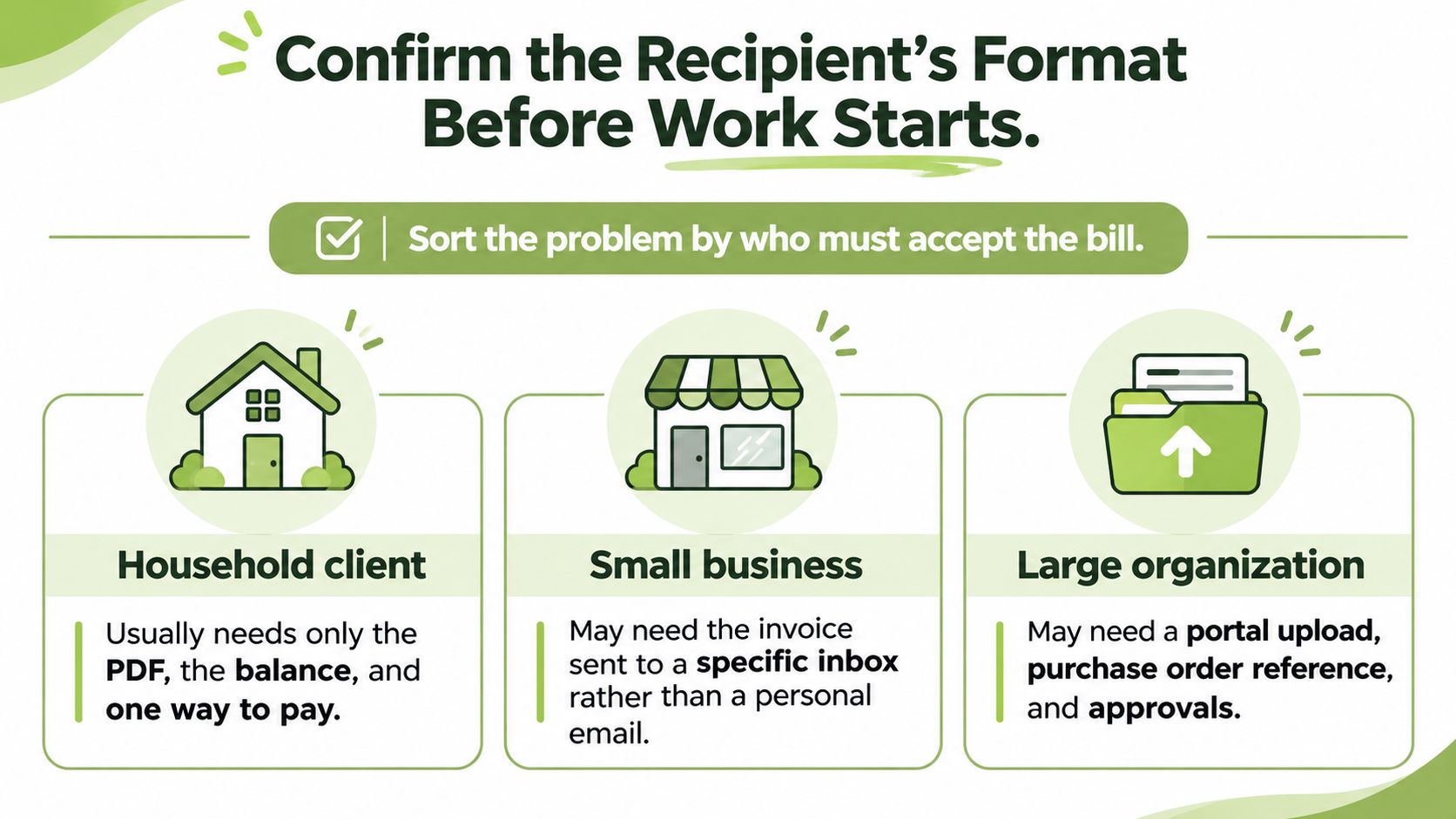
The simplest delivery method is the one the intended recipient can accept. A household customer may need only a readable PDF and payment instructions. A corporate buyer may require an accounts-payable inbox, vendor reference, and portal submission before anyone can approve the same work.
The person who booked the job isn't necessarily the person who releases payment. A facilities manager may confirm that cleaning was completed while an administrator checks the invoice and accounts payable schedules the payment. Identifying those roles before the job prevents a finished invoice from circulating without an owner.
The recipient check starts with the kind of customer receiving the bill.
Match delivery to the buyer
For a household client, confirm the billing name and preferred email address. Avoid making the customer search a long message thread for the payment instructions. The invoice should be easy to retain even after the payment is complete.
For a small business, ask whether the owner, office administrator, or bookkeeper receives bills. A familiar contact's personal inbox may be convenient during scheduling but unsuitable for routine billing. Send the invoice where the customer has agreed to process it.
A larger company may need additional references before it accepts the document. Ask for the purchase order and vendor details early, particularly if the customer must register the business as a supplier. A polished attachment won't resolve missing procurement authorization.
What to confirm by client type
| Client | Usual delivery | Confirm first |
|---|---|---|
| Household or local consumer | Email with PDF and one way to pay | Billing name, balance, and due date |
| Small business | Email to the person who pays | Whether the owner or an administrator receives bills |
| Larger company | Email to accounts payable | PO, vendor, or project reference |
| Public agency or mandated e-invoice buyer | Required format or portal | Structured fields before work starts |
Distinguish a digital document from a compliant submission
An emailed PDF and a structured electronic invoice aren't the same deliverable. The PDF presents information for a person to read; a structured invoice supplies fields that a receiving system can process. OpenText's global e-invoicing guide describes differing national requirements, making recipient and jurisdiction checks especially important for cross-border work.
Treat that guide as orientation, not a substitute for current government guidance. Before applying a requirement, confirm the buyer's country, the relevant transaction type, the businesses covered, and the effective date. Don't assume a payment link satisfies a tax-reporting or structured-format requirement.
For U.S. federal contracts, the Federal Acquisition Regulation's proper-invoice provisions identify required information, including invoice identity, contract authorization, service descriptions, quantities, prices, and payment details. Those are federal contracting rules, not a universal invoice law for local photography or household cleaning.
Before accepting work with formal procurement requirements, obtain written answers about the submission route, mandatory fields, and approval contact. Preserve the portal confirmation or other delivery evidence after submitting. Payment collection and invoice compliance remain separate tasks: a customer can have a convenient way to pay while still needing a different document for its records or regulatory process.
Follow Up and File the Payment Record
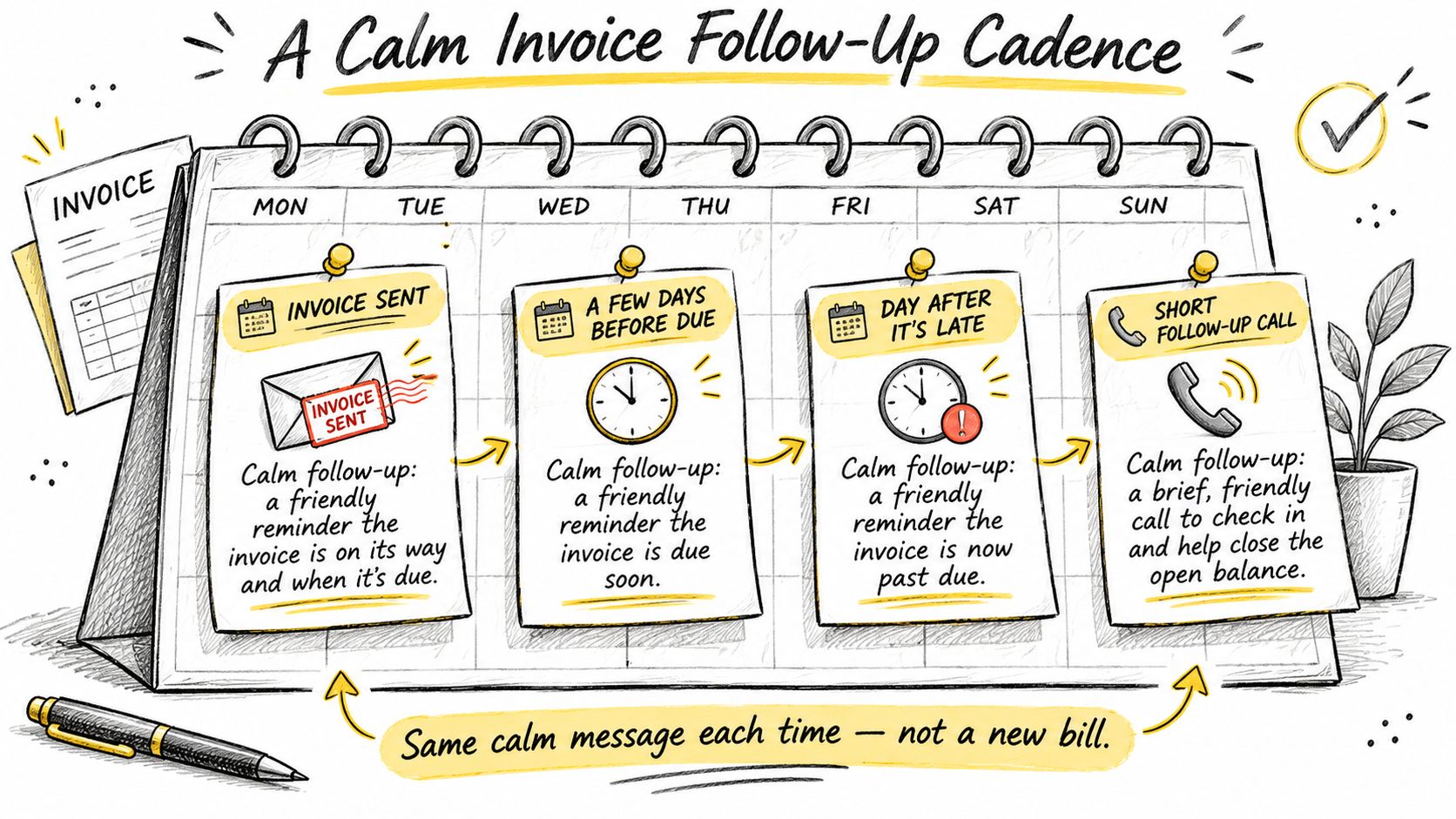
Use a fixed follow-up cadence instead of drafting a new collection strategy whenever an invoice remains open. A practical sequence is confirmation on the send date, a brief reminder shortly before the due date, a past-due note after the deadline, and a call if the balance remains unresolved.
Each message should point to the same account position: invoice number, original amount, amount received, remaining balance, and due date. That consistency lets the recipient act without comparing conflicting emails.
The calendar below illustrates a calm sequence rather than an escalating stream of demands.
Give each contact a specific purpose
- On the send date: Record where the invoice went and the expected due date. For a new business customer, request confirmation that the document reached the correct billing contact.
- Before the deadline: Send a brief reminder with the outstanding balance and payment instructions. Avoid implying that a payment is late before the agreed date.
- After the deadline: Identify the unpaid invoice and ask for the expected payment date. If payment has already been sent, request the remittance details needed to match it.
- When email stalls: Call the billing contact to identify the blocker. Ask whether the problem is missing authorization, a disputed line, an incorrect reference, or an unscheduled payment.
A useful reminder to pay gives the customer a clear action. Repeatedly asking for an update without naming the invoice or balance makes the recipient do the administrative work again.
If a customer disputes a charge, record the disputed item and the explanation separately from the collection notes. Resolve the scope or price question rather than treating every unpaid invoice as simple forgetfulness.
Apply partial payments to the original record
When a client pays part of the bill, record that payment against the existing invoice and show the new balance. Don't issue another invoice for the same work merely because some money remains due. That can leave the customer's bookkeeper with duplicate liabilities and the business with an unclear collection record.
Retain the payment date, amount, and identifying reference. If a payment is still processing, distinguish that status from cleared funds before closing the balance.
Recordkeeping rule: A reminder should always lead back to one identifiable invoice and one current remaining balance.
Keep the accepted estimate, approved changes, final invoice, reimbursable-expense receipts, and proof of payment together. A consistent job folder or billing record makes later questions easier to answer than a search across text messages, email attachments, and bank transactions.
For U.S. federal recordkeeping, IRS Publication 583 lists purchase and sales invoices among supporting documents that can show income and expense flows, and says a cash expense without a receipt should receive an adequate explanation in the records when paid. This guidance concerns business records; it doesn't prescribe a universal service-invoice template or establish when a customer is legally late.
Collected-payment records also serve a different purpose from estimated-tax planning. The operational goal is a clear trail from approved work to the final collected balance, with no uncertainty about which document remains active.
GetBill offers itemized estimates and invoices, downloadable PDFs, and records for deposits and partial payments with remaining balances. Visit GetBill to carry an agreed estimate into a clear payment request and give the client a straightforward way to view the bill.