

A client needs a professional invoice today. You could open a spreadsheet, adjust a template, export a PDF, and email it, but that approach starts to break down when the same client asks for an estimate first, pays a deposit, or needs a recurring invoice next month. At that point, you're choosing more than an invoice creator PDF. You're choosing how much of the billing lifecycle you want to manage manually.
A standalone generator is usually best for occasional one-off documents. A payment platform makes more sense when collecting online is the priority. A mobile-first app suits field work, while accounting software connects invoices to bookkeeping, reporting, and tax workflows. This comparison evaluates PDF export, branding, delivery, payment options, deposits and partial payments, recurring billing, mobile access, setup effort, integrations, and practical limitations.
GetBill sits between spreadsheets and full accounting suites. It focuses on estimates, invoices, payment collection, client links, deposits, and branded PDFs without asking a small service business to adopt a complete accounting system. The list starts with focused billing tools, moves through payment-led and accounting platforms, and ends with mobile and self-hosted options. After the comparison, you'll find implementation guidance and an export-quality checklist for choosing a workflow that remains useful after the PDF leaves your screen.
Table of Contents
- 1. GetBill
- 2. Stripe Invoicing
- 3. Square Invoices
- 4. PayPal Invoicing
- 5. Zoho Invoice
- 6. Wave Invoicing
- 7. FreshBooks
- 8. QuickBooks Online
- 9. Invoice Ninja
- 10. Invoice Simple
- Top 10 Invoice PDF Creators Comparison
- Turn Your Chosen Tool Into a Reliable Billing System
1. GetBill
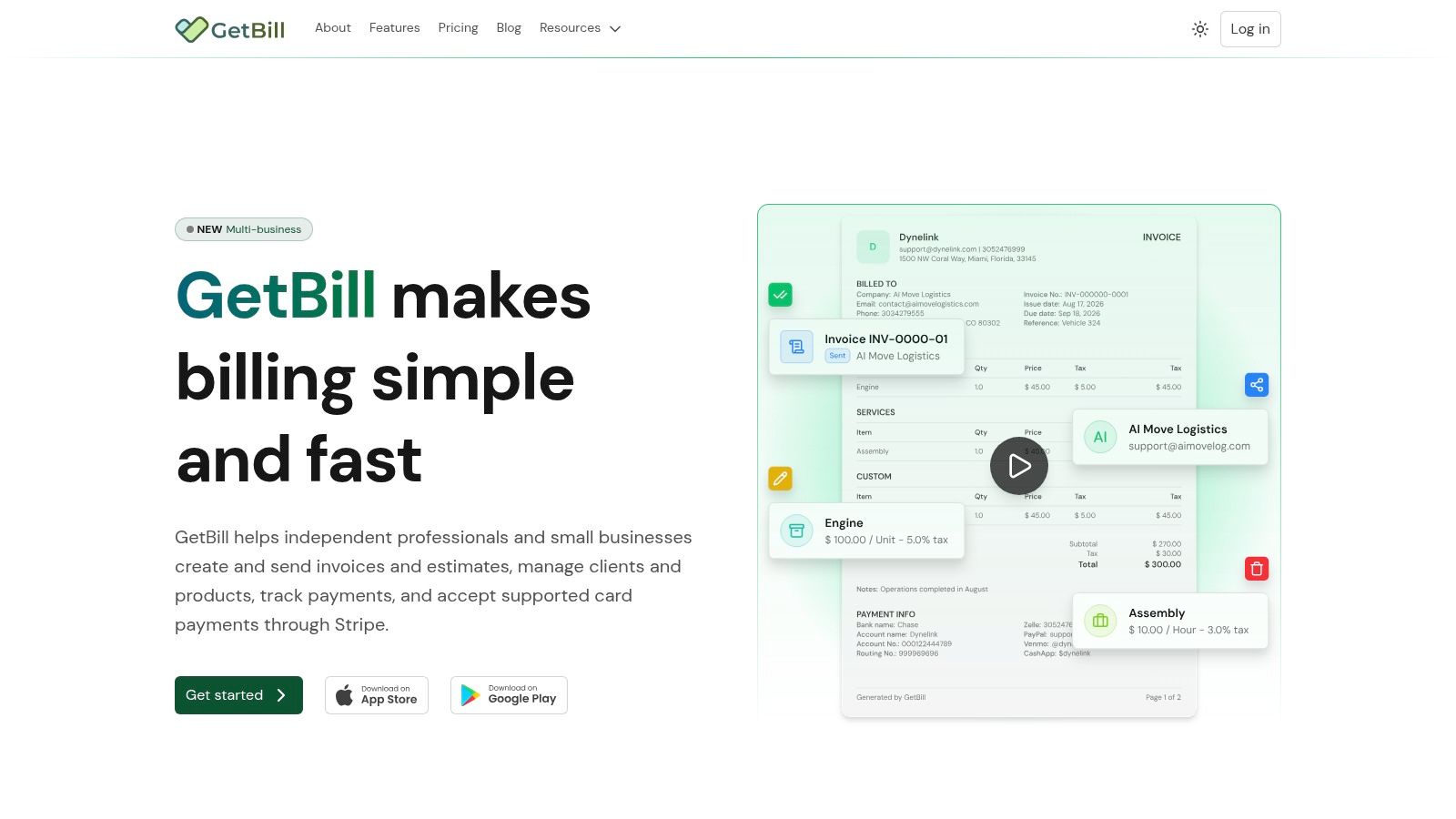
GetBill is built for freelancers, independent professionals, and small service businesses that want to move from draft to payment without adopting a heavy bookkeeping platform. You can create itemized invoices and detailed estimates, send them by email or secure public link, and give clients a way to view and pay without creating an account. The result is a billing workflow rather than a document-only generator.
The estimate workflow is particularly practical. After a client accepts an estimate, you can convert it into an invoice in one click instead of re-entering the customer, service lines, taxes, and notes. GetBill also supports deposits, installments, and partial-payment tracking, which matters for contractors, consultants, studios, and other businesses that don't collect the full balance at once.
Best for a complete billing lifecycle
GetBill uses Stripe-hosted checkout for supported card payments. Funds go directly to the connected Stripe account rather than being held by GetBill, and Stripe determines supported card brands, currencies, regional availability, and payout timing. Automatic status updates through Stripe webhooks can reduce the need to check payment dashboards and reconcile every transaction manually.
Clients can pay from a public invoice link, and the checkout displays any enabled processing fees before payment. That gives the sender a professional delivery option while keeping payment conditions visible to the buyer. Android and iOS apps extend the same workflow to on-site estimates, field work, and billing away from a desk.
Where the trade-offs appear
GetBill's Starter plan costs $9.99 per month and includes 50 invoices, estimates, and emails per month, along with limited storage. Pro costs $19.99 per month with unlimited invoices, estimates, and emails plus Stripe payments. Business costs $29.99 per month and adds multiple business profiles and white-label documents. Monthly and annual billing options are available, as described in the GetBill plan overview.
Practical rule: Choose GetBill when billing speed, deposits, estimates, and payment status matter more than general ledger reports. Choose accounting software instead if bookkeeping is the central requirement.
GetBill isn't a full accounting or bookkeeping system, and every online payment workflow depends on having a connected Stripe account. For a small operation that wants reusable client and product records, branded PDF documents, payment links, and less re-entry, it offers a focused middle ground between spreadsheets and a broader accounting suite.
2. Stripe Invoicing
Stripe Invoicing is strongest when payment collection already runs through Stripe. It combines branded PDF invoices, hosted invoice pages, email delivery, and online payment collection in one payment-led workflow. A business can send a customer a PDF for records while directing the customer to a hosted page for payment, which is more useful than treating the PDF as the entire transaction.
One-off and recurring invoices make Stripe suitable for both project work and ongoing services. Reminders and smart retries can reduce follow-up work, while Stripe Tax and related integrations support businesses that need more structured tax handling. Its ecosystem also helps companies connect invoicing to checkout, subscriptions, payment records, and other Stripe services.
The setup is relatively direct if Stripe is already configured. It becomes less attractive when you only need occasional PDFs and don't want to add payment-processing charges or manage another payment account. Stripe's pricing includes a per-paid-invoice fee in addition to payment processing, so review the current commercial terms before treating it as a low-cost document generator. The Stripe Invoicing product page is the right place to verify current features and fees.
A good payment-first workflow
Stripe works well for a business that wants the invoice and payment page to remain connected after sending. It can scale from a solo operator to a higher-volume billing operation, but that scalability also brings more configuration than a simple browser generator.
For guidance on the document side of the process, this practical guide to invoicing someone is useful alongside Stripe's payment tooling. The key decision is simple: if the customer should pay online and Stripe is already part of your stack, Stripe Invoicing is a logical fit. If the customer only needs a PDF attachment and you record payment elsewhere, it may be more platform than you need.
3. Square Invoices
Square Invoices suits businesses that already use Square for point-of-sale, appointments, or in-person payments. You can create, send, schedule, and download invoices as PDFs, then keep payment activity closer to the same ecosystem used for day-to-day sales. That connection is more valuable than isolated PDF quality for salons, repair businesses, appointment-led services, and other operators already working in Square.
Estimates can convert into invoices, and optional e-signature support can add an approval step before billing begins. Saved cards and multiple payment channels help reduce repeated payment entry for returning customers. Square's mobile apps also support billing away from a desktop, while POS integration can make the transition from a completed service to an invoice more practical.
Where Square earns its place
Square has a solid free option for creating and sending invoices, which makes it approachable for a business testing a digital billing workflow. The main benefit isn't only the PDF download. It's the ability to connect estimates, customer payment, appointments, and point-of-sale activity within a familiar operating environment.
Advanced capabilities may require a paid plan, and Square can change plan names and rates. Confirm the current terms on the Square Invoices website before committing. A business that doesn't use Square elsewhere may find that a focused invoice tool offers a cleaner setup, especially if it needs estimates and branded PDFs but not POS connectivity.
4. PayPal Invoicing
PayPal Invoicing is a practical choice when clients already expect to pay through PayPal. You can create and customize an invoice, share an invoice link, download the document as a PDF, and accept PayPal or card payments through a widely recognized payment service. That familiarity can remove a client objection that has nothing to do with the invoice design itself.
The workflow is lightweight across web and mobile. A freelancer can prepare a polished document, attach or print the PDF, and still give the client an online payment route. PayPal also lets a business start invoicing without a monthly subscription, which suits occasional billing and early-stage operations.
The trade-off is payment economics and accounting depth. Processing fees can be higher than some alternatives, and PayPal Invoicing isn't intended to replace a full accounting suite. It can record the payment event, but businesses with complex reporting, expense management, or bookkeeping requirements will eventually need another system.
When recognition matters more than automation
PayPal is strongest when the customer already has a PayPal preference or the sender wants a familiar payment brand. It's less compelling when the business needs advanced estimate conversion, deposit balances, recurring operational controls, or deep accounting integration.
Check the current options and payment conditions on the PayPal Invoicing page. For a one-off PDF, PayPal can be faster than opening a full accounting account. For a growing service business, treat it as a payment-led invoicing tool rather than a complete billing back office.
5. Zoho Invoice
Zoho Invoice offers a broader invoicing workflow without requiring a monthly subscription for its core positioning. It supports PDF invoice creation and download, estimates, automated reminders, time and expense billing, and a client portal. That combination makes it more capable than a basic generator while remaining more focused than a full accounting platform.
Customization is one of its strongest practical advantages. Custom fields, templates, tax features, multi-currency support, and multi-language support help businesses produce documents that fit different clients and markets. Time and expense billing is also useful for consultants, agencies, and professional services firms that need to turn tracked work into itemized invoice lines.
A strong choice for customization
Zoho Invoice is a good fit when the business wants recurring reminders and reusable billing data but doesn't want to pay for a complete accounting suite immediately. A client portal can also make the process feel more organized than sending a PDF attachment with no payment context.
The limitation is the boundary between Zoho Invoice and Zoho Books. More advanced accounting needs may require moving into the broader Zoho ecosystem, and usage limits may apply at higher volumes. Review the current product scope on the Zoho Invoice website before building a workflow around features that may belong to Zoho Books.
A free invoice tool is only inexpensive if it doesn't force you to recreate client, product, and payment information elsewhere.
For an occasional document, Zoho may provide more controls than necessary. For a small team with international clients, time-based billing, and recurring reminders, its customization and localization options make the extra setup worthwhile.
6. Wave Invoicing
Wave is designed for freelancers and small businesses that want to create, send, and export invoices as PDFs without starting with a subscription. Its web and mobile workflows cover estimates, recurring billing, basic tracking, and optional online payments. Wave also connects invoicing to its free accounting basics, giving a small business more continuity than a standalone PDF generator.
The interface is straightforward for service billing. A freelancer can create an invoice, send it, download a PDF, and keep basic records in the same environment. Recurring billing is useful for regular client work, while estimates provide a starting point for businesses that need approval before invoicing.
Simple is useful, until it isn't
Wave's main strength is its low-friction starting point. It can make sense for a new freelancer who wants basic invoicing and accounting without assembling separate tools. Its main weakness is depth. Templates and customization are more limited than premium suites, and advanced features such as bank connections may sit behind the paid Pro plan.
Wave is especially relevant to users in the United States and Canada, so verify regional availability and payment functionality before relying on it for cross-border work. The Wave invoicing product page provides the current scope. Choose Wave when basic accounting continuity matters and invoice complexity remains modest. Choose a more specialized tool when deposits, branded documents, or detailed payment states need to be central.
7. FreshBooks
FreshBooks makes sense for a service business that wants invoicing alongside lightweight bookkeeping. It supports branded PDF invoices, PDF attachments in invoice emails, recurring invoices, late fees, reminders, time and expense tracking, retainers, deposits, estimates, and proposals. That is a substantial workflow for an agency, consultant, or studio that bills from tracked work rather than from a fixed product list.
The client experience is polished. A business can create an estimate or proposal, track work and expenses, convert the result into billing, and communicate with the client from a more connected platform. Retainers and deposits are especially relevant when a project starts with an advance payment and continues through several billing stages.
Better for service operations than quick PDFs
FreshBooks is heavier than an invoice-only app, but the added structure can prevent re-entry. A time-based business may save more effort by keeping hours, expenses, invoices, reminders, and client communication together than by choosing the fastest PDF screen.
Plans scale by client count, which can increase ongoing cost as the customer list grows. Businesses considering it should compare the price of that integrated workflow with a focused billing tool. This invoice software guide for freelancers offers useful context for making that distinction, while the FreshBooks invoicing page confirms the platform's current invoice features.
FreshBooks is the better choice when billing is tied to billable time, reimbursable expenses, retainers, and client management. It's not the most efficient choice for someone who only needs to produce a clean PDF a few times each year.
8. QuickBooks Online
QuickBooks Online is the strongest option in this list when invoicing must stay connected to full accounting. It can email invoices with PDF attachments, support recurring invoices and reminders, record deposits, accept online payments through QuickBooks Payments, and connect invoice activity to reporting and bookkeeping.
That integration changes the decision. A business using QuickBooks doesn't need to export invoice totals into a separate ledger or ask a bookkeeper to reconstruct the billing history from emailed PDFs. Bookkeepers and accountants also commonly support the platform, which can reduce handoff friction when the business grows or financial reporting becomes more demanding.
Choose the accounting system deliberately
QuickBooks is more expensive and more feature-rich than an invoice-only application. Its value comes from the surrounding accounting system, not from PDF generation alone. If you only need estimates, invoices, payment links, and partial-payment tracking, the extra subscription and configuration may feel unnecessary.
The product and pricing environment can change, so confirm current terms on the QuickBooks Online invoicing page. QuickBooks is the right choice when the invoice is one part of a larger financial record. It's the wrong choice when the business is deliberately trying to keep bookkeeping separate and lightweight.
9. Invoice Ninja
Invoice Ninja is an invoice-first platform for users who want a capable cloud product or a self-hosted deployment. It supports live PDF previews, viewing and downloading invoices, quotes, recurring invoices, payment reminders, and multiple payment gateway integrations. That breadth gives a technical freelancer or small company more control over deployment than most simple SaaS generators.
Self-hosting is the defining difference. A team can retain more control over its hosting environment, data handling, and deployment decisions, but it also takes responsibility for installation, updates, backups, access control, and troubleshooting. That isn't a free form of simplicity. It trades vendor dependence for operational work.
A real self-hosting decision
Invoice Ninja can suit a developer, agency, or privacy-conscious business that has a reason to control the application environment. The cloud option is easier for teams that want the feature set without administering infrastructure. Some advanced capabilities require paid tiers, so compare the desired payment gateways and automation features before choosing a deployment model.
The Invoice Ninja website explains the current cloud and self-hosted options. Use it when deployment control is a genuine requirement, not merely because self-hosting sounds flexible. A hosted tool is usually more practical for a solo operator who needs to send a PDF immediately and doesn't want invoice administration to become a technical project.
10. Invoice Simple
Invoice Simple is a mobile-first option for freelancers, tradespeople, and small operators who need to produce a clean invoice while moving between jobs. It supports PDF creation, saving and downloading on web and mobile, estimates that convert to invoices, simple payment setup through Stripe or PayPal, and basic tracking.
The free web invoice generator is useful for a one-off document. The mobile apps are more valuable for repeated field work, where waiting to return to a desktop creates delays and forgotten details. A tradesperson can prepare an estimate, turn it into an invoice, and share the document close to the completed job instead of rebuilding it later.
Fast output with limited depth
Invoice Simple prioritizes speed over accounting depth. Its lower-priced plans have invoice-count package limits, and its reporting and bookkeeping features are less extensive than those in FreshBooks or QuickBooks Online. Payment setup is also simpler than a complete receivables workflow, so businesses with complex deposits, recurring billing, or multi-stage projects should test the balance tracking carefully.
The Invoice Simple website is the place to confirm current packages and mobile functionality. This comparison of invoice templates for Excel also helps clarify when a mobile app is a better next step than continuing with manual spreadsheet templates.
Invoice Simple is a good fit when the immediate problem is producing a professional PDF anywhere. It becomes less suitable when the business needs integrated accounting, advanced automation, or detailed payment reconciliation.
Top 10 Invoice PDF Creators Comparison
| Product | Core features | UX & Automation | Value & Pricing | Target audience | Unique / USP |
|---|---|---|---|---|---|
| GetBill 🏆 | Itemized invoices & estimates, Stripe checkout, partials, webhooks | ★★★★☆, fast drafts, mobile apps, real‑time sync | 💰 $9.99 / $19.99 / $29.99 pm (Starter/Pro/Business) | 👥 Freelancers, independent pros, small service businesses | ✨ One‑click estimate→invoice, public invoice links, white‑label (Business), direct Stripe payouts |
| Stripe Invoicing | Branded PDFs, hosted invoice pages, reminders, tax support | ★★★★☆, strong automation & retries | 💰 Per‑invoice fee + Stripe processing | 👥 Businesses already on Stripe / payment-heavy workflows | ✨ Deep Stripe integration; scalable hosted payments |
| Square Invoices | Invoices, estimates, e-sign, scheduling, POS integration | ★★★★☆, mobile-first, scheduling & POS flow | 💰 Free tier; card processing fees | 👥 Retail, appointments, businesses in Square ecosystem | ✨ Tight POS & Appointments integration |
| PayPal Invoicing | Create/share PDFs, PayPal & card payments, mobile/web | ★★★☆☆, simple, widely familiar UI | 💰 No monthly fee; PayPal processing fees | 👥 Freelancers with PayPal-preferring clients | ✨ Ubiquitous global payments acceptance |
| Zoho Invoice | Invoices, time/expense billing, automation, client portal | ★★★★☆, customizable templates & automations | 💰 Free plan; paid tiers for more users/features | 👥 Small teams needing customization & intl support | ✨ Strong customization, multi-currency & language |
| Wave Invoicing | PDF invoices, estimates, recurring, optional payments, basic reporting | ★★★☆☆, straightforward & budget-friendly | 💰 Free invoicing; payment processing fees (US/CA focus) | 👥 Freelancers & micro businesses on tight budgets | ✨ Free invoicing + basic accounting integration |
| FreshBooks | Branded invoices, recurring, time & expense, retainers | ★★★★★, polished client experience & automation | 💰 Tiered subscription; price scales by client count | 👥 Service businesses wanting bookkeeping + invoicing | ✨ Deep time/expense workflows & client communications |
| QuickBooks Online | Email PDFs, recurring, deposits, payments, deep reporting | ★★★★★, full accounting + invoicing automation | 💰 Higher subscription; accountant-friendly | 👥 Businesses needing end-to-end accounting | ✨ Integrated bookkeeping, reporting & tax workflows |
| Invoice Ninja | Live PDF preview, quotes, recurring, reminders, multi-gateway, self-host | ★★★★☆, powerful, developer-friendly | 💰 Free self-host; affordable hosted plans | 👥 Tech-savvy users & self-hosting seekers | ✨ Self-host option + flexible gateway support |
| Invoice Simple | Quick PDF invoices, estimates, simple payment tracking | ★★★☆☆, very fast mobile-first UX | 💰 Freemium; paid plans to remove limits | 👥 Freelancers & trades needing fast, simple invoices | ✨ Ultra-simple, on-the-go invoice creation |
Turn Your Chosen Tool Into a Reliable Billing System
The best invoice creator PDF tool depends on the failure you're trying to remove. If the problem is an occasional document, choose a lightweight generator such as Invoice Simple, PayPal Invoicing, or a basic Wave workflow. You'll get to a clean PDF quickly without paying for accounting features you won't use.
Choose a payment-led tool when collection matters as much as document creation. Stripe Invoicing works well when Stripe is already central to the business and hosted payment pages, reminders, recurring invoices, and payment automation are important. Square is more natural for businesses already using Square POS or appointments. PayPal is useful when clients already prefer its payment methods and the business wants a familiar route to payment.
Choose GetBill when you want more than a static PDF but less than a full accounting suite. Its useful middle ground includes estimates, one-click conversion to invoices, public links, Stripe-hosted checkout, deposits, partial-payment tracking, branded documents, and mobile apps. It's particularly relevant for freelancers, consultants, agencies, studios, trades, and small service businesses that need a repeatable billing lifecycle without moving bookkeeping into the same product.
Choose an accounting platform when invoice data must remain connected to financial records. FreshBooks is a strong service-business option where time, expenses, retainers, and client communication drive billing. QuickBooks Online makes more sense when bookkeeping, reporting, accountant access, and payments need to operate in one system. Zoho Invoice sits between those categories for users who want customization, reminders, estimates, and internationalization without immediately adopting Zoho Books.
A self-hosted option such as Invoice Ninja is appropriate when deployment control is important enough to justify technical administration. The decision isn't only about where the application runs. It also includes who manages backups, security updates, payment integrations, user access, and recovery when something fails.
A practical implementation sequence
Set up the workflow in this order:
- Enter business details: Add the legal business name, contact information, tax details, payment instructions, and preferred currency.
- Create a consistent template: Use the same logo, colors, footer, contact details, and payment language across invoices and estimates.
- Define numbering: Choose a numbering pattern that makes invoices easy to identify and reconcile. Don't change it casually once clients and accountants rely on it.
- Add itemized lines: Describe the service, quantity, rate, tax treatment, discount, and total clearly. Avoid vague lines such as “work completed” when a more specific description is available.
- Set payment terms: State the due date, accepted methods, deposit requirements, installment schedule, late-payment policy, and any processing fee shown to the client.
- Test the document: Open the PDF on a desktop and phone, check that text remains selectable, confirm totals, inspect page breaks, and print a copy if clients or regulators may archive paper records.
- Send through the right channel: Use a secure link when online payment matters, email the PDF when the client needs an attachment, and keep a record of the sent version.
- Record every payment: Mark deposits, card payments, bank transfers, cash, and remaining balances so the invoice status matches reality.
PDF quality is only one part of compliance. The global invoice ecosystem remains mostly non-electronic. One 2026 estimate places worldwide B2B invoice volume at about 300 billion, with roughly 87 billion electronic, or about 29% of the market, and projects electronic B2B invoice volume to grow from around 88.3 billion in 2026 to 107.0 billion by 2030. The Billentis 2026 findings published by Qvalia also identifies Latin America as the most advanced region for electronic exchange at roughly 78%, compared with about 64% in Europe, with lower shares in several other regions. These figures are a reminder that a PDF workflow may be practical today while structured e-invoicing requirements continue to expand.
The historical reason PDF became so useful is straightforward. A UK government SME study found that participating small businesses commonly generated invoices in accounting software, converted them to PDF, and emailed them to clients, while supplier invoices were also usually received as email PDFs. A U.S. payments-industry white paper describes PDF invoicing as a bridge between paper processes and structured electronic exchange. That bridge still works, but it shouldn't be mistaken for a machine-readable invoice format.
Before committing, check whether your chosen tool can produce the format your customers or authorities require. Recent market coverage points to Germany's B2B e-invoicing mandate already being in force in 2025, with France, Belgium, and Poland following during 2026 to 2027. Depending on the jurisdiction and transaction, expectations may include PDF/A-3, EN 16931, UBL, CII, XRechnung, Factur-X, or ZUGFeRD, as discussed in this overview of PDF and e-invoicing trends. A visually polished PDF isn't automatically structured, machine-readable, or compliant.
Use this final decision test:
- Occasional PDFs: Pick the simplest tool that produces a professional document and lets you save a reliable copy.
- Estimates and deposits: Pick a workflow with estimate conversion, partial-payment recording, and clear balance status.
- Online collection: Pick a payment-led platform when hosted checkout, reminders, and payment retries matter.
- Recurring billing: Confirm that recurring invoices, failed-payment handling, reminders, and client updates work as expected.
- Mobile billing: Test the app on the device used at job sites, not just the desktop dashboard.
- Accounting integration: Choose FreshBooks, QuickBooks Online, Zoho Books, or a comparable suite when invoice records must feed bookkeeping and reporting.
- Self-hosting: Choose Invoice Ninja only when control over deployment justifies the administration.
- Compliance readiness: Verify export behavior, structured formats, regional availability, tax handling, retention, and audit requirements.
- Commercial limits: Check processing fees, subscription terms, invoice quotas, storage limits, client limits, and payment availability in your region.
Independent software-review signals support the importance of ease and billing workflow quality. Forbes includes customer satisfaction as 8% of its ranking model, while G2 data cited by Learn G2 reports FreshBooks at 88% digital billing satisfaction and 86% recurring billing satisfaction. The Forbes invoice software ranking is useful as a comparison reference, but your own workflow test matters more than a generalized ranking.
Run one estimate, one deposit invoice, one partial payment, one recurring invoice, and one PDF export before switching your entire billing operation. Check what the client sees, what the business records, what the accountant receives, and what happens when a payment fails. That small test will reveal whether you've chosen a true billing system or only a faster way to make a document.
GetBill provides estimates, branded PDF invoices, secure public links, Stripe-hosted card checkout, deposits, partial-payment tracking, automatic payment status updates, and Android and iOS apps for freelancers and small service businesses. If you want an invoice creator PDF workflow that sits between spreadsheets and full accounting software, visit GetBill and test whether its billing lifecycle fits your work.