


Work finishes on a Friday. The files are delivered, the client says thanks, and the project goes quiet. Three weeks later the balance in your account hasn't moved, and the only document connecting the finished work to the money is a PDF you built in ten minutes from an old template.
Invoices for freelancers do more than that when they're built properly. The document has to survive two very different readers: a client's accounts payable clerk who needs a number, a due date and a legal name, and a future version of you who needs to prove, at tax time or in a dispute, exactly what was delivered and what was paid.
The gap between those two jobs is where most billing problems start.
Table of Contents
- What a Freelancer Invoice Really Does
- The Fields Every Freelancer Invoice Needs
- Choosing Payment Terms and Deposits
- Billing Models With Worked Examples
- How to Prepare and Send an Invoice
- Chasing Late and Partial Payments
- Records, Taxes and What Clients Must Report
- Set Up Your Billing Workflow Before the Next Invoice
What a Freelancer Invoice Really Does
Say a freelance designer finishes a logo package, uploads the final files, and sends a note that the project is complete. Three weeks pass with no payment and no reply. The work was accepted without complaint, so what went wrong? Usually nothing on the design side. The client had no document stating what was owed, to whom, by when, and how to pay, so the request sat in an inbox next to forty others.
An invoice is a payment request that doubles as a business record. It's where scope, price and deadline collapse into one document the client can act on and you can defend later. That makes it different from the two documents around it: a quote or estimate proposes a price before work starts, a contract sets the rules of the engagement, and an invoice asks for money after delivery or at an agreed milestone.
Think of it as a shipping label for money. A label states what is being sent, where it's going, what it costs and when it must arrive, and a parcel without one doesn't move. An invoice missing the client's legal name, the itemized scope or a due date is the billing equivalent. It exists, but nothing about it compels movement.
The population relying on this is large. The 2018 Freelancing in America report counted 57 million U.S. freelancers, up from 53 million in 2014, which means millions of people bill clients directly with no payroll or accounts department behind them.
Your goal with each invoice is narrow: a document the client can pay without asking a question, and that you can produce two years later if a tax reviewer or a small claims judge wants to know what was billed and what was paid.
An invoice is only as useful as the payment it produces. The branding, the thank-you note and the PDF layout are decoration until the money clears.
The Fields Every Freelancer Invoice Needs
A bookkeeper opens the PDF between two other vendor bills. The name matches, the math matches the estimate, the deposit is already subtracted, and a due date sits next to a way to pay. That invoice can be scheduled. One that forces a clarifying email sits in a queue while the work is already done.
Ten fields decide whether a finished job becomes cleared cash. A document can be valid on paper and still fail to collect if any of them is vague.
| Field | What to Enter | Example |
|---|---|---|
| Business name and contact details | Legal or trading name, mailing address, email | Jane Rivera Design, Austin, TX |
| Client legal name and address | Exact name used for billing and tax reporting | Harbor Textiles LLC, Denver, CO |
| Invoice number | Unique, sequential, never reused | INV-2025-014 |
| Issue date and due date | Date sent and agreed payment deadline | Issued March 3, due March 18 (Net 15) |
| Line items | Service, quantity, unit price, line total | Logo design, 1 × $1,200.00 = $1,200.00 |
| Tax | Rate and tax type, only where state or city requires it | Sales tax line, if applicable to the service |
| Deposits and prior payments | Amount already received and the date | $600.00 deposit received February 26 |
| Balance due | Invoice total minus all payments, shown in bold | $600.00 due March 18 |
| Accepted payment methods | Card, bank transfer or check, with instructions | Bank transfer details or a payment link |
| Terms and late-payment wording | Only terms already agreed in the contract | Net 15; late fees only if the contract states them |
The two fields that stall payments
The client's exact legal name is the field most often approximated. "Harbor Textiles" and "Harbor Textiles LLC" are different strings in an accounts system. A mismatch parks the invoice in review, and the cash waits on a correction you could have avoided.
Reconciliation details are the other failure. Show quantity and rate on every line so the client can check the arithmetic against the approved estimate without calling you. Then show deposits and prior payments as separate rows. A client who cannot see the $600 already paid will hold the full $1,200 until someone explains the balance. I treat the bold balance-due line as the collectible amount: it is what should match the bank deposit, not the original project price.
Tax belongs on its own line, and only where the jurisdiction and the service type require it. Rules depend on where the work is performed and where the client sits, so confirm the local requirement rather than copying a generic template from another state.
Tax and reporting details to collect up front
During onboarding, capture the client's legal name, business structure and taxpayer identification details. Under IRS guidance on Form 1099-NEC and independent contractors, a business that pays a non-employee contractor for services may have a 1099-NEC reporting obligation. That filing duty sits with the payer, not with you, but your invoice numbers, dates and payment records have to support whatever the payer files.
A pre-built layout saves time on the first pass. The Stewart Accounting Services invoice templates give you a structure to adapt to this field list, including deposits and a balance that can be paid.
Could a stranger reconcile the invoice against the approved estimate and the bank deposit without asking you a question? That is the test of a collectible invoice.
Choosing Payment Terms and Deposits
Choose the simplest structure the client's accounts process will accept, and ask for money before work begins whenever your own costs land before delivery. Everything else is a variation on that rule.
| Payment Structure | Best For | Main Trade-off |
|---|---|---|
| Due on receipt | One-time projects and small jobs | Fastest cash, but many clients cannot pay that quickly |
| Net 15 | Repeat clients with simple approval steps | Shorter wait than Net 30, but needs the client's agreement |
| Net 30 | Larger organizations with standard payables cycles | Longest wait; you finance the work until payment arrives |
| 50% deposit, balance on delivery | Projects with materials, booked labor or reserved dates | Client may push back; collect before work begins |
| Milestone billing | Multi-month projects with defined phases | Requires clear milestone definitions and approval points |
Decision rules for each structure
Due on receipt suits a one-off job with a client who has no approval chain, like a photographer delivering a single headshot session. Where the client pays through a portal, a due-on-receipt invoice with the payment instructions on the document removes the extra email.
Net 15 works for repeat clients whose approval is one person signing off. Net 30 is realistic for organizations with fixed payables cycles, but only after you've calculated the reserve to cover rent, subcontractors and living costs across thirty days of unpaid work. The trade-off isn't theoretical: QuickBooks' 2025 small business late payments report found that 60% of businesses offering longer payment terms reported cash-flow problems, against 40% using immediate terms.
Deposits and milestones cover the cases where your money goes out first. Ask for 50% when you buy materials, book other people or reserve dates, and bill by milestone on anything running more than a month or two, tied to a named approval point. Slower payers cluster in the public sector: the European Commission's 2025 Payment Observatory measured average payment periods of 60.3 days for business-to-business invoices and 69.8 days for government-to-business invoices, with public authorities taking 9.5 days longer than businesses to pay suppliers.
Practical rule: the term appears identically in the estimate, the contract and the invoice. If the contract says work pauses when an installment is late, the invoice can say so too. If the contract doesn't, the invoice can't invent it.
Billing Models With Worked Examples
Four models cover most freelance work, and each shifts risk to a different party. Every figure here is illustrative, and each calculation is one you can repeat with your own numbers.
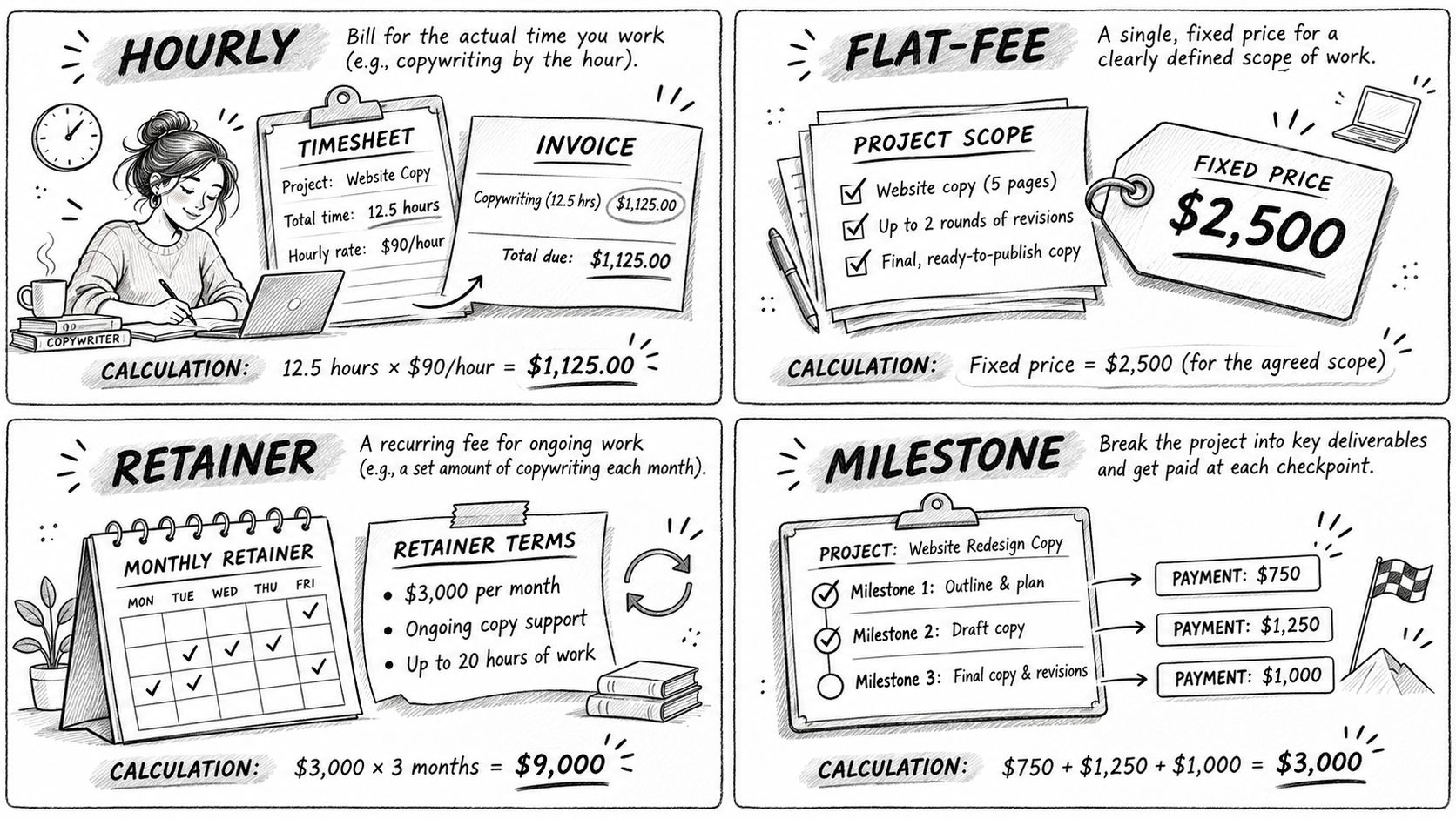
Hourly. A copywriter logs 12.5 hours at $90 an hour: 12.5 × $90 = $1,125.00 for the period. State your rounding rule in the engagement letter (nearest quarter hour is the common one, with anything under seven minutes dropped) and attach a time summary by task when the client asks. An hourly rate invoice template keeps the hours, rate and line total in columns the client can audit. The risk this shifts to you is dispute over hours, plus the quiet incentive to work slowly.
Fixed fee. A $2,400 website project split 40/30/30 across three milestones bills $960, $720 and $720. Each invoice matches a delivery point, and the client approves before the next bill goes out. The risk is hidden underpricing: if the project takes twice the estimated hours, the fee doesn't move.
Retainer. A fixed monthly amount covers an agreed block of hours, with an overage rate and a written rule for unused hours. Say $1,500 a month for ten hours, with additional hours at $150 and unused hours rolling forward one month only. The risk lands on you when the client uses two hours and you've reserved ten.
Pass-through expenses. A photographer bills $180 in travel and stock costs as separate lines with receipts attached, never folded into the creative fee. The risk is a client who disputes an expense they never approved, so get written approval before you spend.
Pick the model where the client can see the value and you can see the cost.
How to Prepare and Send an Invoice
The nine-step sequence below covers the whole send, and each step ends with the mistake that breaks it.
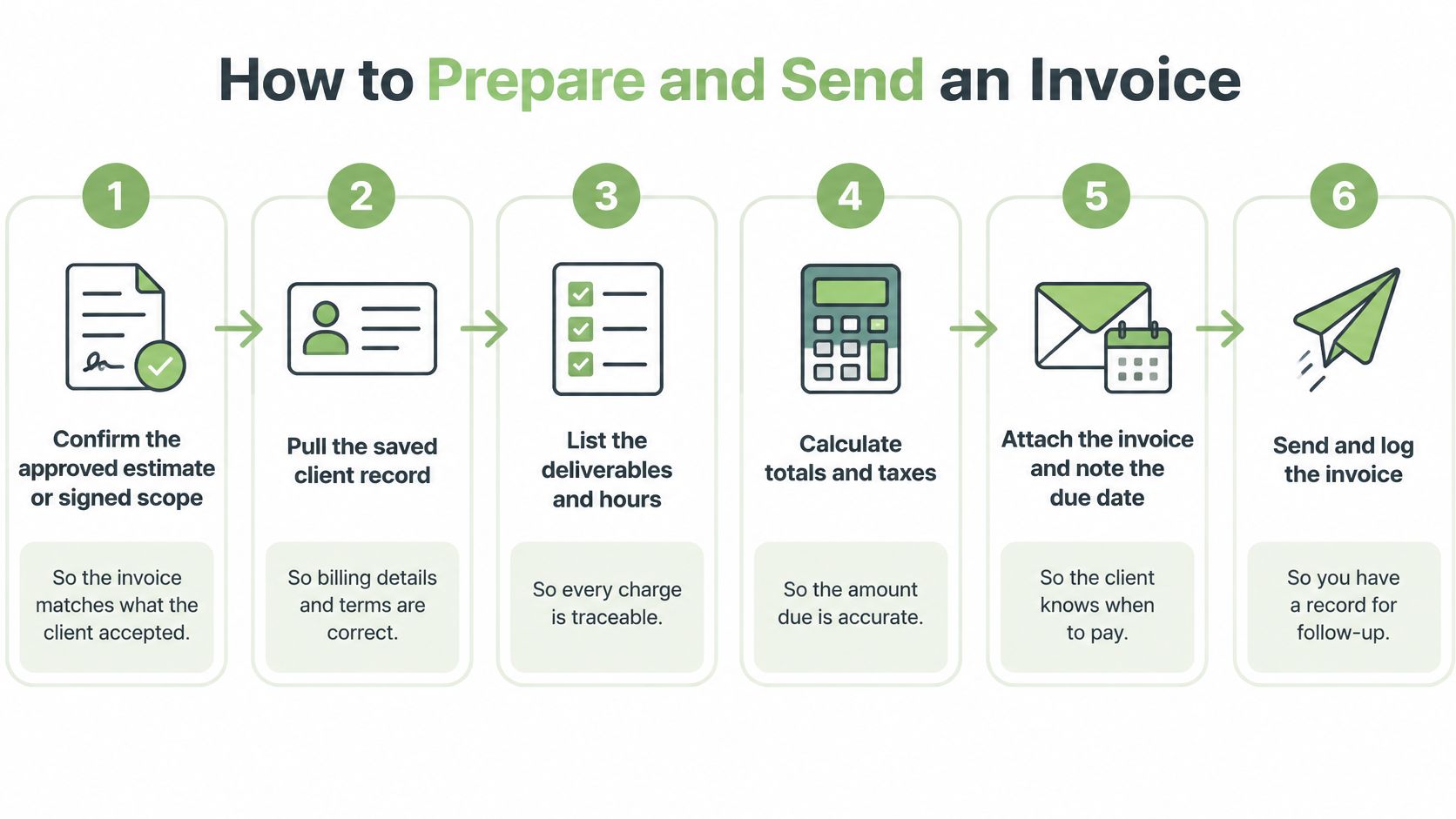
- Confirm the approved estimate or signed scope. Pull the version the client accepted, not your later draft. Invoicing a scope that only ever existed in an email is the classic version of this error.
- Open the saved client record and check the legal name and billing address. Retyping from memory is how a company suffix goes missing and the payment stalls.
- Enter each deliverable as a line item with quantity and unit price. A lump sum asks the client to trust you; itemized rows let them verify the total themselves.
- Apply tax only where the jurisdiction and service require it. Copying a tax line from an invoice in another state produces either a charge the client disputes or a liability you carry.
- Subtract deposits and prior payments and show the balance due. A client who sees the deposit credited pays the remainder without a phone call.
- Set the issue date and derive the due date from the agreed term. A due date that contradicts the contract hands the client a reason to pay later than agreed.
- Check the total against the estimate, line by line. Totals that drift from the approved figure are the single most common cause of a client holding an invoice for review.
- Save a PDF copy and send it with the payment instructions in the body. Put the invoice number in the subject line so the client can match it to the payment later.
- Log the send date. Without it you can't tell a client who is five days late from one who is twenty.
Check the format before you send
A branded PDF is human-readable, and it's fine for most small clients. It isn't a structured electronic invoice. The OECD's analysis of electronic invoicing defines an electronic invoice, consistent with EU Directive 2014/55/EU, as a document issued, transmitted and received in a structured format that permits automatic processing.
Some jurisdictions mandate a specific channel or schema, and national implementations differ enough to create real cross-border friction. If you're billing a business in a mandating jurisdiction, confirm its required format before you send, and keep the source records behind the PDF either way.
Chasing Late and Partial Payments
Most late payments come from one of three places: an approval bottleneck, a cash shortage at the client, or a dispute about scope. Each needs a different response, and sending the same polite nudge to all three wastes weeks.
Diagnose the cause before you write
An approval bottleneck looks like silence from your contact and a prompt reply from accounts. A cash shortage shows up as vague assurances with a date attached. A dispute usually arrives as a specific objection, which is useful information. The UK government research on late payments puts the scale in perspective: 54% of businesses receiving payments from business customers used standard terms of 30 days after the invoice date, and the mean share of invoices paid late was 17%. On a monthly run of ten invoices, that's roughly one or two arriving after the agreed date.
Lateness also isn't distributed evenly. Invoice-level analysis cited in a 2025 Museums Journal report on creative freelancers found that 29% of freelance invoices were paid at least one day late, with female freelancers' invoices late 31% of the time against 24% for male freelancers. The gap isn't closed by adding an invoice number.
A follow-up cadence that holds
Send a short reminder to pay on the due date or the day after, and ask the client to confirm a payment date rather than asking whether they saw the email. About a week later, send a balance-due statement with the original invoice attached. After two weeks, go to the person who approves payments. If the balance is still open, send a written escalation that cites the agreed term and proposes a specific next step.
Reminder template: "Invoice INV-2025-014 for $600.00 was due March 18. Could you confirm the date it's scheduled to run so I can update my records?"
Dispute template: "Of the $1,200.00 invoiced, we agree on $900.00 for the logo package. I've issued a revised balance of $900.00 due March 25 and separated the remaining $300.00 so we can resolve it without holding the undisputed amount."
Partial payments, pauses and last resorts
Record every partial payment against the invoice and send an updated balance each time, so nobody argues later about what was already received. Pause work only when the contract allows it, and state the pause in writing with the condition for resuming. Collection remedies depend on the jurisdiction, and small claims court is one route worth checking locally. Before the first reminder goes out, confirm the invoice is collectible, not merely valid: keep the signed estimate, the delivery record and the client's written approval in the same folder as the invoice.
Records, Taxes and What Clients Must Report
Treat the invoice as the middle document in a chain, with the estimate before it and the payment record after. The Internal Revenue Service requires independent contractors to keep records of money received, sales receipts and business expenses, and to report all income on the tax return, including income from clients who never issue a form. The IRS guidance on managing taxes for gig work sets out the rest.
What the IRS requires
- Schedule C carries business income and expenses for a sole proprietor or single-member LLC.
- Schedule SE applies when net self-employment earnings reach $400 or more.
- Form 1040-ES is the worksheet the IRS directs taxpayers to use for quarterly estimated payments.
Keep each estimate, invoice, payment record and receipt together so the invoice total reconciles against deposits and year-end totals without reconstruction. One folder per client per year does the job, and it makes an audit question answerable in minutes.
Where state and local rules differ
The federal rules above are the floor, not the whole picture. State income tax, state and local sales tax, and local business licensing vary by where you work and where your clients are located, so confirm the requirement for each jurisdiction before you add a tax line or assume one isn't needed.
The business that issues an invoice remains responsible for the underlying services, the payer relationship, payouts, chargebacks, refunds, disputes, taxes and compliance. Software doesn't absorb any of that.
Set Up Your Billing Workflow Before the Next Invoice
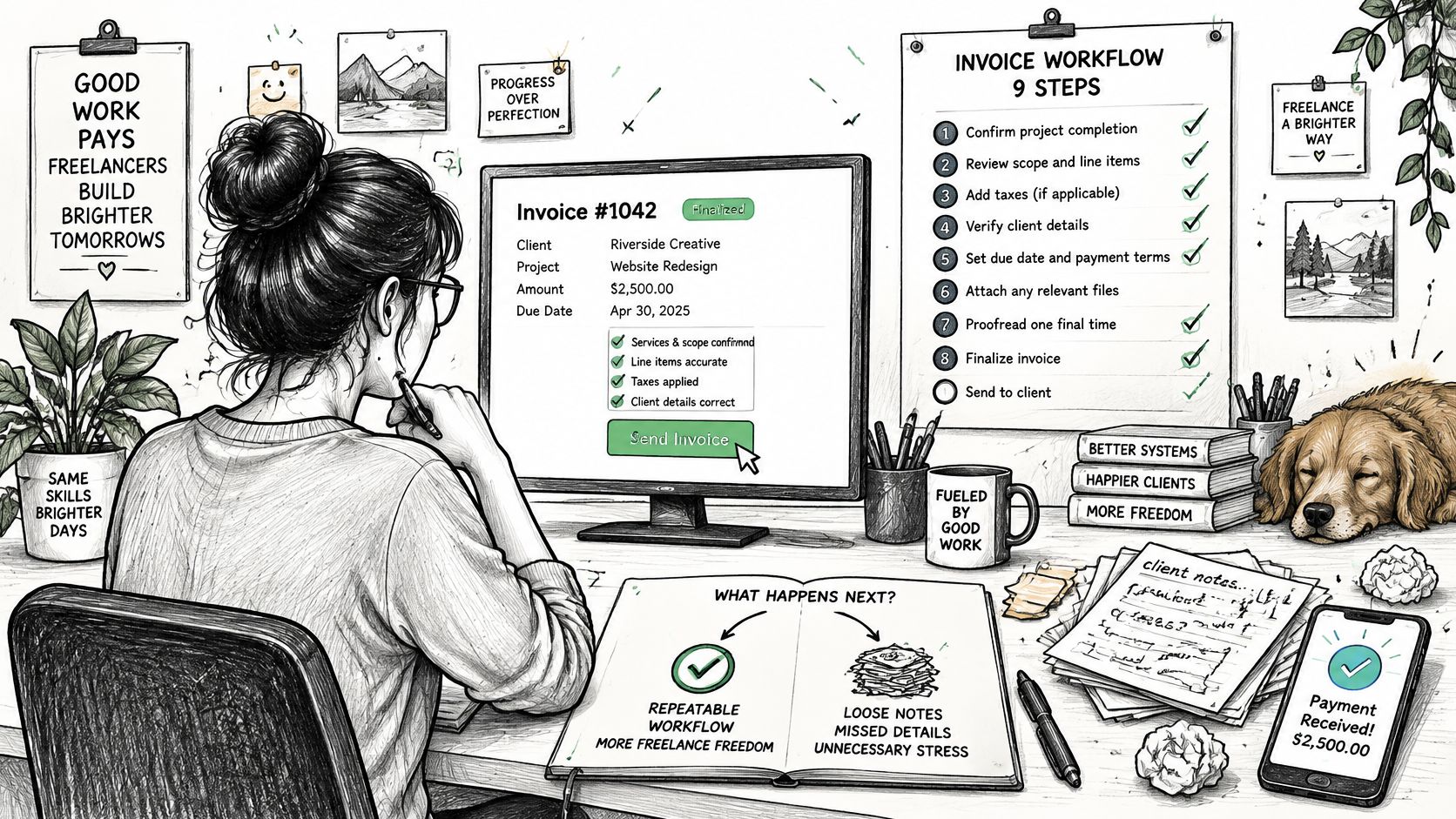
Before the next bill goes out, lock four things down: the payment term written into the estimate, the client's legal name and tax details captured at onboarding, a numbered invoice system you never reuse, and a decision about how you'll accept payment. Done once, the nine-step procedure becomes a checklist you run in minutes instead of an exercise in reconstruction.
Where a dedicated tool earns its place is in the repeatable parts. GetBill lets independent professionals create itemized invoices and estimates from saved client and product records, send them by email with a secure link the client can open without an account, record deposits and partial payments against the balance, and accept supported card payments through a connected Stripe account. Payment availability depends on Stripe and the account's region, funds settle to the business's own Stripe account, and GetBill doesn't warrant that generated documents meet legal or tax obligations.
None of that replaces the judgment calls: which term to offer, what to deposit, when to escalate. It removes the retyping that turns a correct invoice into a late one.
GetBill builds itemized invoices and estimates from your saved client and service records, sends them with a secure link the client can open and pay without an account, and keeps deposits and partial payments reflected in the balance due. Run your next bill through the nine-step procedure and compare how long it takes against your current template. Visit GetBill to send that invoice and see what the workflow looks like when the records, the document and the payment all live in one place.