


To accept credit card payments online, you need three things working together: a payment processor, a connected account, and an invoice with a secure link that clients can click to pay. Cards aren't a bonus feature anymore. For many clients, they're simply what they expect.

In this guide:
Table of Contents
- Why Card Payments Now Matter for Service Invoices
- How Card Fees, Card Types, and Payout Timing Work
- Choosing a Pricing Model That Keeps Fees Transparent
- Using Stripe Payments Inside GetBill Invoices
- Practical Fee Examples for Service Professionals
- Common Misconceptions and Final Takeaways
Why Card Payments Now Matter for Service Invoices
Picture a photographer who finishes a wedding shoot, emails the final invoice, and then waits weeks for a bank transfer that arrives late or short. If you've run a service business for any length of time, you've probably lived some version of that cycle. Every payment depends on the client finding the time and the right account details.
Cards have moved from a nice extra to a routine expectation. In the United States, 79% of small businesses accepted at least one form of card payment in the 2024 Small Business Credit Survey. A separate 2024 survey found that 89% of consumers use credit or debit cards, yet 30% of small businesses still didn't offer cards as a customer payment option. Read the full research on small business card payments
Think of Card Acceptance as a Workflow
Think of card acceptance less like a single button and more like a relay race. You create the document, pass it to the client, the client pays, and the payment lands on the right balance. Each leg has a different runner, and a dropped baton anywhere slows the whole thing down.
The Card Collection Workflow at a Glance
Before you set anything up, it helps to see who owns each step. Some parts of the process are yours to control. Others depend on the client, the processor, or how your account is configured.
| Workflow Step | What Happens | Who Controls It |
|---|---|---|
| Create the document | Build an itemized invoice | You |
| Share the document | Send by email or public link | You |
| Take payment | Client pays by card | Client, processor, and account settings |
| Record the result | Payment applies against the balance | You, with processor data |
Each step is simple on its own. Most problems show up at the handoffs, which is why it pays to know exactly where your responsibility ends and the processor's begins.
What You Need Before Accepting Cards
Three pieces have to be in place before a card payment can go through:
- A payment processor that handles the card transaction securely.
- A connected account where settled funds get deposited.
- An invoice with a secure link so the client can pay right away, without a phone call.
One caveat before you start. What's available to you depends on your processor, your account, and where you're based. Treat these steps as a checklist to confirm, not a promise that every option will be open to you.
How Card Fees, Card Types, and Payout Timing Work
Think of a card payment as a trip down a toll road. Your client pays the full amount at the start, but the money passes through several booths before it reaches your bank account. Each booth takes a small cut, which is why the amount that lands with you is rarely the invoice total. Once you know where those booths are, pricing becomes much less mysterious.
The Three Layers of a Card Fee
Most card fees are built from three parts: network-set interchange, card network fees, and the processor's own pricing. The mix shifts depending on the card, the type of transaction, and how your account is set up.
Components of a Card Processing Fee
Not every part of the fee is in your hands. The table below shows who sets each piece and what it means when you price a service invoice.
| Fee Component | Who Sets It | What It Means for Your Invoice |
|---|---|---|
| Interchange | Card networks, collected through the card-issuing system | You cannot negotiate it directly, so it is built into the cost you pay |
| Card network fees | Card networks | Added to each transaction and set outside your control |
| Processor pricing | Your payment processor | The part you can compare, review, and factor into estimates |
Interchange is the one that trips up most owners, and it's also the one you can't negotiate. Card networks set the rate, and the card-issuing bank collects it as part of each transaction. You never see it as a separate line item, but it shows up in what you're charged.
Rates change, so check Stripe's pricing page for current figures rather than trusting an older blog post. Rate tables go stale quickly, and that includes any table you saved last year.
The diagram below shows how a card payment moves from purchase to bank settlement.
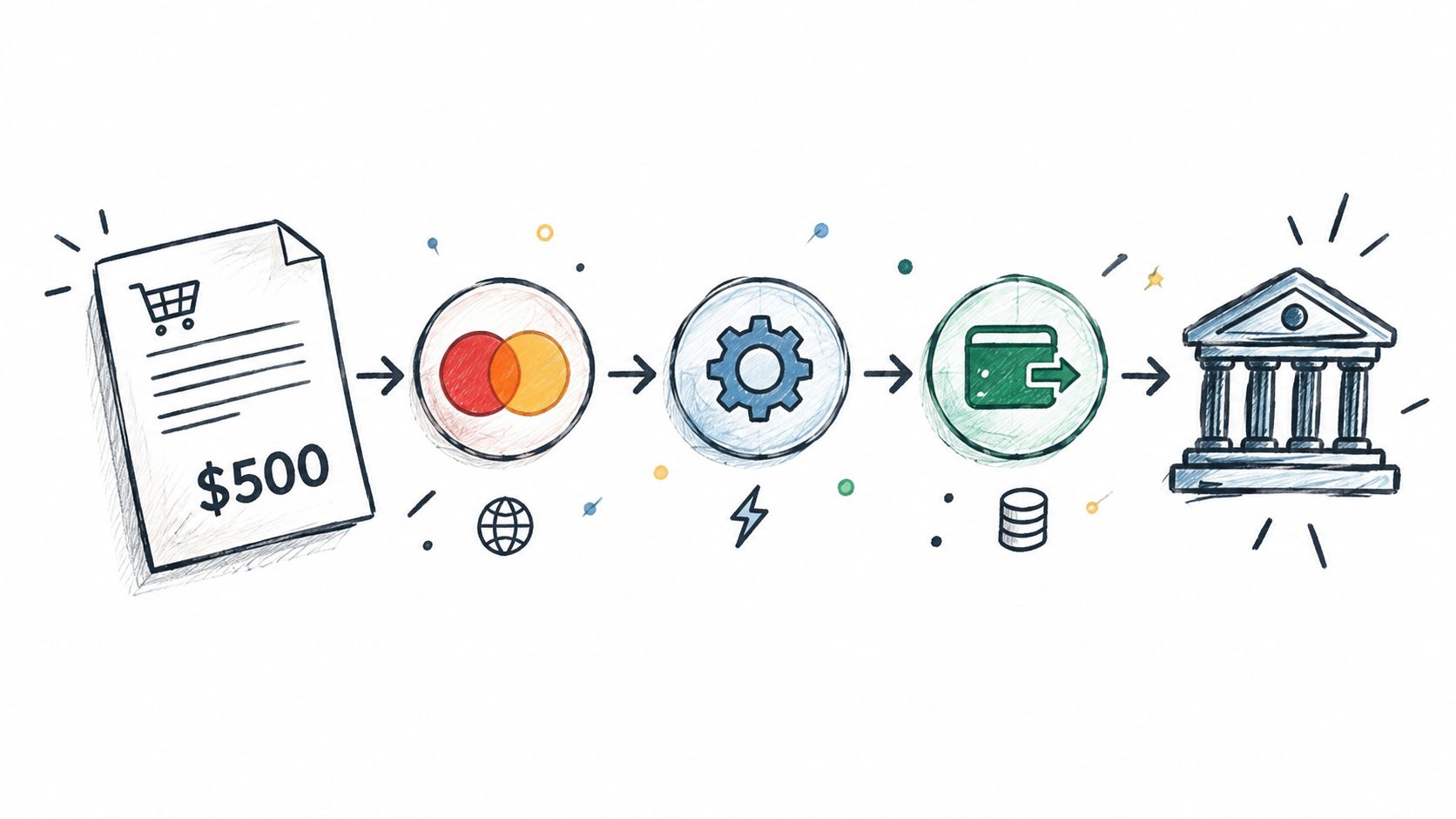
Read the figures for your own country and card type. A rate that looks low in one region may not apply where you work.
Why Card Types Change Your Cost
Picture the checkout line at a grocery store. A loyalty card, a premium rewards card, and a basic debit card can each cost the store a different amount, even for the same bag of groceries. Card payments work the same way. The card your client pulls out determines the category, and the category drives the cost.
As a freelancer, you usually can't choose the card your client uses. That makes understanding the cost more useful than trying to control it.
Key idea: You set the price, but the card in your client's wallet sets part of the cost.
Once you see this, a payment report stops being a puzzle. Two similar invoices can produce different net amounts, and now you know why.
How Payout Timing Affects Your Cash Flow
Payout timing is a separate question from the fee. Processors batch authorized transactions and settle funds on a schedule, so the money can show up days after your client pays.
That delay often hurts more than the fee itself. Don't guess at the timeline. Check the payout schedule in your Stripe dashboard, then plan around the gap before you commit to materials or a subcontractor.
Working Through a $500 Deposit
Say a client pays a $500 deposit by card. The processing fee comes out of that gross amount, so the figure that reaches you is smaller than $500.
- Gross amount: $500 charged to the client.
- Processing fee: Subtracted at your provider's current rate for that card type.
- Net amount: What's left after the fee, arriving on your payout schedule.
Build your estimates around the net amount, not the sticker price. Keep a record of each fee so your books match the payout that actually lands in your account.
Card rules and availability vary by country. If you operate outside the United States, confirm your options with your provider before promising card payments to clients.
Read also: how a Stripe Checkout page handles the client's side of the payment. It walks through the checkout experience from your client's point of view.
Choosing a Pricing Model That Keeps Fees Transparent

Every card payment carries a fee, and someone has to cover it. The real question is whether that someone is you, your client, or a bit of both. Your answer affects your margin, and it also affects how your client feels when the total appears on the screen.
Think of it like shipping on an online order. Some shops build delivery into the price, some show it as a separate line, and some make you choose a cheaper option to avoid it. Each approach can work, but each one sends a different message.
Four Ways to Handle Card Costs
The simplest approach is to absorb the fee into your standard rate. Clients see one price, and nothing changes at checkout. The catch is that your margin shrinks on every card payment, and the cost climbs as your card volume climbs.
The second approach is to build an allowance for card costs into your pricing. The total stays steady, which keeps clients calm. Your quote may look higher than a competitor's base rate, though, even if the final cost ends up about the same.
A surcharge is the third option. It keeps your base rate clean, but it adds a line item clients have to notice and accept. Some US states restrict or ban surcharges, and card network rules add another layer on top.
The fourth option is steering clients toward lower-cost methods, such as bank transfer, when they're willing. This tends to suit larger balances, where the savings matter most. The trade-off is friction, because some clients simply prefer to pay by card.
Checking Surcharge Rules Before You Add One
A surcharge looks like the cleanest fix, but it's also the option most likely to cause trouble. Before you add one, check your state attorney general's or consumer protection office's guidance, and read your processor's terms carefully.
A practice that's legal in one state may be restricted in the next. If your clients are spread across several locations, verify the rules where each client is based rather than assuming one policy fits everyone. A quick check now costs far less than a refund request or a complaint later.
Trade-Offs Between Common Card Fee Pricing Models
Use this table to match a model to your client base, your margins, and the rules where you operate.
| Pricing Model | Main Advantage | Main Trade-Off |
|---|---|---|
| Absorb the fee in your rate | Simple, with one price for clients | Lower margin on every card payment |
| Build the cost into your pricing | Consistent total, no checkout surprises | Quotes can look higher to price-sensitive clients |
| Add a visible surcharge where legal | Clean base rate | Extra friction and legal exposure |
| Steer clients to bank transfer | Lower processing cost on agreed payments | Clients may resist, and some prefer cards |
No single model wins everywhere. A consultant with high-margin retainers may absorb the cost without a second thought, while a contractor billing large sums to price-sensitive buyers may find bank transfer incentives more practical.
Key takeaway: Choose one model on purpose and write it into your estimate template.
Keeping Transparency at the Center
Transparency does most of the heavy lifting. An itemized invoice that shows the service, the payment options, and any card-related amount prevents most checkout surprises. Clients rarely object to a fee they saw coming. They object to one that appears out of nowhere.
Client expectations matter here too. In a 2024 U.S. consumer and small-business survey, nearly 9 in 10 consumers wanted to pay by card, yet 30% of small businesses did not accept credit or debit cards, while 67% offered an online payment gateway. That gap suggests card acceptance is as much a competitive decision as a cost decision. Read the full research on US payment preferences
For a closer look at what belongs on the document itself, see terms that belong on invoices.
Using Stripe Payments Inside GetBill Invoices
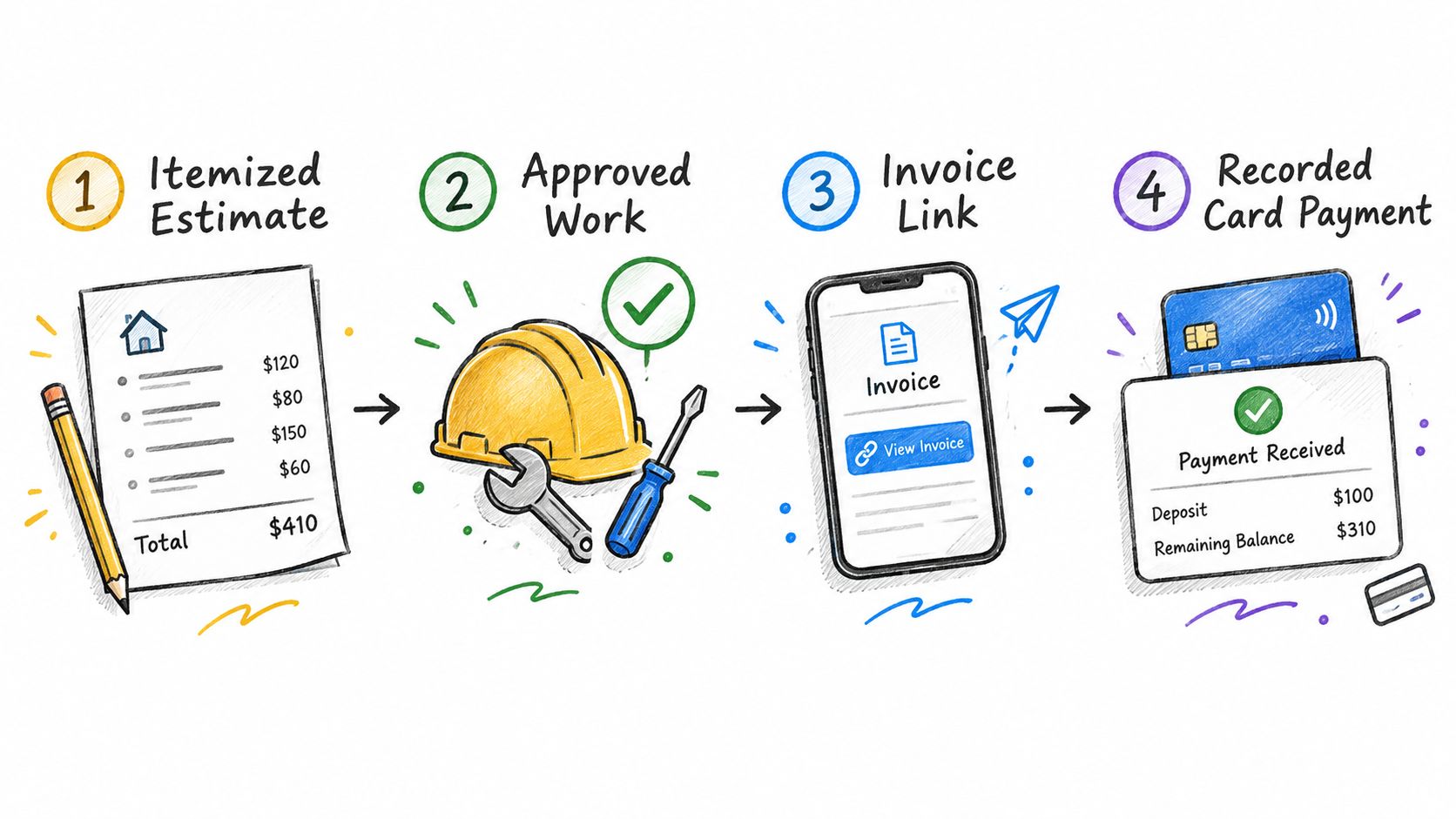
Card fees only start to matter once money is actually heading your way, so it helps to see how the paperwork gets there. This section separates general service-business steps from third-party processing and from what GetBill provides for estimates, invoices, and payment records.
Following the Workflow From Estimate to Payment
Each document grows out of the one before it, so the order matters. Here is a practical sequence for preparing an estimate, issuing the invoice, and collecting payment:
- Create an itemized estimate. List labor, materials, and time as separate lines. The client sees exactly what they're agreeing to, and you avoid arguments later.
- Get approval outside the app. When the client says yes, record it the way you normally would, whether that's an email reply or a signed scope. GetBill doesn't let clients approve estimates online, so keep that proof somewhere you can find it.
- Convert the estimate into an invoice. Once the work is agreed, turn the estimate into an invoice. Retyping line items is where small mistakes creep in.
- Share the invoice. Send it by email or through a public link so the client can open it right away.
Skip a step and you usually end up rebuilding something by hand.
Accepting Card Payments Through a Connected Stripe Account
Eligible users can connect a Stripe account and accept supported card payments through it. That's what lets a client pay straight from the invoice instead of hunting for bank details.
Availability depends on Stripe, your account, and your region. Confirm eligibility before you promise card payment. Nothing frustrates a client more than hearing "we take cards" and then hitting a dead end at checkout.
Recording Deposits and Partial Payments
Deposits and partial payments are recorded against the invoice, and the remaining balance stays visible. This is where many contractors quietly lose track, especially when they collect money before buying materials.
Suppose you collect a $600 deposit before ordering lumber. The invoice shows $600 paid and the balance still due, so you and the client are looking at the same number. Nobody has to dig through old texts to work out who paid what.
The balance stays visible to both sides, so nobody has to ask what is still owed.
Keeping Invoices Consistent With Branded PDFs
Branded PDFs give every estimate and invoice the same look as your business. Your name, layout, and details appear the same way each time. Clients start to recognize your paperwork, which makes it less likely a bill gets buried in a crowded inbox.
What GetBill Does Not Cover
Clear limits save headaches later. GetBill does not handle these tasks, so you'll need a plan for each one:
- Processing rates: Stripe and your account set them. Check Stripe's pricing page for current figures.
- Payment reminders: You follow up with clients yourself.
- Online estimate approval: Clients agree to work outside the app.
- Tax filing: Handle it with your accountant or the tax authority in your jurisdiction.
Build your process around those limits rather than hoping they won't matter.
Practical Fee Examples for Service Professionals
Percentages stay abstract until you see them hit a real invoice. The three examples below use the same $1,000 job and an illustrative 3% card fee, so you can compare the math side by side.
Handyman Takes a Deposit Before Repair
Say you quote $1,000 for a bathroom repair and take a $300 deposit by card to cover materials.
At 3%, that deposit costs $9 to collect, leaving you with $291 in hand. The other $700 is still outstanding until the job is done.
That $9 comes straight off your margin. Small on one job, noticeable across ten.
Consultant Bills a Remote Client
Now take a consultant billing a $1,000 project to an out-of-town client. This time the fee is passed through instead of absorbed.
The invoice shows $1,000 for the work plus a $30 card fee. The client pays $1,030 and the consultant keeps the full $1,000.
Cash-wise it works. But the client sees that extra line before they click pay, so be clear about it up front.
Cleaner Splits a Recurring Contract Payment
A cleaner on a $1,000 recurring contract splits payment: $200 by card, $800 by bank transfer.
Only the card portion triggers the fee. At 3%, that is $6, for a combined net of $994.
Bank transfers are not automatically free either. Check your bank's terms before you assume the $800 moves at no cost.
Put together, the same job lands very differently:
| Approach | Client Pays | Card Fee | Net Amount |
|---|---|---|---|
| Absorb the fee | $1,000 | $30 | $970 |
| Pass the fee through | $1,030 | $30 | $1,000 |
| Bank transfer for $800, card for $200 | $1,000 | $6 | $994 |
Building Your Collection Worksheet
You do not need fancy software for this. A simple four-column sheet is enough to track what is really happening:
- Job amount
- Expected fee
- Net amount
- Balance remaining after each payment
Update it every time money lands. After a month or two, you will see the true cost of collection, which makes the next estimate much easier to price.
It might look like this for that deposit job:
| Job Amount | Expected Fee | Net Amount | Balance Remaining |
|---|---|---|---|
| $1,000 | $9 on $300 deposit | $291 | $700 |
For broader context, global online card spending hit almost US$13 trillion in 2024 across more than 200 billion transactions. E-commerce's share of total card volume rose from 26% to 28% in a single year. That describes the market, not a promise that your business will win more clients. Read the full research about global card payment trends
Practical rule: Run the worksheet before you send the estimate, not after the payment clears. Once the numbers are on paper, fees stop being surprises.
Before you turn on card payments, draw a clear line between two numbers: what the client agreed to pay, and what you actually keep after processing.
Common Misconceptions and Final Takeaways
Three assumptions cause most of the trouble. They sound reasonable until they hit a real invoice.
- “Fees disappear if I don’t mention them.” They don’t. Silence just moves the cost into your margin. If you absorb it, build it into your pricing. If you pass on a permitted charge, explain it before the client pays — not after they approved the estimate.
- “Every card works the same everywhere.” It doesn’t. Card categories, domestic rules, and international costs change by country. Check Stripe’s current pricing for your location before you quote.
- “The cheapest processor is always best.” The advertised rate is only part of the math. Look at payout timing, supported payment methods, and how much manual work it takes to match deposits to invoices.
A low processing rate isn’t the whole decision. Pick the setup that fits how you quote, invoice, and chase balances.
A photographer taking a booking deposit, for example, should care when the money lands — not just what the transaction costs. A consultant needs to check the same thing from the other side: can the client actually pay the way they prefer?
Check Legal Scope Before Changing Invoice Prices
The FTC’s Rule on Unfair or Deceptive Fees, effective May 12, 2025, applies to US live-event tickets and short-term lodging. It doesn’t set general pricing rules for handyman, photography, consulting, or cleaning invoices.
For those service jobs, check the layers that do apply: state surcharge rules, card network requirements, processor terms, your contract, and what the client expects. A separate line on the invoice doesn’t automatically make a surcharge allowed.
Practical rule: Keep the final review short and operational:
- Understand fee sources before you estimate what you’ll net.
- Choose your pricing model deliberately, instead of adding charges at checkout.
- Keep invoices itemized, with agreed services and payment terms visible.
- Track deposits and balances after every payment.
Pull one recent estimate and its invoice, compare it against Stripe’s current terms for your country, then enable cards around the workflow you already use.
Do I Have to Pass the Card Fee to the Client?
No. That call is yours.
You can absorb it, build it into your estimate, or add a surcharge where it is allowed. Just know surcharging is not open-ended — some US states restrict or ban it, and the card networks have their own rules.
Check your state consumer rules and your processor terms before you add one. The pricing models explained earlier lay out the commercial trade-offs so you do not solve the math and miss the legal part.
Can I Collect a Deposit by Card?
Yes, and it is common for service work.
GetBill lets you record a deposit or partial payment against the invoice, so you and the client both see the remaining balance. Each card payment runs as its own transaction, so the fee applies to that payment — not to the full invoice.
For example, a $600 deposit on a $1,000 invoice leaves $400 remaining. Build the expected fee into your pricing so the net deposit does not come up short.
Why Did I Receive Less Than the Invoice Amount?
Because what the client paid and what hit your account are two different numbers.
The client paid the gross invoice amount. Fees came out before payout, so what you received is the net payment. Timing is separate too — the payout date follows your processor's schedule, not the day the client clicked pay.
Review the fee breakdown and expected payout date in your Stripe dashboard. Those steps are covered in more detail under how card fees and payout timing work.
Is Card Acceptance Available in Every Country?
No. It depends on Stripe, your connected account, and your region, so confirm eligibility before you advertise online card payments.
Support can also vary by account type and transaction type.
If you serve clients internationally, check current availability and pricing directly with Stripe. Then decide whether card should be part of your standard invoice terms.
The invoice total, processing fee, and payout date are separate figures. Look at all three before you set pricing and offer card payment.
Here is a concise checklist for service businesses:
| Question | Practical Action |
|---|---|
| Who pays the fee? | Choose a pricing model deliberately |
| What happens to a deposit? | Record it against the invoice |
| Why is the payout lower? | Review fees and settlement timing |
| Who can pay by card? | Confirm Stripe eligibility first |
Ready to review your invoice workflow? GetBill helps independent professionals and small service businesses create itemized invoices, record deposits and partial payments, and accept supported online card payments through a connected Stripe account. Payment availability depends on Stripe, your account, and your region.