

A client just accepted the estimate, and the job can't start until the deposit lands. They want to pay by card. The invoice still has no pay option, the fee policy was never written on the estimate, and you're checking the bank again tomorrow. That gap is what credit card acceptance for small business looks like for most service owners: not a retail counter, but a path from estimate to deposit to final invoice.
A plumber who quotes on site and takes a phone deposit needs a different path from a designer who bills remote clients after delivery. In the United States, card-network rules, state law, and your processor's terms establish the actual limits on what you can charge and how you present it.
Table of Contents
- Choose the Card Setup That Fits Your Billing
- Decide Who Pays the Card Fee
- How to Turn On Card Payments on Your Invoices
- Reconcile Card Receipts and Tax Records
- Build a Dispute-Ready Record for Each Job
- Protect Card Payments From Fraud and Phishing
- Confirm Your Setup Before the Next Invoice
Choose the Card Setup That Fits Your Billing
Start with how the money moves. Do clients pay at booking, on site, or only after they receive an invoice? The answer picks the setup. Read the Best for column first, then the trade-off.
| Setup | Best for | What you set up | Main trade-off |
|---|---|---|---|
| Invoice with a hosted payment link | Remote work billed by invoice | Processor account linked to your invoicing tool | Client leaves the document to pay |
| Merchant account with virtual terminal | Phone and deposit payments keyed in manually | Merchant account and manual card entry | More admin for each payment |
| Mobile card reader | On-site jobs such as cleaning or handyman work | Reader paired with your phone | Needs a working signal and clients who pay on site |
| Payments inside accounting software | Owners already billing in one tool | Processor linked to the accounting app | Limited to what that app supports |
If clients pay after they receive an invoice, a hosted payment link on that invoice is usually the shortest path to cleared cash. If you collect in person, the reader matters more than the invoice template. Phone deposits fit a virtual terminal, where you key the card while the client is on the call.
What you give up with each path
Several setups can run together. Each one adds its own payout report and its own matching routine later. A link inside the invoice is convenient for remote work, but the client leaves the document to finish payment, so the total has to be obvious before they click. Manual entry is flexible for deposits and slow when you do it all day. A reader fails in a basement with no signal. Accounting-app payments only cover the methods that app already supports.
Choose a setup that leaves a clear record of the invoice, the amount authorized, the payment result and any refund. Use those records to explain a charge to the client and to answer a dispute through the processor's documented process.
Practical rule: Test one setup against one real job before you offer cards to every client.
Name the setup you'll try first and the scenario it must handle, such as a $300 deposit paid before a job starts. If that deposit clears and matches the invoice, add a second setup only when a real client can't pay the first way.
Decide Who Pays the Card Fee
Passing the fee to the client looks like the cheapest choice on a rate sheet. It isn't always the choice that leaves the most money, or the client.
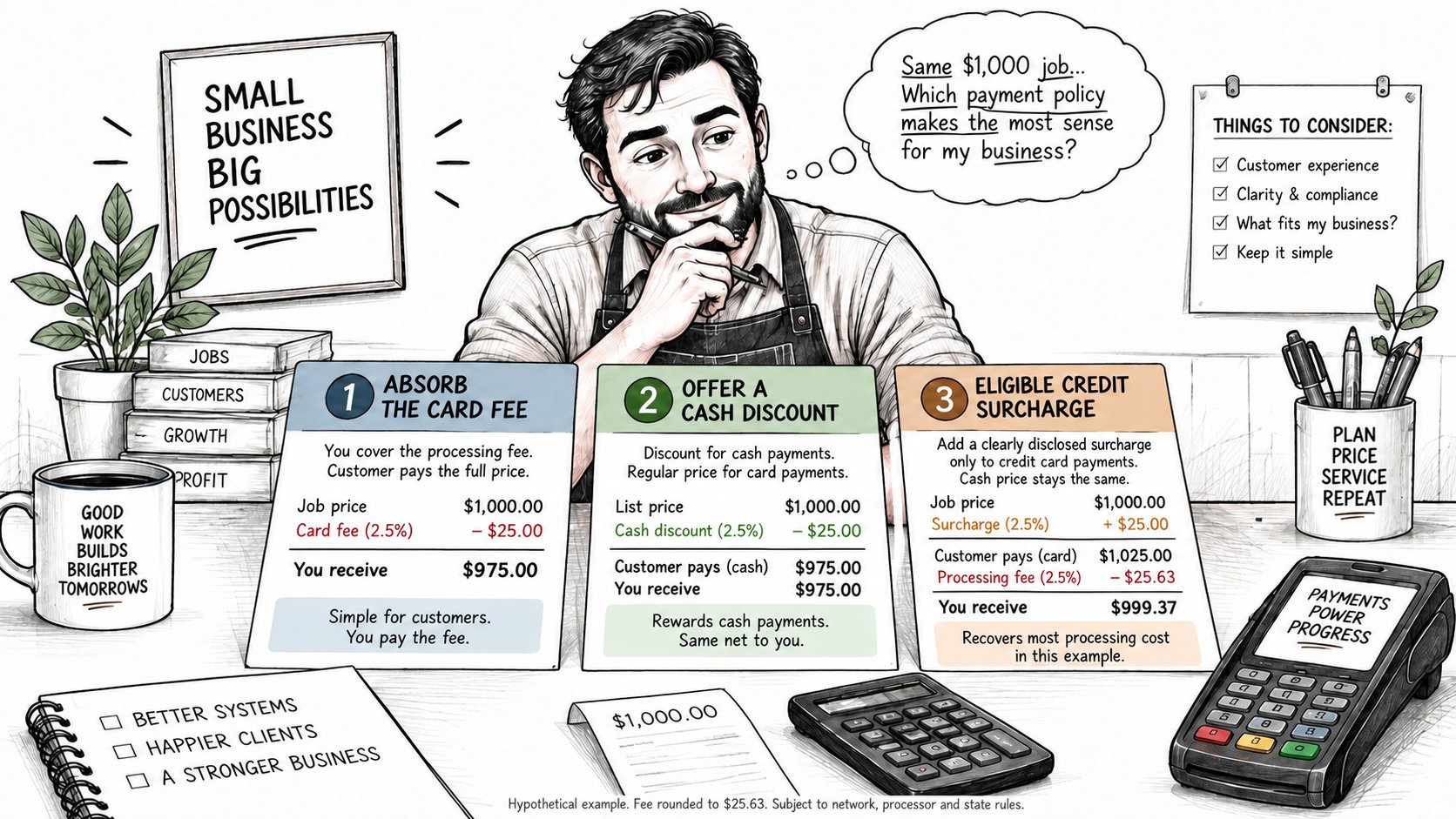
Compare three policies on the same job. Say the quote is $1,000 and the card cost is 2.5%.
Absorb the fee. The client pays $1,000. About $25 stays with the processor, and about $975 reaches you before any other charges. The estimate stays simple. Thin margins on large invoices feel that cut every time.
Cash discount. The card price stays $1,000. Cash payers see a lower figure. Card payments keep the full price in the calculation of your net, and you still pay the processor from that amount. The policy has to follow your state's rules and the card network's rules.
Disclosed surcharge on eligible credit-card payments only. In this hypothetical example, adding 2.5% to a $1,000 price means the client pays $1,025. If the processor charges 2.5% on the full amount collected and rounds its fee to $25.63, the net is $999.37 before other charges, so this does not fully recover the fee. In the United States, Visa and Mastercard prohibit surcharges on their debit and prepaid cards. Confirm current network limits, processor support, disclosures and applicable state law before using a credit-card surcharge.
| Policy | What the client pays | Effect on your net | Main risk |
|---|---|---|---|
| Absorb the fee | Quoted price | Lower net on each card payment | Thin margins on large invoices |
| Cash discount | Lower price for cash payers | Card payments keep the full price | Must follow local and card-network rules |
| Disclosed surcharge on credit cards | Price plus surcharge | Recovers part or all of the fee | Lost sales and lower client trust |
Judge each option on three questions: net after fees, the chance a client delays booking or picks someone else, and how the policy reads on the estimate, invoice, payment link, and receipt. A surcharge that appears only at checkout is more likely to surprise someone than the same line on the estimate.
The 2025 U.S. Merchant Services Satisfaction Study found that 34% of surveyed small-business merchants added credit-card surcharges. It also reports that 41% of credit-card users said a surcharge led them not to use a card at a business; that does not establish that they abandoned the purchase. Satisfaction with processing costs was 24 points lower among merchants that surcharge. Separately, a Pew Research Center chart using Federal Reserve Bank of Atlanta consumer data reports that 78% of Americans prefer credit or debit cards for in-person payments and 16% prefer cash. These are different sources and populations, rather than one study of GetBill users or remote service invoices.
How that choice shows up on a remote invoice is covered in this guide to accepting credit card payments online. Pick one policy, put it on the next three estimates, and count how many of those clients still pay by card.
How to Turn On Card Payments on Your Invoices
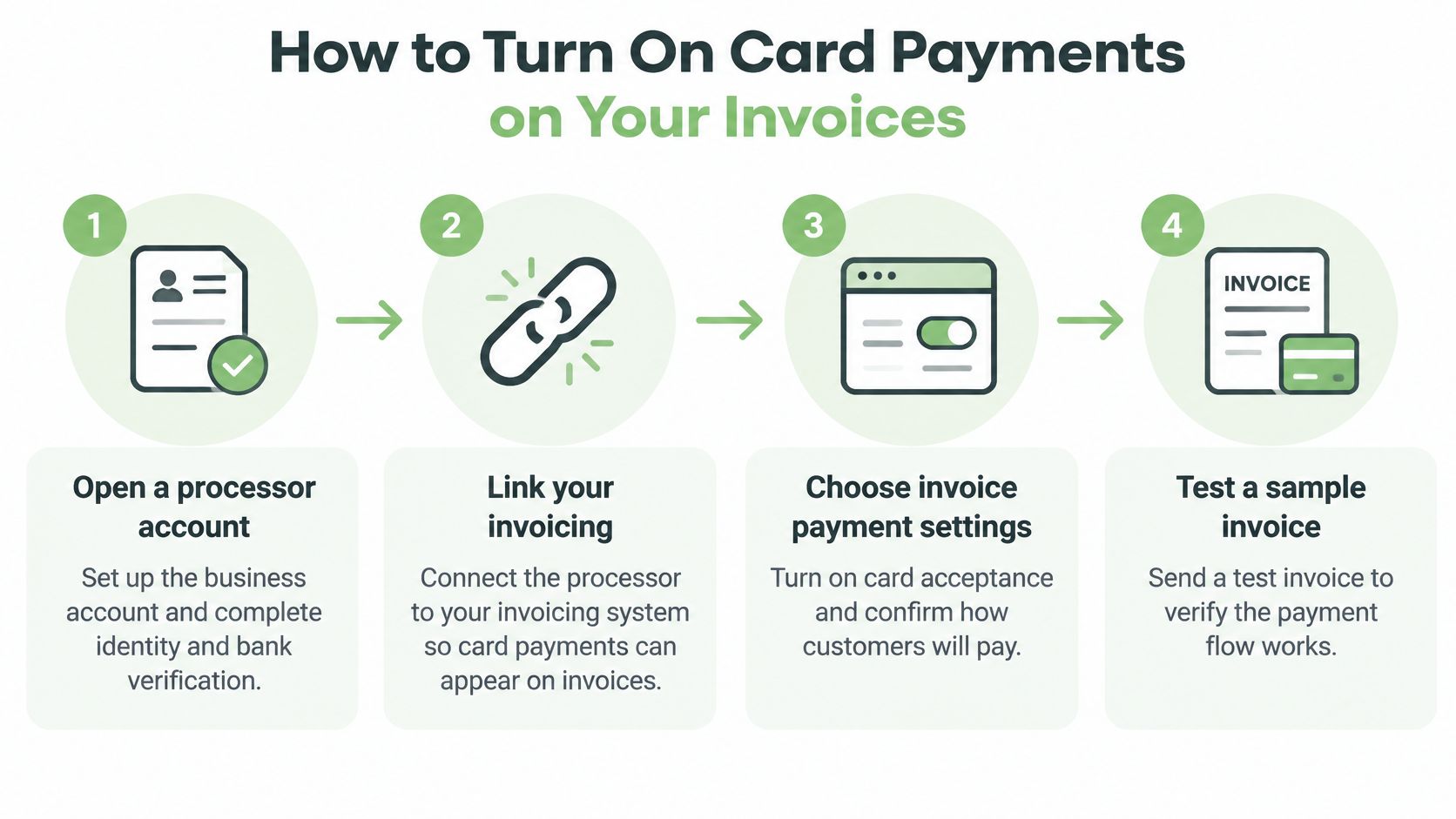
A remote service job may need a deposit before work starts and a final payment after the last milestone. Set up card acceptance so both payments connect to the same invoice and its remaining balance stays clear. The 2024 Report on Payments found that more than 90% of firms taking payment at the time of sale accepted cards. Fees were the most frequently reported payments challenge, and firms using third parties commonly reported settlement delays.
Turn the path on in order
- Set up the processor account in the business's name. Complete the identity and bank checks it requires before expecting payouts. Keep the account and business details consistent for payment records and tax paperwork.
- Connect the processor account to your invoicing tool. Check the payout bank account and currency. A mismatch can leave an invoice marked paid while the expected deposit is delayed or does not arrive as expected.
- Enable supported card payments on invoices. Use the estimate to document scope, price and payment terms. After obtaining the client's approval through an agreed channel, convert it into an invoice and make the supported payment option visible there. For milestone work, show the amount due now and what remains due later.
- Show the full amount before the client pays. Apply the pricing policy you selected and make the total clear before checkout. A 2%–3% processing cost means a $100 payment typically leaves $97–$98 before other fees or currency effects. The client's authorized amount and your net receipt are different figures.
- Send the invoice with its payment link. Record deposits and other partial payments against that invoice, then check that the balance updates. A deposit covers only the amount received, not the whole job.
- Check the payout against the invoice. A payment authorization does not confirm that funds have reached the business's bank account. Match the processor's payout record to the invoice and note any remaining balance.
- Use test mode for a small test invoice if the processor offers it. Confirm the payment flow before sending a live invoice to a client.
What a working invoice looks like
The client sees the amount due and a working payment option. After a deposit or partial payment, the invoice shows the amount received and the balance still owed. Don't treat an authorization as a bank deposit, and don't assume every client's bank, currency, or country can complete the same card payment.
For milestone work, keep each payment tied to the job's invoice. That makes it easier to see what has been paid and what is still due.
A payment authorization confirms approval, not that the payout has reached the bank.
Reconcile Card Receipts and Tax Records
Walk one invoice all the way through. A photographer invoices $1,500. The client pays by card. The processor withholds a $45 fee and deposits $1,455. The IRS guidance on Form 1099-K says the form reports gross payment-card proceeds, and that gross amount is not adjusted for fees, credits, refunds, shipping, cash equivalents, or discounts. The form may show $1,500, not $1,455. Record the full client payment as revenue and track the $45 as a processing expense under your normal bookkeeping. Receiving the form doesn't create taxable income by itself, and service income is still reported when no form arrives.
Gross receipts and the forms that don't overlap
For a US service business, card proceeds are reported differently from ordinary contractor payments. The IRS instructions for Forms 1099-MISC and 1099-NEC say a payment settlement entity must report payment-card transactions on Form 1099-K under Internal Revenue Code section 6050W, and those payments generally should not also be reported on Form 1099-NEC or Form 1099-MISC. If a handyman issues a $2,000 invoice and the client pays by card through a processor, the processor, not the client, handles that information reporting. Keep the estimate, the invoice, the processor statement, and the deposit record together so the gross receipt can be matched to the bank and to the fee.
A $500 deposit followed by a $1,000 payment can fully settle a $1,500 invoice once both successful payments are recorded against it. The invoice balance and the bank payout are separate records. An authorization alone is not a completed payment, and processor funds can remain pending before they become available for payout. Reconcile gross payments, processing fees, refunds and disputes to the net payout and the bank deposit separately.
What the processor sees, and what you book
Refunds and chargebacks are separate ledger lines. Don't edit the original invoice to hide them. A clear walk-through of how to reconcile gateway refunds and chargebacks helps when a payout is short because a refund left in the same batch. When a client pays through Stripe-hosted checkout, Stripe may receive the client's email address, invoice number, business name, currency, amount, and processing-fee information. Card and bank details are entered in Stripe's interface and are not stored by GetBill, so your books rely on the payout report and the invoice, not on a card number in your files.
An itemized billing statement makes that match easier, because each line the client accepted is still visible when you compare the payout to the open balance. Each month, compare payouts, bank deposits, and open invoices, and clear every difference before you close the month. State tax treatment varies. Confirm your state's obligations with a tax professional there.
Build a Dispute-Ready Record for Each Job
A service-payment dispute can involve unauthorized card use, unfinished work, cancellation terms or a disagreement over a deposit. The reason code determines which records are relevant. Keep evidence of the agreed scope, payment authorization and service delivery without assuming that one category accounts for most disputes.
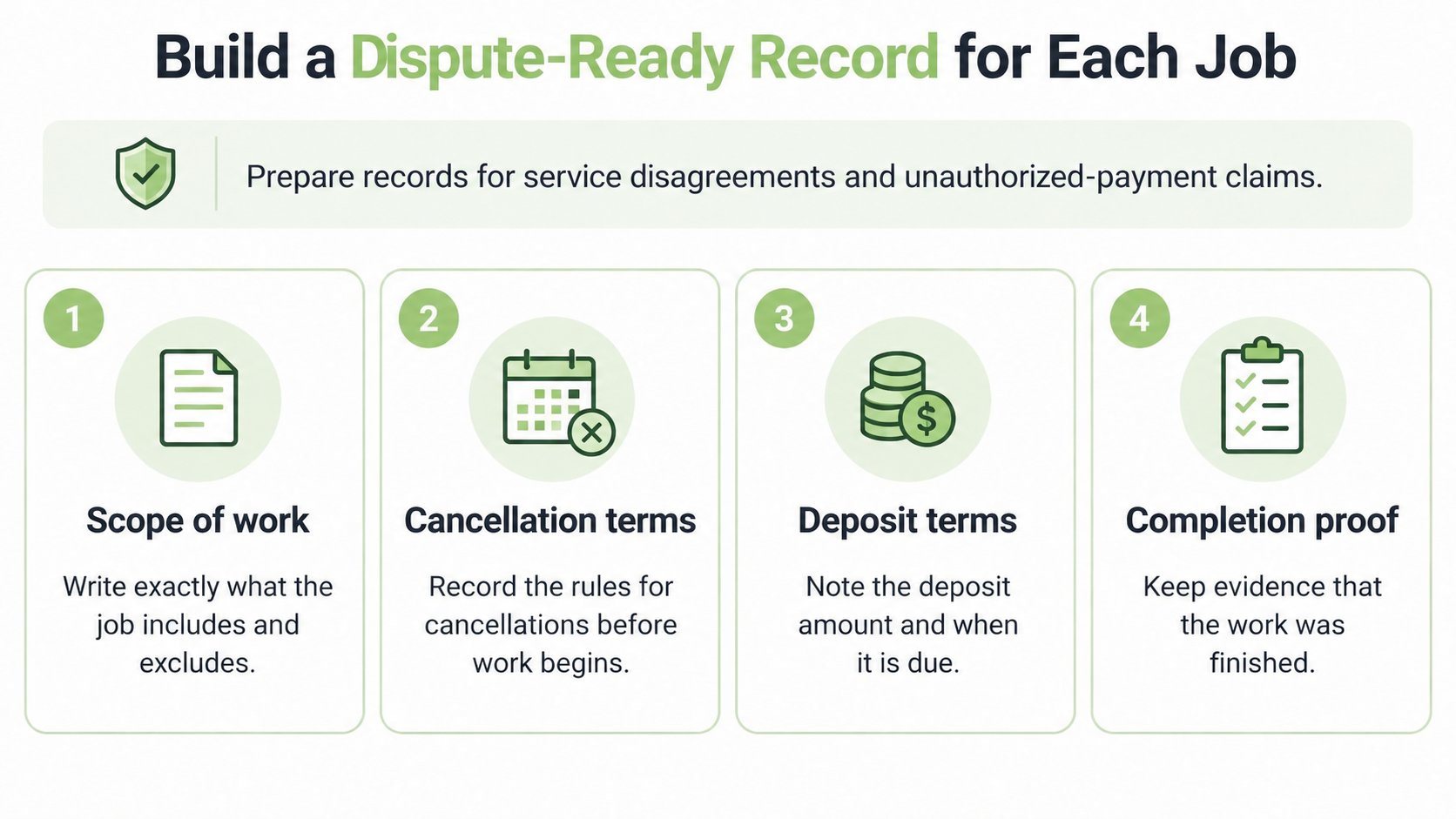
Card acceptance doesn't remove a commercial disagreement. The processor's deadline and evidence list control how you answer. The business that issues the invoice remains responsible for the service, the payer relationship, payouts, chargebacks, refunds, disputes, taxes, and compliance. These papers are the defense.
Write it before the card is charged
- Scope of work: Price, exclusions, and the date the client agreed. "Paint the living room, not the trim" beats a one-line "painting."
- Cancellation and refund terms: Put them on the estimate, not in a text sent after the client is already unhappy.
- Deposit terms: State what the deposit pays for and when it is kept. Don't stamp every deposit "nonrefundable" and hope the network agrees.
- Milestone or completion sign-off: A short note, photo, or email that the stage is done.
- Dated messages, appointments, and before-and-after photos: Keep them with the job, not in a personal camera roll.
- Estimate-to-invoice history: The amount charged should match the price the client accepted.
- Proof of delivery: The finished room, the delivered files, the signed completion note.
Labeling every deposit nonrefundable is weaker than writing what the client received for that money and when you keep it.
Treat quality, cancellation, deposits, and completion as patterns to check on your own jobs, not as a measured share of all disputes. This week, tighten one document. The deposit paragraph on the estimate template is usually the one that pays for itself first.
Protect Card Payments From Fraud and Phishing
Card security for an invoicing business starts by keeping card numbers out of your own systems.
Use a hosted payment page or payment link. The client enters the card in the processor's interface. Don't ask for card numbers by email, text, or a note on your phone. If you take cards on a mobile reader instead, check which PCI DSS self-assessment questionnaire applies in the PCI Security Standards Council's published documentation, and follow your processor's fraud settings for that device.
Turn on two-factor authentication for the invoicing tool, the processor, and the email account that sends invoices. A compromised mailbox can redirect a payment link or a payout request.
Review any change to the payout bank and confirm it by phone on a number you already have on file. Don't accept a new routing number from an email alone.
Treat surprise payment links, invoice edits, and "update your card" messages as phishing until you open the platform yourself and check. A practical guide to spear phishing prevention for small businesses is worth reading with whoever answers your client email, because those messages are written to one person, not blasted to a list.
Use the processor's fraud checks, including address and security-code checks, and look at declined or unusual payments before you release work. Limit invoice access to people who need it, and remove former staff the day they leave. Sending invoices by email is safe only when the message comes from an account you still control and the pay link is the one your invoicing tool generated.
Write a short procedure for anyone who takes client calls: no card numbers in email, no payout changes without a callback, no work released on a payment that hasn't settled.
Confirm Your Setup Before the Next Invoice
Roll this out on one job, not the whole client list. Pick someone who owes a deposit or a final invoice. Use the setup that matches how you already bill that person, and use the fee policy you chose to test.
Send one invoice with supported card payment enabled. Record the result as full, partial or deposit. Payments received through cash, cards or bank transfers can be recorded against the invoice to keep the balance current. Match the gross payment to the invoice, then reconcile processor fees, refunds, disputes and any batching to the net payout and bank deposit before expanding the workflow.
Write the deposit terms and the cancellation rules on the estimate before any money moves. If you invoice with GetBill, confirm on its current help documentation which card payment, deposit, and partial-payment features your plan includes before you rely on them. A business can connect its own Stripe account, and Stripe collects the identity, bank, and payout information it needs. GetBill is an invoicing and productivity tool. It isn't a bank, payment processor, money transmitter, escrow service, or financial adviser, so processor terms, card-network rules, and local law still decide the outcome.
Look at the setup again after the first month of payouts. If the deposit clears, the fee line matches what the client was shown, and the books tie out, then widen it to the next client.
GetBill helps independent professionals and small service businesses send estimates and invoices and accept supported card payments through a connected Stripe account, including deposits and partial payments with the balance kept current. That fits remote, milestone-based work where the client pays from the invoice rather than at a counter. Visit GetBill to see how invoicing and card collection fit the jobs you bill now.