


A consultant completes three weeks of work and sends an invoice showing a single total. The client is satisfied with the work, but accounts payable cannot match the amount to approved hours, a contractual milestone, or a purchase order. Payment is delayed while the consultant still needs to cover operating expenses and subcontractor costs.
This is a common weakness in invoices for consulting services. An effective invoice does more than request payment: it connects the agreed scope, evidence of work performed, applicable deposits, and outstanding balance in a format the client can approve without further clarification.
When those elements do not align, even a client intending to pay promptly may be unable to do so. When they do, invoice approval becomes a straightforward control check.
Table of Contents
- Match Each Billing Model to Its Invoice Lines
- Payment Terms and Deposits That Protect Cash Flow
- Tax and Reporting Details to Include on Every Invoice
- How to Build and Check a Consulting Invoice
- Sample Consulting Invoice Layout
- Recording Deposits and Partial Payments Accurately
- Fixing Late Payments and Rejected Invoices
Match Each Billing Model to Its Invoice Lines
The invoice should reflect the billing method established in the agreement. Presenting hourly work as an unexplained flat amount, for example, prevents accounts payable from reconciling the charge to approved time records and can delay approval.
Each billing model has a different verification standard. Hourly work is checked against time records; a fixed fee against the agreed scope; and a milestone payment against the contract's delivery or acceptance condition. Invoice lines should give the reviewer the information needed to perform the relevant check.
Invoice Line Format by Billing Model
| Billing model | Line item format | What the client checks | Common mistake |
|---|---|---|---|
| Hourly | Service dates or date range, hours, hourly rate, subtotal | Hours against approved time records | Listing hours without dates or a rate |
| Monthly retainer | Retainer period, fee, scope note | Fee against the agreed retainer period and scope | Combining the retainer and additional hours on one line |
| Fixed fee | Project or phase, fixed amount, agreement reference | Amount against the signed scope | Showing a total without identifying the covered work |
| Milestone | Milestone, contractual trigger or acceptance status, amount due | Delivery or acceptance against the contract | Billing before the agreed trigger occurs |
| Reimbursable expenses | Expense type, date, amount, receipt reference | Charges against receipts and expense approvals | Applying an undisclosed markup |
Many engagements combine billing models, such as a retainer with additional hourly work or a fixed fee with reimbursable travel. Give each component separate lines and a separate subtotal. The retainer is verified against the contract period, additional hours against time records, and expenses against receipts.
Separating charges also makes disputed items easier to resolve. If one expense receipt is missing, the client can identify that line without having to question an undifferentiated invoice total. The same principle applies to related service work, including an invoice approach for design work. Reviewers need a clear basis for every charge.
Can someone outside the project team reconcile each invoice line to the agreement and the relevant time, delivery, or expense record without requesting clarification?
If not, revise the line descriptions before sending the invoice. Clear supporting detail reduces avoidable approval delays.
Payment Terms and Deposits That Protect Cash Flow
Consultants often incur labor and operating costs before receiving payment. Payment terms therefore affect working capital and should be selected deliberately rather than copied from a standard template. Net 30 may be necessary for some buyers, but it need not be the default for every engagement.
A Five-Step Term Decision
- Assess the client's approval process and payment risk: A client who can approve payment directly differs from an organization that routes invoices through procurement and several approvers.
- Set terms appropriate to the engagement: Due on receipt or Net 15 may suit smaller projects with a simple approval process. Use Net 30 where the buyer's documented process requires a longer term.
- Limit work performed before payment: Consider a deposit or milestone payments when substantial effort precedes final delivery or acceptance.
- Document the mechanics: Specify how the due date is calculated, the currency, accepted payment methods, applicable taxes, and any agreed late charges in the agreement and invoice.
- Monitor receivables: Use an aging ledger to identify outstanding balances and follow up against the stated due dates.
The European Commission comparative report on prompt payment notes that U.S. federal agencies generally operate under a 30-day prompt-payment framework and may owe interest when responsible for late payment. It also describes Canadian government rules that commonly use 30 days from receipt of a proper invoice or acceptance, whichever is later. These public-sector rules do not establish the appropriate default for private consulting engagements. Clearly stated terms for invoices also help prevent disagreements about when payment becomes due.
Payment Term and Deposit by Client Situation
| Client situation | Typical term | Deposit or milestone |
|---|---|---|
| Small project with a new client and a simple approval process | Due on receipt or Net 15 | Deposit before substantial work begins |
| Repeat client with a reliable payment history | Net 15 | Milestone billing for longer engagements |
| Enterprise or government buyer with formal approval requirements | Net 30 or the term required by the buyer's process | Milestones linked to accepted deliverables |
| Cross-border client | Explicit term, currency, and tax treatment | Confirm the payment channel and currency before work begins |
| Client with a history of late payment | Shorter term where feasible | Deposit or milestone payment before the next phase |
Late charges should be agreed before work begins and reflected consistently in the invoice. The same applies to a stop-work provision: the agreement should specify when work may pause following a missed milestone payment.
For cross-border work, confirm currency, payment method, potential withholding, and VAT or GST documentation requirements before issuing the first invoice. These issues can otherwise create preventable approval holds. Compare outstanding invoice balances with upcoming expenses so you can see how delayed payments affect near-term cash flow.
Practical rule: Base deposits and milestone payments on the engagement's payment risk and work schedule, and record those terms in the agreement before work starts.
Tax and Reporting Details to Include on Every Invoice
An invoice documents a transaction; it is not a tax return. Keeping invoicing and tax-reporting responsibilities distinct helps prevent errors in both records.
A consulting invoice should identify the legal business name, any business or tax details the client requires, the services provided, the invoice date, the amount due, and the payment terms. Show tax according to the rules applicable to the transaction and the classification of the services. Do not label an amount "tax included" without confirming that treatment is appropriate.
What the Client Reports in the United States
Information reporting is generally the payer's responsibility, not a feature of the consultant's invoice format. The IRS guidance on reporting payments to independent contractors describes when a payer generally files Form 1099-NEC: the payee is not an employee; the payment is for services in the payer's trade or business; the payee falls within the applicable recipient categories; and annual payments reach the relevant threshold.
The threshold is $600 for payments made through December 31, 2025, and $2,000 for payments made after December 31, 2025, measured per payee for the calendar year. A personal payment for a nonbusiness service should not automatically be treated as a business payment.
The consultant's tax obligations are separate from the client's reporting duties. Keep records of service income, deposits, expenses, tax set-asides, and outstanding receivables. An invoice total is neither net profit nor the amount of tax owed.
Cross-Border and Responsibility Limits
For clients outside the United States, confirm required tax identifiers, currency, and invoice format before work begins. Some buyers or procurement systems require a structured electronic invoice rather than a PDF sent by email.
Invoicing software does not transfer compliance responsibility to the provider. GetBill does not provide legal, tax, accounting, financial, or professional advice, and it does not warrant that invoices, estimates, reports, calculations, templates, payment links, tax settings, or business records generated through the Service will meet legal, tax, accounting, or regulatory obligations. The issuing business remains responsible for its services, payer relationships, payouts, chargebacks, refunds, disputes, taxes, and compliance obligations. Confirm applicable thresholds against current IRS guidance and consult a qualified professional about jurisdiction-specific requirements.
How to Build and Check a Consulting Invoice
Start with the signed agreement, not a blank invoice template. The agreement should establish the billing basis, interval, currency, tax treatment, approval requirements, and due-date rule. The invoice should implement those terms accurately.
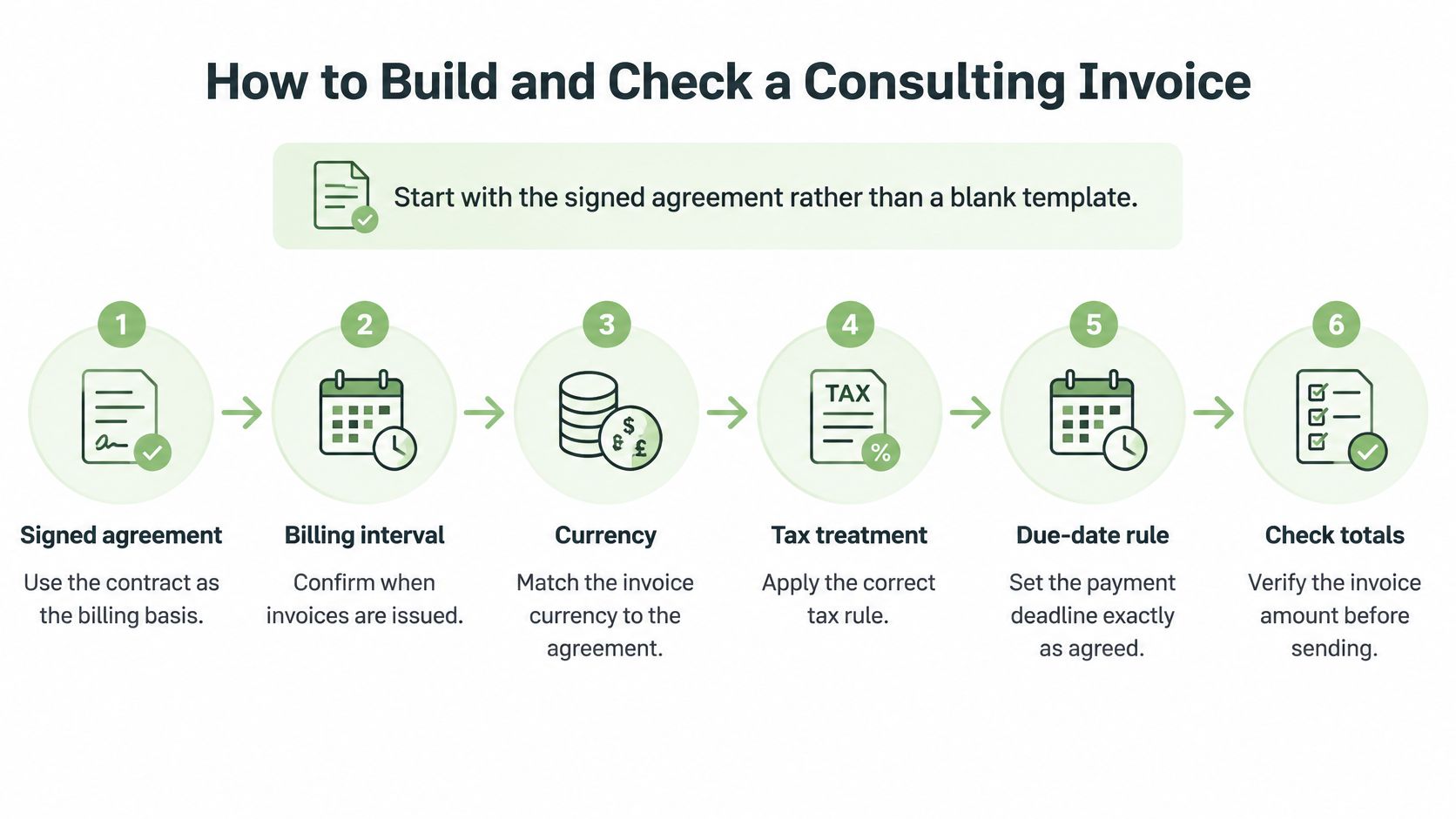
Building the Invoice in Order
- Check the agreement: Confirm the billing basis, billing interval, and due-date calculation. An invoice that conflicts with the contract may be rejected even if its arithmetic is correct.
- Assign a unique invoice number: Use a consistent sequence, such as INV-1042, and include the relevant contract, statement-of-work, or purchase-order reference. These identifiers support approval, retrieval, and correspondence.
- Identify the client's legal entity: Use the required legal name, billing address, tax details, and approval contact. An invoice addressed to the wrong entity may be returned for correction.
- Itemize according to the billing model: Show the relevant service period, deliverable, quantity, rate, and subtotal. Include dates and hours for hourly work, the contractual trigger for milestones, and the covered period for retainers.
- List reimbursable expenses separately: Provide dates and receipt references, and disclose any agreed markup. Keeping expenses distinct makes them easier to verify.
- Calculate tax and the remaining balance: Show subtotals, applicable tax, deposits or prior payments applied, and the balance due. The amount currently payable should be explicit.
If the engagement began with an accepted estimate, use it as the reference for the invoice rather than re-entering agreed details manually. GetBill allows an accepted estimate to be converted into an invoice with one click, without re-entering data, reducing opportunities for transcription errors in scope, rates, and client information.
The Pre-Send Control Check
Before sending, reconcile billed work to approved time records or deliverables. Verify the client's legal entity, billing address, purchase-order number, currency, due date, and calculations.
- Hours check: Every billed hour has a corresponding dated time entry.
- Trigger check: Each billed milestone satisfies the delivery or acceptance condition in the agreement.
- Balance check: Deposits and earlier payments are applied correctly.
- Terms check: The due date follows the agreed calculation rather than a default setting.
The client's accounts-payable team should be able to audit the invoice using the agreement and supporting records, without relying on the consultant's explanation.
Send the invoice when the contractual billing trigger occurs. Waiting until month-end unnecessarily postpones the start of the payment process. Where invoices are emailed with a secure viewing link, retain the issued copy and evidence of delivery.
File the agreement provision, supporting work records, issued invoice, and payment evidence together. If the client raises a question later, the documents needed to resolve it should be readily available. As a final review, read each line from the approver's perspective: if its basis is not clear from the invoice and supporting records, revise the description.
Sample Consulting Invoice Layout
Consider invoice INV-1042, issued under a signed monthly agreement and referencing the client's purchase order 88741. It covers work performed in March.
How the Lines Stack Up
- March monthly retainer: $3,000, with a description of the services covered during the period.
- Additional hourly work: 4.5 hours at $150 per hour, with service dates shown separately, for a subtotal of $675.
- Reimbursable travel: $240, with receipt references on separate expense lines.
These components total $3,915 before tax. If tax applies, use the rules for the type of service and the applicable jurisdiction. Show the tax separately on the invoice.
The terms specify Net 15 from the invoice date, and the invoice states the resulting due date and accepted payment methods. A $1,000 deposit received on March 3 is shown below the invoice total as an applied payment. The balance due is $2,915 before any tax adjustment. The deposit reduces the outstanding balance; it does not change the underlying invoice total.
Each component has a distinct verification source: the retainer is checked against the agreement, the hourly work against dated time records, travel against receipts, and the deposit against the payment record.
This format can be saved as a template, but figures and terms should be checked afresh for every invoice. Reusing a prior month's amounts risks carrying forward an outdated rate or applying a deposit twice.
Recording Deposits and Partial Payments Accurately
Consider a $5,000 consulting invoice. The client pays a $2,000 deposit, followed by the remaining $3,000 after final delivery.
The invoice remains a $5,000 transaction. It should not be split into two sales or edited down as payments arrive. Instead, record each receipt against the invoice with its date, amount, payment method, and reference.
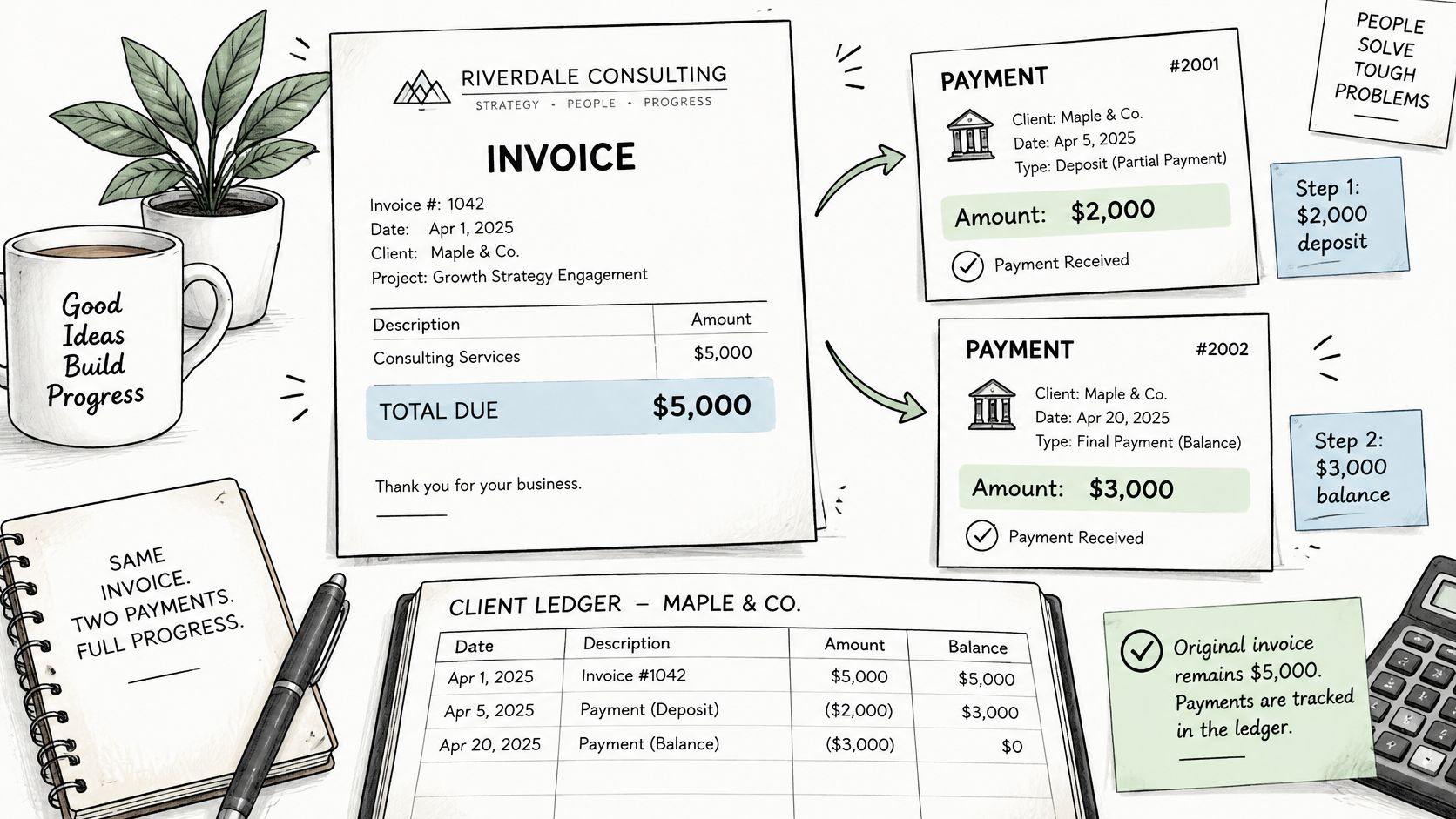
Record the date, amount, payment method, and invoice reference for each deposit or partial payment. Use that record to reconcile each receipt and show the remaining balance on the invoice.
Applying Each Receipt
- Record the deposit: Log the $2,000 receipt with its date and method, apply it to the invoice, and reduce the balance due to $3,000.
- Display the application clearly: Show the deposit received, amount applied, and remaining balance so the document agrees with the ledger.
- Reconcile each receipt: Match payments to bank records, and mark the invoice paid only after cleared funds are confirmed. A payment notification alone does not establish that funds have cleared.
- Record the final payment: Apply the $3,000 receipt to the same invoice, reduce the balance to zero, and retain both payment records.
This approach supports bank reconciliation, receivables monitoring, and year-end reporting. Use the invoice number as the common reference so anyone reconciling the records can match each receipt to the invoice and confirm the balance.
Online payments should follow the same standard. Each GetBill invoice has a unique access link, and clients can view and pay without creating an account. Payment is handled through Stripe-hosted checkout, with funds moving directly to the business's connected Stripe account. GetBill does not take custody of those funds.
Fixing Late Payments and Rejected Invoices
Late payment can materially affect a consultant's cash flow. In its 2025 Small Business Late Payments Report, Intuit QuickBooks surveyed 2,487 U.S. small businesses. Of those surveyed, 56% reported unpaid invoices, and those with unpaid invoices were owed $17,500 on average. In the same survey, 47% reported having at least some invoices more than 30 days overdue. See the report at https://quickbooks.intuit.com/r/small-business-data/small-business-late-payments-report-2025/.
Although these figures describe U.S. small businesses, the operational issue is relevant to consulting engagements: substantial work may be completed well before payment is collected. A documented follow-up process helps identify and resolve approval problems before balances age further.
Invoice Symptoms, Causes and Fixes
| Symptom | Likely cause | Fix |
|---|---|---|
| Accounts payable rejects the invoice | Missing purchase-order number or incorrect legal entity | Correct the required PO, entity, and billing address, then reissue |
| Payment is 30 or more days late | Unclear due date or no follow-up process | Confirm receipt, send a factual reminder, and follow the agreed late-payment terms |
| Client disputes the amount | Hours or deliverables cannot be reconciled to records | Provide the relevant time records or milestone evidence and a corrected itemization if needed |
| Outstanding balance continues to grow | Scope changes were not formally approved | Pause further out-of-scope work until a revised estimate is approved |
Use a consistent escalation process. Confirm that the invoice reached the correct contact, follow up on the due date, and address missing approvals promptly. A clear reminder to pay an outstanding invoice should identify the invoice, amount, due date, and requested next step without escalating the tone unnecessarily.
If a milestone payment is missed, apply the stop-work provision established in the agreement. Continuing work without resolving the overdue balance increases the consultant's financial exposure.
Three Habits That Prevent Repeat Problems
- Include the purchase-order number: Where the client uses purchase orders, put the number on every applicable invoice. The project contact's approval may not replace accounts payable's documentation requirements.
- Keep supporting records accessible: Time entries, milestone approvals, and expense receipts should be ready to provide if an invoice is questioned.
- Approve scope changes before billing them: Issue a revised estimate and obtain approval before performing or invoicing changed work. This preserves a clear basis for the charge.
Next step: Review one open invoice against its agreement, supporting records, payment history, and due-date rule. Correcting that invoice may also reveal an issue in the underlying template.
For consultants who need itemized invoices, estimate conversion, and a clear record of deposits and partial payments, GetBill helps independent professionals and small service businesses create and send invoices and estimates, track payments, and accept supported card payments through Stripe. Before sending the next consulting invoice, confirm that its charges, balance, terms, and due date match the agreement and supporting records.