

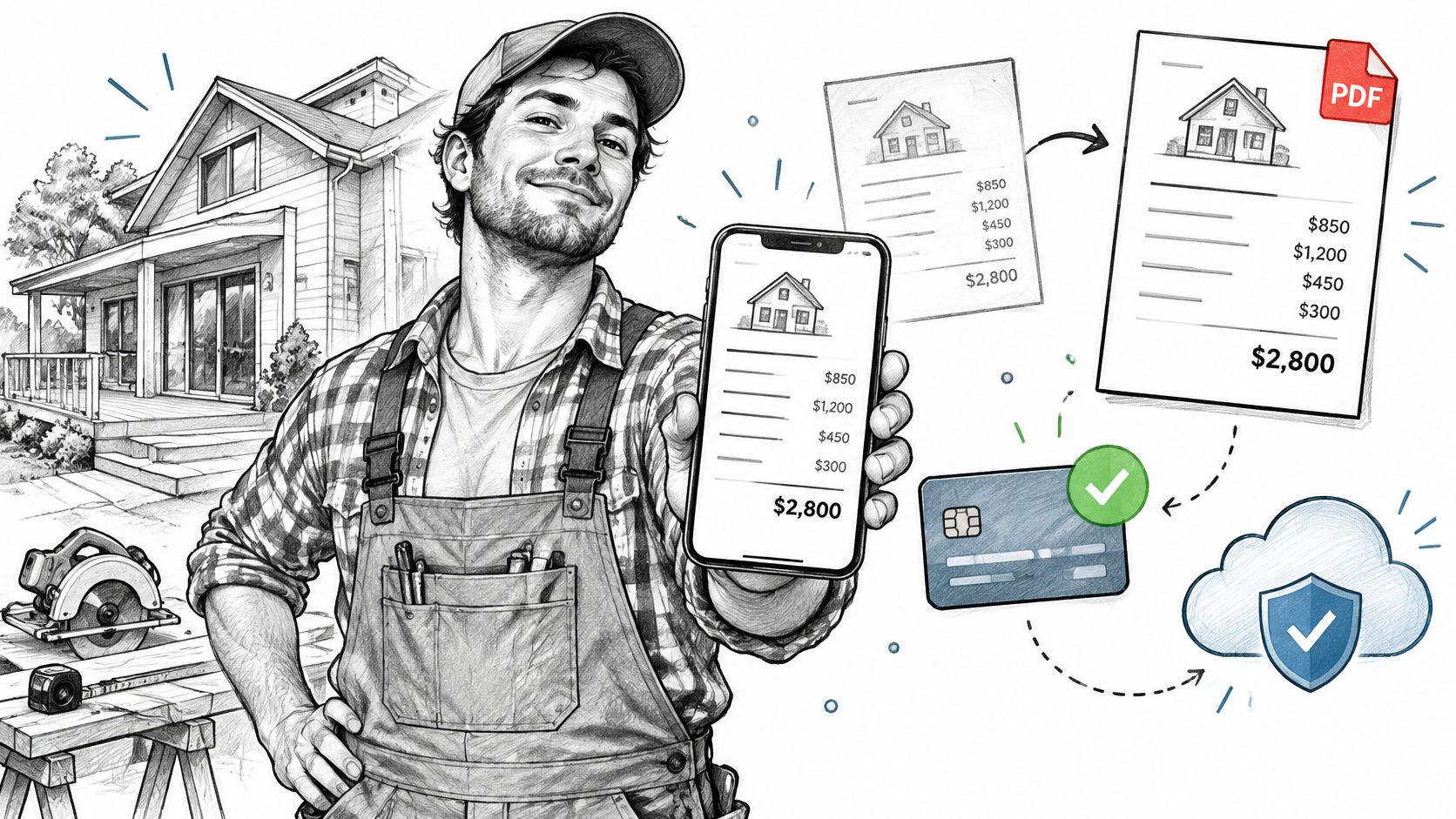
The job is finished, the ladder is back on the truck, and the client has already approved the estimate by text. Then comes the part that takes longer than the work itself. The invoice sits in a draft because the numbers have to be retyped, the tax line checked, and the deposit remembered.
That gap between finishing a job and getting paid is where small service businesses leak money. It's also what separates a phone billing setup that works from one that just looks tidy. This guide judges invoicing apps for iPhone by one standard: what happens to the deposit, the balance and the record after the invoice leaves your phone. Not template galleries, not feature counts.
Every claim here can be tested on one real trial invoice, with one real client, before you pay for a subscription.
Table of Contents
- Why Billing From an iPhone Changes the Job
- From Estimate to Sent Invoice on Your iPhone
- How Deposits and Partial Payments Stay Accurate
- Branded PDFs That Keep Totals Intact
- Protecting Records, Backups and Client Data
- Tax Records and Where Jurisdiction Changes the Answer
- Score Eight Criteria With One Trial Invoice
Why Billing From an iPhone Changes the Job
A painter finishes a two-bedroom repaint on a Friday afternoon, photographs the walls, and texts the client an estimate from the driveway. Approval comes back by message that evening. The invoice waits until Monday because the line items have to be retyped, the tax rate verified, and the $300 deposit added before anything goes out.
None of those steps is slow by itself. The delay comes from the handoffs: building the estimate on site, converting it once the client agrees, sending something the client can open on a phone, and collecting the money without a trip to the bank.
Invoice speed is a cash-flow feature, not a cosmetic one. In a Chase for Business survey cited in 2024, 86% of small-business owners said sending and receiving invoices quickly was important, while 48% said invoices took more than three business days to get paid (Chase for Business). That survey describes small-business owners in general, not iPhone users specifically, but the gap it measures is exactly the gap a phone can either close or widen.
Once the app holds the estimate, the invoice, the payment and the client history, its weak points stop looking cosmetic. A payment that isn't recorded becomes a chasing call three weeks later. A draft that never syncs becomes a client who says they never received a bill. The template is the least important thing in the app.
What follows isn't a ranking of five apps. It's eight criteria, a working sequence from estimate to payment, the rules that keep deposits honest, a firm boundary around tax, and a trial you can run on a real job before you pay anything.
Start with your own routine. Write down the three points where a job waits longest, whether that's the estimate, the approval, the invoice or the deposit, and keep that list next to the criteria table at the end.
From Estimate to Sent Invoice on Your iPhone
The order of these steps matters more than the speed of any single one. Run the sequence once on a finished job and the weak link shows up in about ten minutes.
Here's the shape of the whole flow before the detail.
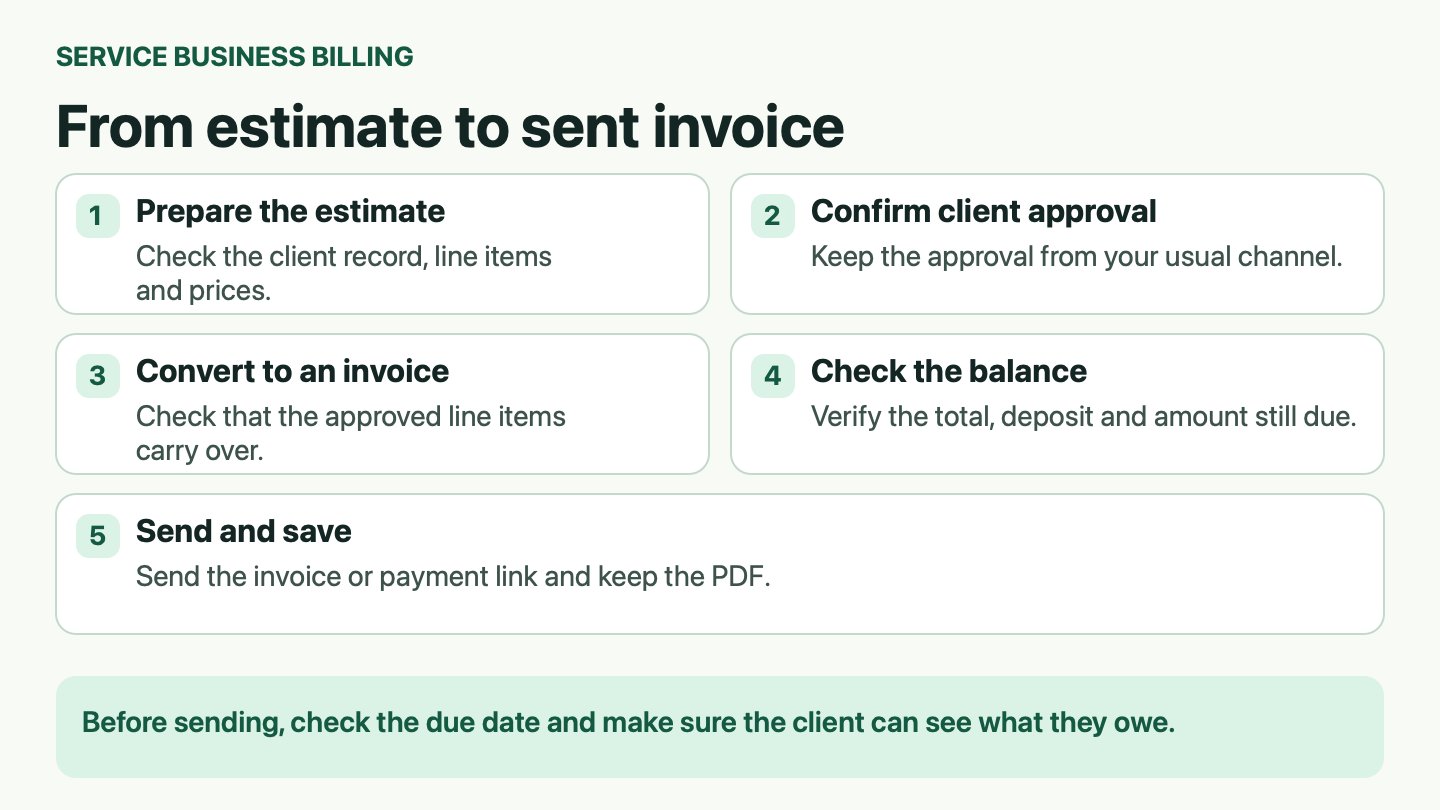
- Start from a saved client record. Open the existing client rather than typing a new one, so the name, email and billing address fill in and match what's on file. The usual slip is creating a duplicate client for a second job at the same address, which splits the history you'll need at tax time.
- Add line items with a real scope description. Enter quantity, unit price and a description specific enough to survive a dispute, such as "two coats eggshell, 14 x 11 ft walls, prep and masking included" instead of "painting". Vague lines are what turn a settled invoice into a negotiation.
- Apply the tax setting for the job location. Rates vary by state, county and city, and the field in the app is a convenience, not advice. The frequent error is letting the app carry over the previous job's rate because it remembers it.
- Send the estimate through the app's secure link if it offers one. A link lets the client read the scope on their own phone without downloading a file. Screenshots are the slip here, because the client can't accept, search or forward them cleanly.
- Convert the estimate to an invoice without retyping, then check the total. One action should produce the same line items and the same figure the client approved. Skipping the total check is the classic mistake, since a discount or tax setting applied twice is invisible until the client queries it. The handoff is where billing time disappears, and turning an approved quote into an invoice without re-entering data is the single highest-value feature to test.
- Add the deposit before you send. Whether the deposit is a line item or a payment schedule, the client should see full price, deposit and balance from the first view. Sending first and adding the deposit later invites a client to pay the whole amount and then ask for a refund.
- Send with a due date and a payment route. Include a due date and any payment link the app provides, then note the date sent. An invoice without a due date means "whenever it suits you".
- Confirm the status reads sent and unpaid before you close the job. A share sheet opening is not delivery confirmation. Assume nothing went out until the invoice status says it did.
Practical rule: an invoice you can't prove was sent is a draft with extra steps.
If you already use accounting software, check how the invoice and its payments will be reconciled. Save the invoice PDF and keep the invoice number on each payment record so you can match the entries without retyping the bill.
What a clean record looks like when the eight steps are done: one client, one estimate linked to one invoice, a visible balance, and a sent date you can point to.
How Deposits and Partial Payments Stay Accurate
Take a $1,000 job. The client hands over $300 in cash on the first day and pays the remaining $700 by card three weeks later, adding a $50 tip. The table below is what the app should be able to show at every point in that story.
| Event | Amount recorded | Method | Balance due after event |
|---|---|---|---|
| Invoice issued for full project | $1,000 total | None | $1,000 |
| Deposit received in person | $300 | Cash | $700 |
| Card payment declined | $0 recorded | Card attempt | $700 |
| Card retry succeeds with $50 tip | $700 applied; $50 recorded as tip | Card | $0 |
The three rules behind the table
The invoice is the parent record. Every payment points to that invoice number, not to a client name and not to a job description.
Each payment is a dated entry with its own method. A cash deposit on a Tuesday and a card payment on a Friday are two events, not one "paid" flag flipped at the end.
The balance recalculates after each entry. If the app only knows "paid" or "unpaid", it isn't tracking a balance. It's tracking a mood.
Where deposit records go wrong
Record cash the day it arrives. Memory is reliable until Thursday, then it isn't, and a deposit that gets logged a week late can put an invoice into "overdue" while the money is already in your pocket.
Confirm which invoice a card payment attaches to when the client has more than one open job. Payment attribution is a recurring complaint in App Store feedback for mobile billing apps, along with deposit requests, processor deductions, and tips that surface as apparent overpayments (Vyapar billing app reviews on the App Store). Those are individual reports rather than measured rates, and they point at a real design failure: payment buttons multiply faster than reconciliation tools.
Treat a tip as its own recorded amount. A tip that gets merged into the invoice total changes the balance and makes the next statement wrong, unless the app documents a different treatment.
Mark a card payment received only when the processor confirms it, never when a green checkmark appears on the phone. Offline cash entries should stay flagged until they sync, so you can see at a glance which records still need a network round trip.
Processor availability, fees, settlement timing and supported methods vary by country and account, so confirm them with the processor rather than assuming them from a US review. GetBill processes invoice payments through the business's connected Stripe account and doesn't take custody of the funds, which is the arrangement worth insisting on: money moves from client to your processor account, not through a balance the app controls.
Reconciliation check: payments applied plus balance due must equal the invoice total, after every entry, every time.
If you're writing deposit terms for the first time, start from an invoice deposit template and adapt the wording to your contract and your state's rules. Fix the arithmetic habit before you fix the template.
Branded PDFs That Keep Totals Intact
A contractor sends an invoice for $2,400, then realizes the mulch line was priced at last season's rate. The corrected figure should be included in a revised document with a note to the client explaining what changed. It should not be a quiet edit that causes the old PDF and the new one to differ while both remain in the client's inbox.
The PDF is the record the client keeps, forwards to a bookkeeper and prints for a file. Treat it as a business document, not a picture of your app screen.
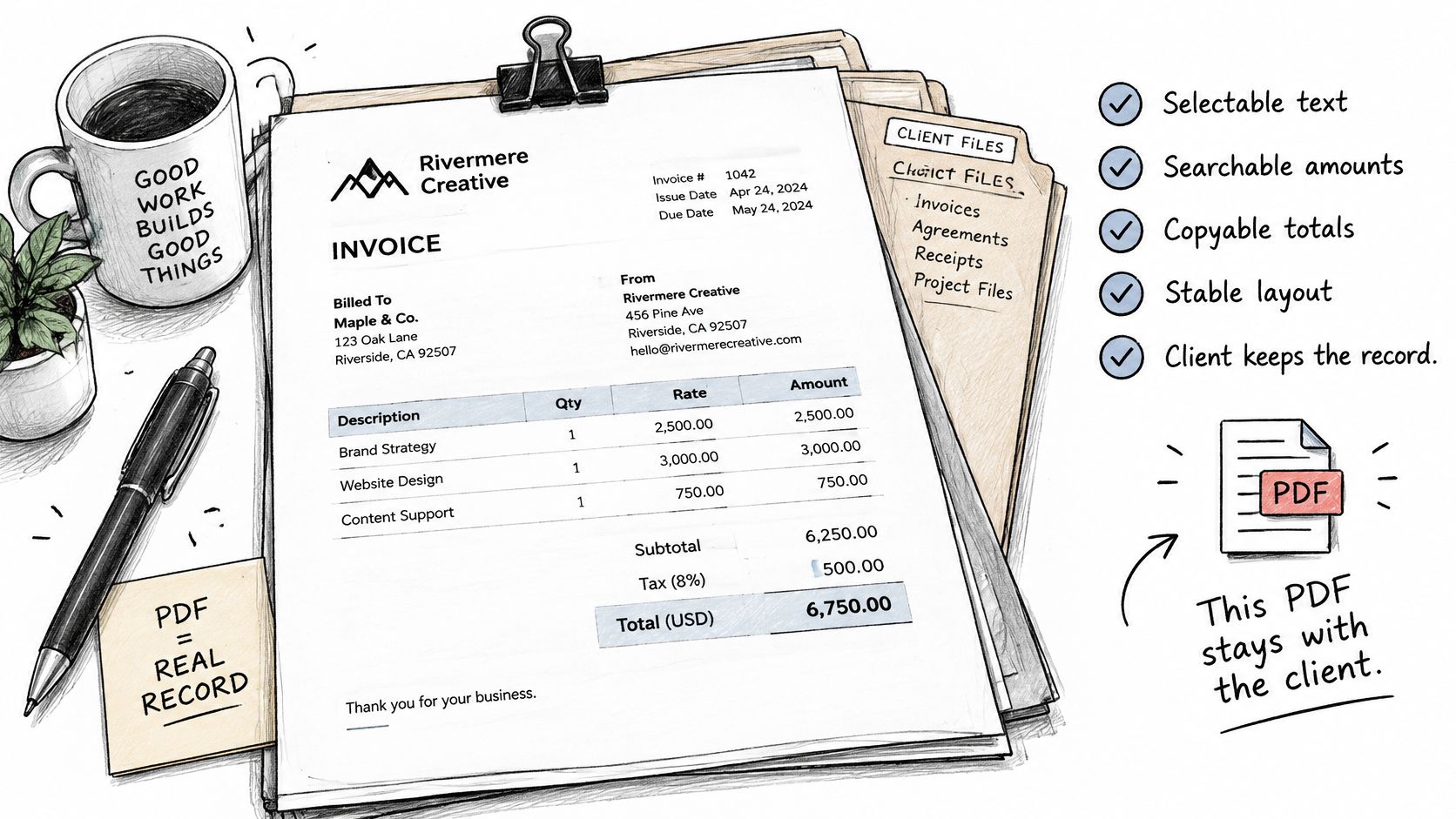
Five checks that separate a document from a screenshot
- Selectable text. The client should be able to search the PDF for an amount and copy it into their own records.
- Totals derived from the saved line items. Subtotal, discounts, tax, total, payments applied and amount due all need to trace back to stored values.
- A stable invoice number. It stays identical when you resend, however many times you resend.
- Fonts that embed or substitute cleanly. Nothing shifts position when the file opens on a different machine.
- Geometry that survives the trip. Email client, cloud storage, office printer, and the alignment is still intact.
What branding can change safely
Logo, colours, business name, address and payment instructions are presentation. None of them should touch a machine-readable amount or identifier. A template that lets you restyle the header without recalculating a single line is a template you can trust.
Branding that alters totals, or a resend that issues a fresh number, breaks the audit trail the client's bookkeeper depends on. When a price changes after sending, the correct path is the app's correction method plus a short message naming the difference.
Test the template before you need it: search for an amount, print the document, then resend it to a second address. If the number or the total moves, the template is decorative, not durable.
Protecting Records, Backups and Client Data
A longer feature list doesn't make an app safer, and assuming it does is how billing records go missing. The risk sits in the data lifecycle: where records live, what an update failure leaves behind, and what remains accessible after a subscription ends.
App Store reviews for mobile invoicing apps describe that failure pattern directly: locally stored data lost after a required platform update, older records that couldn't be migrated because they were never synced, missing invoices, and users pushed from lifetime purchases onto subscriptions (Invoice Manager reviews on the App Store). Those are individual reports, not measured rates. They're still reason enough to run the checks below before you trust any app with a year of invoices.
Here's the checklist to work through in order.
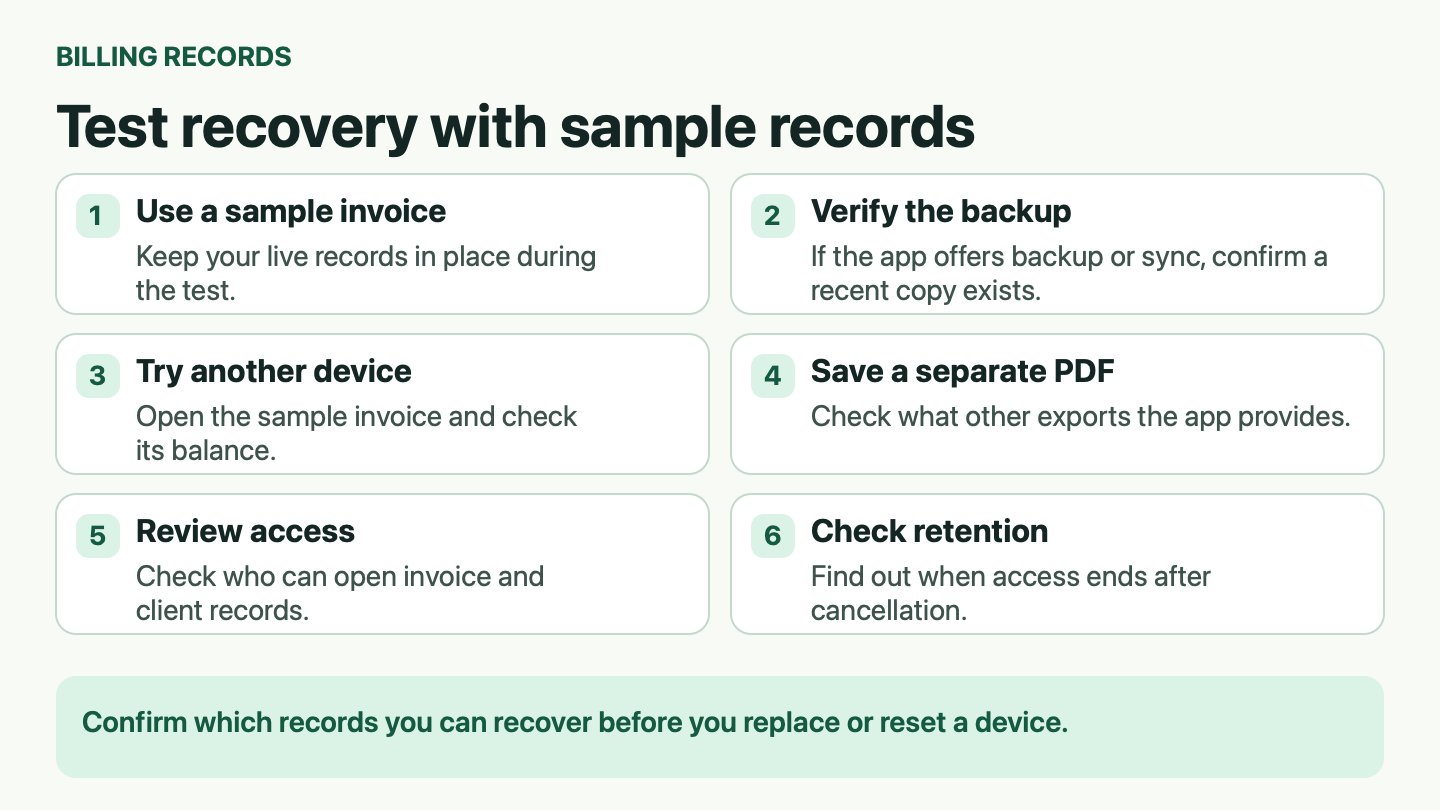
- Check recovery with sample records first. If the app offers backup or sync, confirm a recent copy exists, then try opening the sample records on a second device. Keep your live records in place until you know what the backup contains.
- Save a copy of the invoice PDF. If the app offers data exports, test which invoice, client, and payment fields they include, and store the sample files outside the app.
- Find out whether records live on the device, on a server, or both. Device-only records are the ones that vanish when an update fails mid-install.
- Read the cancellation terms before you subscribe. You want to know whether you keep read-only access, get a defined export window, or lose everything at the end of the billing period.
- Check what a lifetime purchase covers if the app later moves to subscriptions. A one-time purchase that stops opening records is a rental with extra paperwork.
- Watch how client data leaves the app. When you email an invoice, the app and its delivery providers process the recipient address, message content, document details and delivery status. Nothing unusual there, as long as you know it's happening.
Adding a signed work order or a photo set to the invoice record keeps the evidence together, and the mechanics of attaching documents to an invoice are worth testing during the same trial.
Check how the app collects payment. For online card payments, use the checkout page supplied by the payment provider. When Apple Pay is offered, the Secure Enclave authorizes the Secure Element as part of the Apple Pay flow. Available methods depend on the provider, country, and account. See Apple Platform Security at https://support.apple.com/en-ca/guide/security/secc1f57e189/web.
Deleting data in the app doesn't erase everything. Apple, Google, RevenueCat and Stripe may retain transaction records under their own legal obligations and policies.
Before replacing or resetting a phone, confirm that recent invoices and payment records can be opened on another device or from a backup. Keep a separate copy of the PDFs and any exports the app supports.
Tax Records and Where Jurisdiction Changes the Answer
Everything in this section is U.S. federal tax for self-employed individuals. It doesn't cover state income tax, state or local sales tax on services, or rules in any other country, and none of it is advice on your own return.
U.S. federal income tax is paid as you earn income. Self-employed individuals may need to make estimated payments using Form 1040-ES. The IRS generally considers whether you expect to owe at least $1,000 after subtracting withholding and refundable credits, and whether those amounts meet its current- or prior-year thresholds. For both conditions and the exceptions, see the IRS estimated tax FAQ at https://www.irs.gov/faqs/estimated-tax.
What an invoice record proves and what it doesn't
An invoice history should preserve gross receipts, payment dates, client names and amounts so you can plan cash and estimate liability. That's its job, and it does that job well when the entries are dated and complete.
It does not prove tax was paid, and it doesn't replace your tax records. Keep three separations straight:
- An estimate is not income. Sending one creates no receipt.
- An unpaid invoice is not cash. Treating issued invoices as collected money distorts every liquidity decision you make from it.
- A deposit percentage is not a tax rule. A 50% deposit changes your cash position, not automatically the federal treatment of the job.
Take a contractor who books a $5,000 job in March with a 50% deposit and collects the balance in May. The record needs both payments, with dates, attached to the same invoice. Which quarter each payment falls into for estimated-tax purposes depends on the accounting method and business structure, and that question goes to a qualified tax adviser in your jurisdiction.
Scope limit: an invoice record supports a tax position. It doesn't establish one.
State and local sales tax on services varies by state and locality, and the tax setting in an app is a convenience, not advice. Write out the records you're required to keep, then take the uncertain cases to a professional before the deadline rather than after.
Score Eight Criteria With One Trial Invoice
One scorecard, eight yes-or-no answers, and a single real estimate run through every app you're considering. Pass or fail on each row, no partial credit for a pretty template.
| Criterion | What to verify | Warning sign |
|---|---|---|
| Estimate-to-invoice conversion | Accepted estimate becomes an invoice without retyping; totals match the approved version | Totals change or line items are re-entered by hand |
| Card payments through Stripe | Client pays from the invoice and funds reach your connected Stripe account where region and account allow | Payment shows as received with no confirmed processor record |
| Mobile billing | Create, send and record a payment entirely on the phone | Key actions require a desktop login |
| Offline use | Draft and save an invoice with no signal, then sync | Drafts disappear or fail to sync |
| PDF branding | Logo and colours change while amounts and invoice number stay fixed | Branding changes totals or the invoice number |
| Partial payments | Cash, card and transfer recorded against one balance | Only paid or unpaid status is available |
| Pricing and billing terms | Monthly versus one-time cost, free-tier limits, and which store manages the subscription | Limits or cancellation terms are unclear before sign-up |
| Data export and privacy | Invoices, clients and PDFs export as files; retention after cancellation is stated | No export option, or deletion and retention terms are vague |
Run the same trial on three apps
- Choose three must-haves first. For an owner collecting deposits, those are usually estimate conversion, partial payments and data export. Everything else is preference.
- Shortlist three apps and push the same trial invoice through each one. Use the estimate-to-invoice sequence from earlier, with the same client, the same line items and the same deposit.
- Score pass or fail on behaviour, not on screenshots. An app that needs four taps to add a cash deposit fails the partial-payments row, whatever its template gallery looks like.
- Get cancellation, retention and export answers in writing before you pay. A support reply you can save beats a marketing page you can't.
Where the subscription was bought decides who you cancel with. Apple processes subscriptions bought inside the iOS app, Google Play processes purchases made in the Android app, and Stripe handles web purchases, so the cancel path changes with the purchase route.
Weight payments and data heaviest if you collect deposits in the field. Weight offline use heaviest if your work happens where signal doesn't.
Payment availability, processing fees and settlement timing vary by country and account, so confirm those rows with the processor rather than the app's store listing. Then run the trial on one real estimate this week and keep the export file. It's the only proof of what the app will give back when you need it.
Try the billing workflow at https://www.getbill.to. Convert an estimate after the client approves it through your usual channel. Check the invoice total, deposit, and remaining balance. Save the invoice PDF and send the client a payment link through your connected Stripe account, where available.