


The job is finished, but the invoice isn't. The approved estimate is buried in an email thread, the deposit sits in a separate spreadsheet, and the owner still needs to check the balance before sending the bill. Meanwhile, materials and subcontractors need paying.
Invoice software for small business should be judged by how quickly approved work becomes cleared cash, not by template count. The right choice removes the owner's actual bottleneck without confusing billing records, accounting reports, and money available in the bank.
Table of Contents
- Which Invoice Software Fits Your Billing Workflow
- How Work Moves From Estimate to Cleared Payment
- Feature Criteria That Separate Usable Billing Tools
- Pricing Tiers and the Costs Beyond the Plan
- Payment Methods, Stripe and Security Checks
- Tool Categories and Where GetBill Fits
- Choose the Billing Setup That Matches Your Week
Which Invoice Software Fits Your Billing Workflow
The billing pattern decides the software requirement. A designer sending a final project invoice needs a different setup from a contractor collecting materials money before work starts or an agency coordinating with a bookkeeper.
Quick picks by business situation
| Business situation | Billing pattern | Features to prioritize | Fit note |
|---|---|---|---|
| Freelance designer on one-off projects | Estimate, then final invoice | Estimate conversion, branded PDFs, payment link | Billing-only tools usually cover this need |
| Photographer or event service | Booking deposit, balance after delivery | Deposits, partial payments, remaining balance | Confirm deposit tracking before choosing |
| Handyman or contractor | Itemized estimate, approval, sometimes materials upfront | Reusable services, itemized estimates, mobile access | Verify whether separate job costing is needed |
| Cleaner with repeat clients | Billing per visit or monthly | Client records, duplication, email or link sharing | Scheduling may need a separate tool |
| Consultant on retainers | Monthly retainer plus hourly overage | Partial payments, remaining balance, business profiles where relevant | Retainer automation may require another system |
| Agency with staff and a bookkeeper | Project billing with tax and ledger needs | Accounting connections, user roles, reporting | Usually needs accounting alongside invoicing |
Start with the exception that causes delays
The useful buying question isn't whether an application can produce an invoice. It's whether the owner can complete the awkward transaction that currently requires a workaround.
For a photographer, that means recording a booking deposit without losing sight of the final balance. For a cleaner, it may mean finding the correct client and service details without rebuilding the document after every visit. For a contractor, it may mean keeping approved scope separate from additional work.
Buying principle: A polished invoice doesn't compensate for a payment workflow that still depends on scattered notes.
Owners should also distinguish essential functions from adjacent conveniences. A consultant operating under one business doesn't necessarily need multiple profiles, while an agency may need permission controls more urgently than additional document designs.
The table provides a practical shortlist of tool types: focused billing software, accounting-led invoicing, or a document-based setup for occasional work. Comparing those approaches first prevents a long feature list from obscuring the actual requirement.
How Work Moves From Estimate to Cleared Payment
Consider a service owner finishing an approved installation. The billing delay can start before delivery, when the owner hesitates to send an invoice because the estimate, materials adjustment, and deposit don't agree.
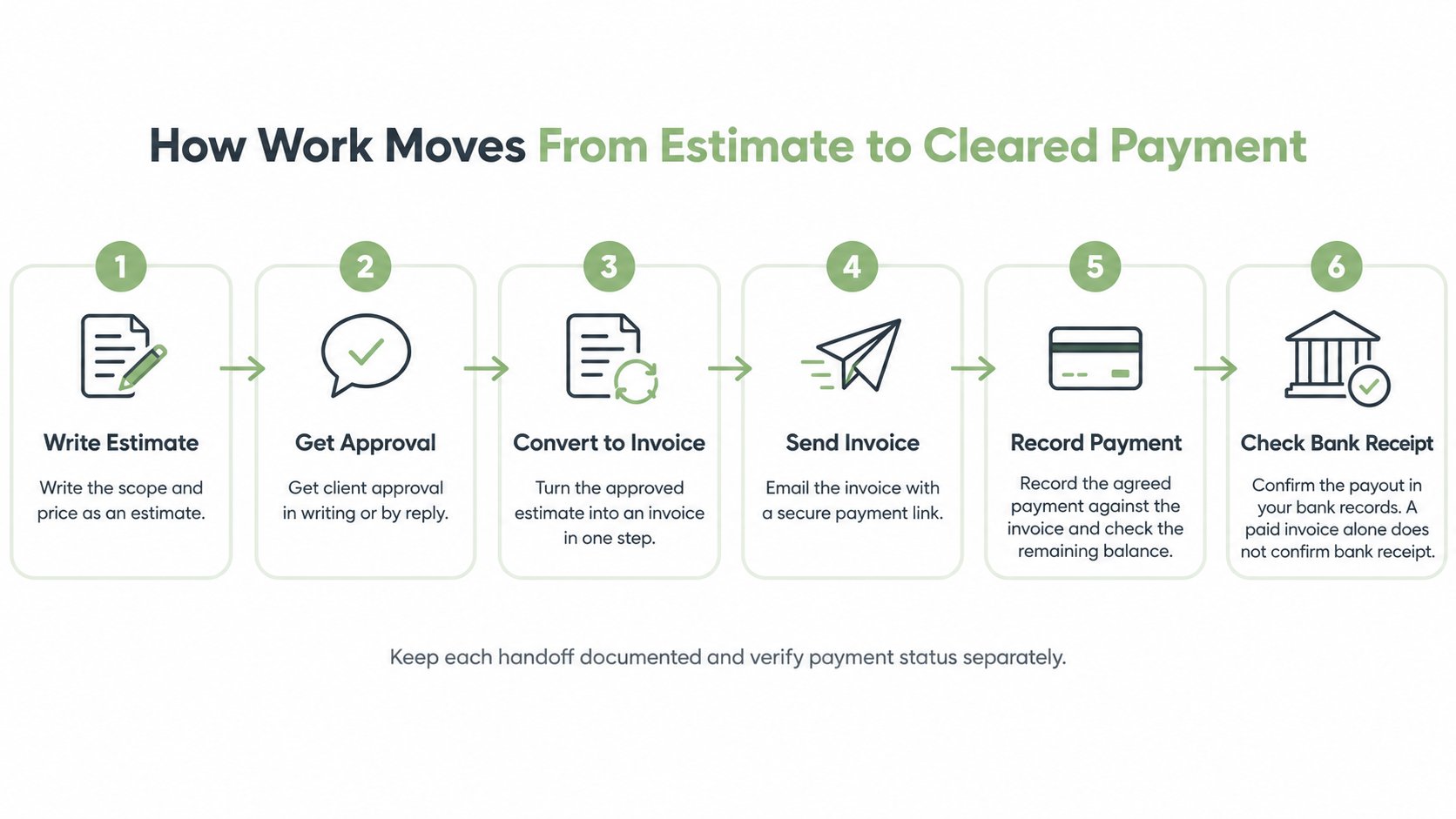
Follow the handoffs in order
- Write the estimate. Record scope, exclusions, service charges, materials, and proposed terms. Vague descriptions create questions that must be answered again later.
- Capture approval. Keep the client's written acceptance or reply with the job record. Searching an inbox for permission to proceed is avoidable administrative work.
- Convert the approved document. Preserve the agreed line items instead of rebuilding them. A quote-to-invoice workflow should make changes visible rather than replacing approved scope without notice.
- Send the invoice. Deliver the PDF, email, or shareable link to the person responsible for payment. An invoice sent only to the on-site contact may still need forwarding.
- Collect the agreed payment. Request the deposit or full amount according to the accepted terms.
- Record partial receipts. Apply each payment to the correct invoice so the outstanding amount remains clear.
- Confirm the bank receipt. Check that money reached the business account rather than relying solely on a document marked paid.
The diagram groups collection and balance tracking into six steps. Recording a customer payment and confirming a payout in the bank are separate checks; a paid invoice does not by itself confirm that the bank has received the funds.
Keep overdue work on a deliberate schedule
In a 2024 UK government study based on 300 telephone interviews, 32% of surveyed microbusinesses said late customer payments caused them to pay suppliers late, compared with 20% across surveyed businesses, according to the UK government's payment-practices research. These are UK findings, not estimates for U.S. service firms.
Software alone doesn't eliminate late payment. Delayed invoices and unclear balances make cash timing harder to plan.
A practical follow-up policy includes a dated reminder on the due date, another after a predetermined interval, and a phone call before escalation. Owners should assign responsibility for those actions rather than assuming automation exists.
The same handoff discipline underpins a simpler estimate-to-payment workflow for service businesses: every stage needs a clear record and a next action.
Feature Criteria That Separate Usable Billing Tools
A feature earns its place when it survives a real service transaction. A demonstration with placeholder clients and empty invoices won't reveal whether the application handles changed scope, deposits, or awkward delivery requirements.
Billing features and the trade-off each one carries
| Feature | What to verify | Why it matters | Trade-off |
|---|---|---|---|
| Estimate-to-invoice conversion | Approved lines transfer without retyping | Preserves agreed scope | Less useful when no estimate is needed |
| Reusable client and service records | Saved details and standard items | Reduces repeated entry | Records need maintenance |
| Branded PDFs | Logo, business name, itemization, tax, terms | Provides a usable client record | Layout controls may vary by plan |
| Delivery options | Email, shareable link, download | Makes dispatch practical | Links require access care |
| Deposits and partial payments | Correct invoice allocation and visible balance | Supports staged collection | Manual entries require consistency |
| Online card payment | Stripe eligibility for account and country | Connects billing with collection | Processor availability and fees apply |
| Mobile apps | iOS and Android workflow | Supports field billing | Long estimates can be awkward to edit |
| Reminders and recurring invoices | Written confirmation of availability | Supports repeat billing | Not verified for GetBill |
Test documents before testing appearance
The first test should use an actual estimate with realistic descriptions, exclusions, and charges. After conversion, the owner should compare the invoice against the approved document, checking quantities, wording, and totals.
Saved service records deserve similar scrutiny. A standard cleaning visit or design service should be reusable without forcing old pricing onto a new job. Tax fields should permit the required presentation, but the owner or tax adviser must still confirm the applicable jurisdiction's treatment.
The delivery test should include sending an invoice to an address controlled by the business, downloading its PDF, and opening its public link on a phone. A shared link needs care over who receives or forwards it.
Verify the payment and mobile edge cases
For a hypothetical $1,200 job, the owner should record a deposit and check that the application displays the correct remaining balance. The important test isn't merely whether a payment note can be added, but whether that entry changes the amount still due without changing the original job price.
GetBill's published product description lists estimate conversion, reusable records, branded PDFs, email and public-link sharing, and Stripe-connected card acceptance. It also describes deposits, partial payments, iOS and Android applications, and multiple business profiles and white-label documents on eligible plans.
The current GetBill plan page lists multiple business profiles and white-label documents under Business, and the site links to Android and iOS applications. Check the current plan limits and try the workflow you need before subscribing.
Verification rule: A vendor should demonstrate the required transaction on the intended plan, not merely confirm that the feature name appears somewhere in the product.
Recurring invoices, automated reminders, and public client approval of estimates remain unverified for GetBill. None should be assumed from the presence of estimates, payment links, or saved customer records.
Pricing Tiers and the Costs Beyond the Plan
The subscription is only part of the buying decision. Processing charges, a separate accounting system, and time spent matching payments can matter more than the advertised entry price.
Cost items to check before subscribing
| Cost item | Where it appears | Question to ask | Effect on income |
|---|---|---|---|
| Base subscription | Monthly or annual plan | Which required features need a higher tier? | Fixed operating cost |
| Card processing | Stripe payment charges | What applies to the account's country and method? | Reduces net receipts |
| Business profiles or white-label | Eligible plans | Is another brand or profile necessary? | May require a higher tier |
| Accounting connections or exports | Billing and accounting systems | Is a separate ledger or service needed? | Possible additional subscription |
| Manual reconciliation | Bank and payment records | How much matching work remains? | Owner time remains unpaid |
| Add-ons | Services outside the base plan | What isn't included? | Additional cost if needed |
Compare the usable tier, not the headline tier
Compare the current Starter, Pro, and Business plans against the features and limits your business needs. The plan-selection guide provides context; current pricing and plan terms should determine the purchase.
Multiple profiles and white-label documents are described as eligible-plan features, not universal entitlements. A business shouldn't upgrade for them unless separate branding solves an actual operational need.
The arithmetic for card collection is straightforward: invoice total minus applicable processing charges equals the net receipt before other adjustments. Owners should check Stripe's current regional fee schedule rather than treating the invoice face value as spendable income.
Keep itemization separate from legal assumptions
The FTC Rule on Unfair or Deceptive Fees took effect May 12, 2025, and covers live-event tickets and short-term lodging, not ordinary handyman, consulting, or photography invoices, according to the FTC's rule FAQs. It shouldn't be cited as the legal basis for a service business's invoice format.
Covered sellers retain flexibility over fee types and amounts, subject to the rule's disclosure and misrepresentation restrictions, as explained in the FTC's rule announcement.
For ordinary service work, owners should check applicable state, local, and client-location consumer-protection, contract, and tax requirements. A practical document identifies scope, service rate, materials, travel, known taxes, deposit, balance, due date, and cancellation or refund terms.
Payment Methods, Stripe and Security Checks
Before enabling card collection, the business should verify who handles card data and which obligations remain with the merchant. A payment button isn't evidence that every security responsibility has moved to the software vendor.
Stripe states that Checkout and Elements transmit sensitive card information through PCI DSS-validated infrastructure, reducing merchant exposure and compliance burden while leaving businesses subject to PCI DSS obligations; payment pages should use TLS 1.2 or higher, according to Stripe's integration security guide.
For a GetBill payment workflow, card acceptance should be treated as conditional on Stripe availability, the user's account, and region. Owners should verify the actual payment-field architecture, tokenization, HTTPS enforcement, and supported payment options rather than assuming every Stripe-connected application works identically.
Establish payment controls before sending links
- Identify the recipient clearly. Put the legal business name on invoices and include verified bank details when bank transfer is offered.
- Challenge changed instructions. Payment details shouldn't be changed or accepted solely because an email requests it.
- Use an established second channel. Confirm unusual requests through a phone number already on file, not contact details supplied in the suspicious message.
- Allocate receipts carefully. Match deposits and later payments to the correct invoice and client.
- Protect account access. Restrict who can edit payment instructions and use the account-security controls available.
- Reconcile actual receipts. Distinguish the processor's transaction status from funds received by the bank.
The operational questions in accepting credit card payments online matter as much as enabling the connection. The owner needs to know how disputes, refunds, partial payments, and payout availability appear in the records.
Choose methods by client and transaction risk
Card links offer convenient collection, but they don't remove fraud or dispute exposure. Bank transfers and checks can introduce their own verification, delay, and reconciliation work, so no method deserves an automatic safe label.
A 2025 Citizens survey found that 55% of smaller businesses, defined as organizations with $5 million to $50 million in annual revenue, reported fraud in the previous year, compared with 44% of larger businesses, according to Citizens' payment-trends research. That population isn't a proxy for solo contractors, but it provides context for treating payment controls seriously.
Offering a pair of suitable methods can balance convenience and client requirements. A household customer and a corporate purchasing department may need different options, and the owner should select them deliberately rather than activate every available method.
Tool Categories and Where GetBill Fits
Emailing a PDF is digital billing. Structured eInvoicing is designed for automated processing between systems. A U.S. service owner should identify the client's requirements and applicable jurisdiction before assuming either format is sufficient.
The European Commission found that 37% of small EU companies sent eInvoices in 2023, up from 22.6% in 2018, according to its eInvoicing thematic report. Separately, 29% of surveyed UK VAT-registered SMEs reported using e-invoicing in 2025, according to HMRC-commissioned research conducted by IFF Research.
Those jurisdiction-specific findings don't decide which application a U.S. business should buy. Client procurement requirements and local obligations need checking independently.
Tool categories compared on the same criteria
| Tool type | Main strength | Main trade-off | Best fit |
|---|---|---|---|
| Billing-only invoice app | Focused estimates, invoices, payment links | Typically leaves ledger, payroll, and filing elsewhere | Service owners with outside accounting support |
| All-in-one accounting suite | Billing connected with books and reports | More setup and accounting fields | Businesses managing bookkeeping internally |
| PDF or document editor | Familiar document preparation | Manual totals and limited payment tracking | Occasional low-volume billing |
| Spreadsheet template | Flexible calculations; may avoid a separate billing subscription | Formula risks and usually no native payment link | Very low volume or one-off jobs |
Choose the system that owns the financial record
An accounting-led setup makes sense when the bookkeeper needs invoices, adjustments, and receipts inside the ledger. A focused billing application can be more appropriate when the accountant already maintains the books and the owner needs a manageable front-end workflow.
Neither category eliminates handoffs automatically. Owners should establish how documents and receipts reach the accountant, who corrects mistakes, and which record is authoritative when systems disagree.
Document editors and spreadsheets remain workable for occasional jobs. Their limitation isn't appearance so much as the owner's responsibility for version control, calculations, outstanding balances, and follow-up.
GetBill's documented scope and boundaries
GetBill is a billing-focused option rather than a replacement for an accounting system. Its document, sharing, and payment-recording workflows cover the following needs; compare plan-specific features with the current plan page before choosing.
- Document preparation and reuse. Itemized estimates and invoices, estimate conversion, reusable client and service records, and branded PDFs.
- Delivery and collection. Email and public-link sharing, deposits and partial-payment records with remaining balances, and supported Stripe-connected card payments.
- Field and multi-brand work. Android and iOS applications, plus multiple business profiles and white-label documents on eligible plans.
Its boundaries matter just as much. It shouldn't be selected as a full accounting, payroll, tax-filing, or ecommerce platform, and the unverified automation and approval functions shouldn't be built into a purchasing decision.
A business needing job costing, staff permissions, or accounting synchronization should request specific evidence rather than infer those functions from the ability to create invoices.
A billing-only tool suits an owner whose accountant already keeps the books and whose immediate priority is shortening the invoice-to-payment step.
Choose the Billing Setup That Matches Your Week
Payment terms deserve the same attention as software features. A well-organized invoice can still leave the business financing a client's project if the agreed collection schedule doesn't match outgoing costs.
In a January 2025 survey of 2,487 U.S. businesses with up to 100 employees, 60% using longer payment terms reported cash-flow problems, compared with 40% using immediate terms; 56% had unpaid invoices, affected businesses were owed $17,500 on average, and 47% reported some invoices more than 30 days overdue, according to the QuickBooks small-business late-payments report.
The survey shows an association, not proof that longer terms cause every cash-flow problem. Its evidence is U.S.-focused, while the practical question of who funds work before collection applies more broadly.
Match collection to the job
- Materials-heavy work. Consider an agreed deposit before committing funds to purchases.
- Long projects. Tie milestone invoices to clearly defined deliverables.
- Extended engagements. Use documented partial payments rather than leaving the entire balance until completion.
- One-off services. Consider payment at completion when appropriate and agreed in advance.
Net 30 should be a justified commercial choice, not an untouched template setting. A net-30 billing guide can help owners assess when extended terms fit the client relationship and when they create an avoidable financing burden.
Before committing money, the owner should run a short acceptance test: create a real estimate, convert it after approval, then record a deposit and confirm the remaining balance. The payment link should also be checked on a phone, Stripe availability confirmed for the account's country, and the required plan features verified on the vendor's current site.
The winning setup is the one that fits the owner's actual working week, including the exceptions, not merely the clean demonstration.
GetBill offers estimate and invoice preparation, document sharing, and payment-recording workflows for independent professionals and small service businesses. Owners comparing invoice software can visit GetBill to check current plan details and test an estimate-to-payment workflow before subscribing.